Squarespace and Wix re-checked on their own pages 5 September 2026 and unchanged; WordPress.com renewals checked 2 September 2026. Page reviewed by Robert Prime, 5 September 2026.
Quick Answer: Squarespace, at £12 a month on annual billing, gives most authors the best-looking site for the least effort. WordPress is the better call if you write a series or a blog, at £48 a year on WordPress.com Personal or £84 a year self-hosted on a UK host, both before a domain, because it is the only one of the three you can export in full. Wix is hard to recommend for a book site in 2026: its own help centre confirms a Wix site cannot be rehosted, and its blog posts cannot be exported at all.
| Platform | Year 2 cost | Can you export it? | Blog | Best for |
|---|---|---|---|---|
| WordPress.com Personal | £70–80 | Yes, complete file | Strong | Cheapest credible hosted site |
| Self-hosted WordPress | £94–104 | Yes, you hold everything | Strong | A series, a backlist, a real blog |
| Squarespace Basic | £154–164 | Partly, with a long exception list | Competent | One book, best looks per hour spent |
| Wix | Not published in pounds | Pages and images only; no posts | Adequate | Little, for a book site |
Costs include a domain and assume your email list lives somewhere else. Working shown below.
How I rate them
The same four ratings I use on every roundup here, one to five, plus the number nobody else prints: how many copies the site costs you a year. A £2.99 ebook at 70% earns about £2.09 a copy, so a £154 year is 74 copies.
| Rating | What 1 means | What 5 means |
|---|---|---|
| Impact | A page that exists | A site that sells books and survives a platform change |
| Difficulty | Pick a template, type | Weekends of setup, then maintenance |
| Technical | If you can write an email, you can do it | Hosting, updates, plugins are your problem |
| Budget | Under £80 a year | £200 a year or more |
| Option | Impact | Difficulty | Technical | Budget | Year 2 | Copies a year |
|---|---|---|---|---|---|---|
| WordPress.com Personal | 4 | 2 | 2 | 1 | £70–80 | 34–38 |
| Self-hosted WordPress (Krystal) | 5 | 4 | 4 | 2 | £94–104 | 45–50 |
| Squarespace Basic | 4 | 1 | 1 | 3 | £154–164 | 74–78 |
| publishing.co.uk care plan (mine) | 4 | 1 | 1 | 4 | £190–200 | 91–96 |
| Squarespace Core | 4 | 1 | 2 | 4 | £214–224 | 102–107 |
| Wix | 2 | 2 | 1 | not published | not published in pounds | cannot be computed |
Impact is scored on the five-year test below, which is why self-hosted WordPress tops it and Wix sits at the bottom despite a capable editor. Difficulty and Technical are the cost in your time. My own row is rated the same way as the others and is the most expensive hosted option here; the arithmetic is in the last section.
A book site has to do four things. Show the book. Send people to a shop. Take an email address. Say who you are, credibly, to a journalist or a festival programmer who is checking. Then it has to keep doing all four in five years, when there are four more books and you stopped enjoying fiddling with it long ago.
That last condition is where the interesting differences are, and it is the one nobody prices. If you are earlier than that and still working out which pages you need, what every author website needs covers the structure and the one-page options like Carrd.
All prices below were checked on the vendors’ own pages on 5 August 2026, from a UK connection. Where a vendor does not publish a GBP figure, I have said so rather than made one up.
What each website builder is, and why WordPress is two things
Two of these are one thing each. The third is two things, and the confusion costs people money.
Wix is a hosted website builder. You edit in the browser, Wix runs the servers, you pay monthly.
Squarespace is the same model with better templates and a stricter editor.
WordPress is software, and it comes in two flavours that share a name and almost nothing else commercially:
- WordPress.com is a hosted service run by Automattic. It behaves like Wix and Squarespace. You pay them, they run it.
- Self-hosted WordPress, sometimes called WordPress.org, is the free software installed on hosting you rent from someone else. You pay the host, not WordPress.
When an author tells me WordPress was a nightmare, my first question is which WordPress. Usually it is self-hosted with nobody maintaining it. Occasionally it is WordPress.com and a plan limit they hit. Only one of those is a reason to avoid the software.
Wix vs Squarespace vs WordPress pricing (UK, 2026)
Squarespace
Squarespace prices in pounds for UK visitors. Four website plans, and the price depends on whether you pay annually or monthly.
| Plan | Annual billing | Monthly billing |
|---|---|---|
| Basic | £12/mo | £16/mo |
| Core | £17/mo | £24/mo |
| Plus | £29/mo | £36/mo |
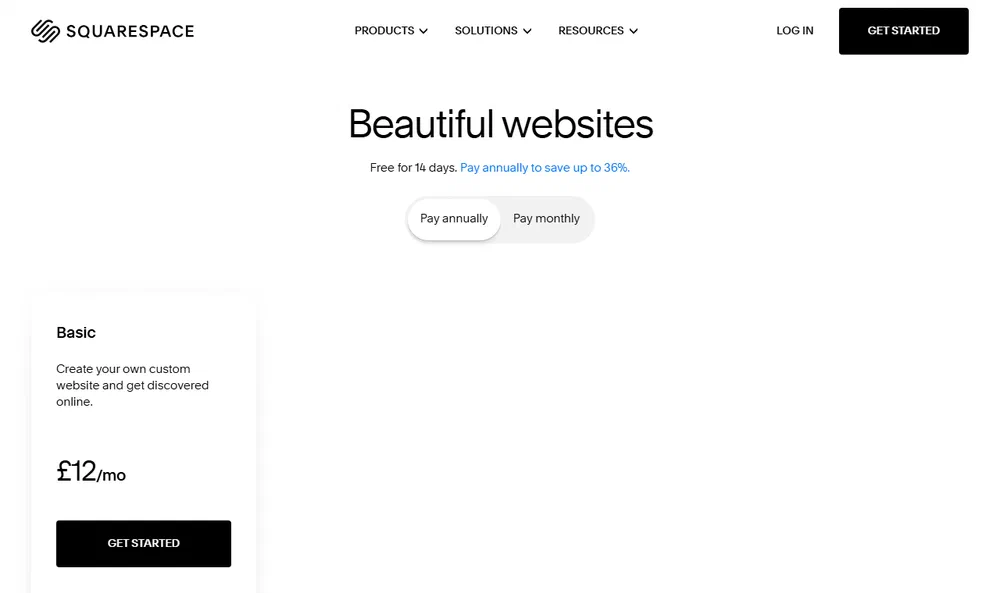
Every website plan includes hosting, templates and a free custom domain for the first year. The trial runs 14 days with no card required.
The one plan difference that matters to an author is at Core, which adds unlimited contributors, advanced website analytics, professional email through Google Workspace, and complete customisation with CSS and JavaScript. If you never intend to touch CSS, Basic is enough for a book site. Blogging is not the dividing line: Squarespace’s own plan guide lists writing a blog among the things Basic is for.
The transaction fees only bite if you sell from the site. Basic charges a 2% Squarespace fee on online store sales and 7% on digital content and memberships. Core drops those to 0% and 5%. Card processing starts at 2% + £0.25 on both. If you are only linking out to Amazon and Waterstones, none of this touches you.
Email Campaigns is a separate product on a separate bill, entering at 500 emails a month with unlimited contacts. Its price would not render today, so I am not quoting one.
Wix
Wix is the awkward one to write about honestly. As of August 2026 its public pricing page shows dollars, not pounds, to a UK browser on a UK connection.
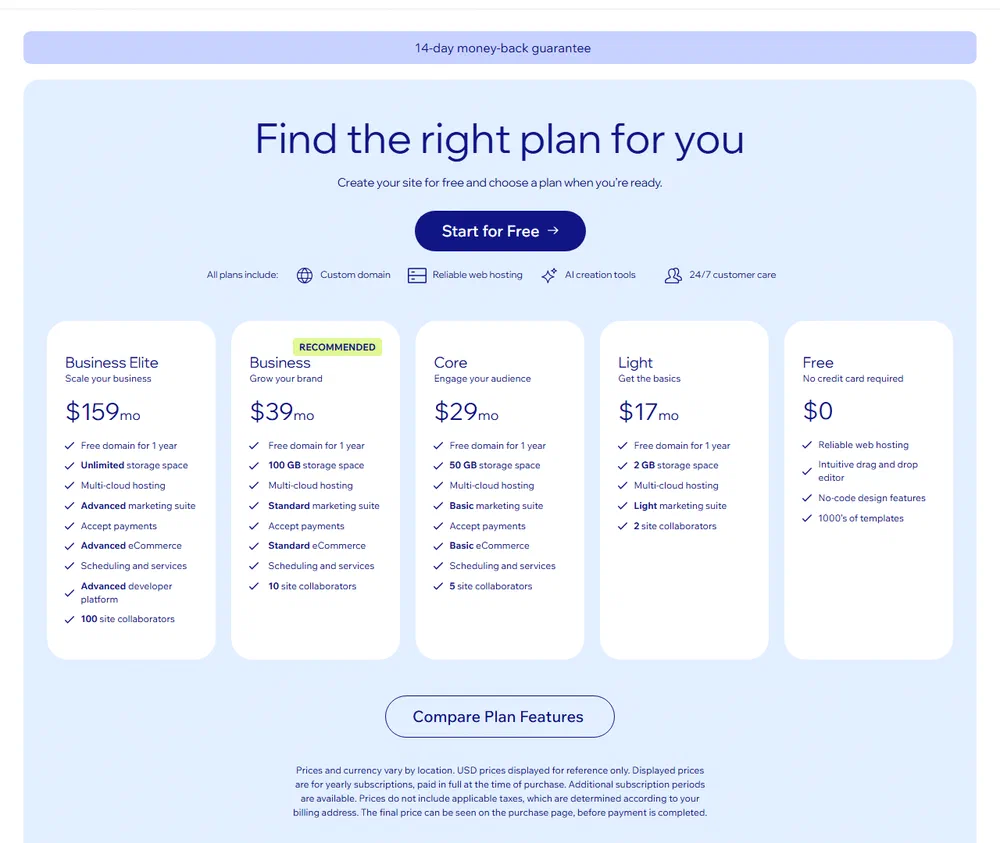
Wix’s own footnote explains why: “Prices and currency vary by location. USD prices displayed for reference only. Displayed prices are for yearly subscriptions, paid in full at the time of purchase. Additional subscription periods are available. Prices do not include applicable taxes, which are determined according to your billing address. The final price can be seen on the purchase page, before payment is completed.”
So here is what Wix publishes, marked as what it is:
| Plan | Published price (USD, annual, excluding tax) |
|---|---|
| Free | $0 |
| Light | $17/mo |
| Core | $29/mo |
| Business | $39/mo |
| Business Elite | $159/mo |
I am not converting those into pounds. Several UK sites do, and they disagree with each other. Pricing in pounds is a separate price list, not an exchange-rate calculation of the dollar one, so a conversion would be a guess dressed up as a number.
The dollar list still tells you the shape: five tiers, an entry plan with no payment handling, ecommerce from the third tier up, a top plan around nine times the entry price. Expect the pound list to follow that shape at its own numbers, and expect to be inside a signup before you see them, because Wix’s footnote says the final price appears on the purchase page.
Paid plans include a free domain for the first year, and ecommerce appears from Core upwards.
The free plan is not a serious option for a published author. Your site sits on a wixsite.com subdomain and carries a Wix banner ad. Wix’s help centre is blunt about it: removing that banner and using your own favicon requires an upgrade to a Premium plan.
WordPress.com
WordPress.com prices in pounds for UK visitors and runs heavy introductory discounts. Those move, so the number to plan around is the renewal, which the page states next to each plan.
| Plan | Renews at | Billed |
|---|---|---|
| Personal | £4/mo | Every 12 months |
| Premium | £9/mo | Every 12 months |
| Business | £26/mo | Every 12 months |
| Commerce | £47/mo | Every 12 months |
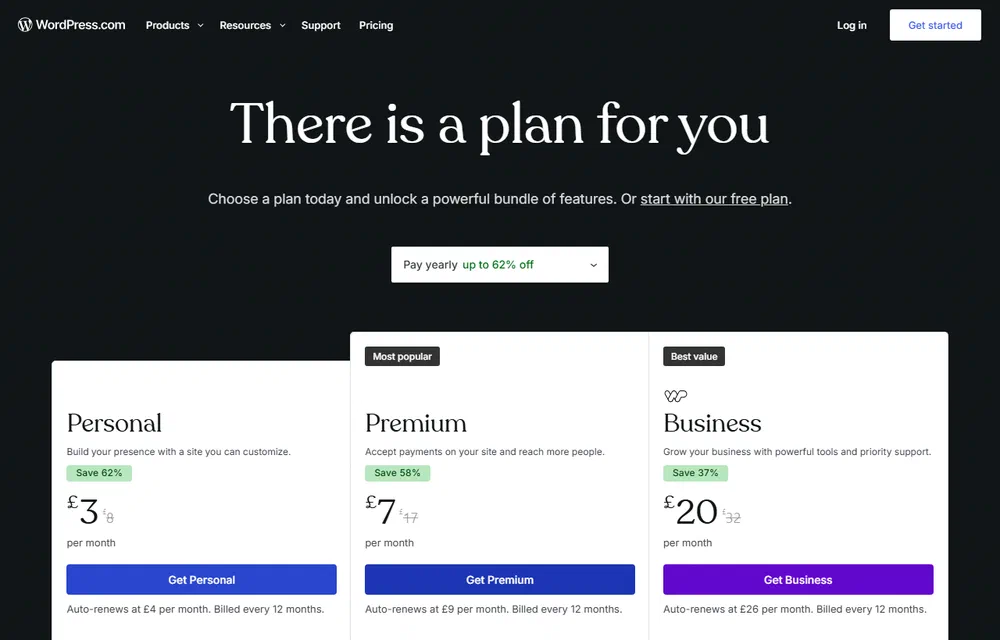
Those are yearly-billing renewals, quoted on the page as “auto-renews at £4 per month, billed every 12 months”. Month-to-month billing is dearer than the annual renewal rate, and the annual plan carries a discounted introductory price for the first term. As with Squarespace, the advertised headline price is the discounted first term, not what you will actually pay in year two.
Paid plans include a free domain for the first year and turn off the ads that WordPress.com displays on free sites. Personal covers unlimited pages, posts, users and visitors, plus a selection of premium themes. For a book site it is the one to look at: £48 a year on renewal, before a domain.
Self-hosted WordPress
Here you pay a host instead. Krystal is a UK company, prices in pounds, and puts a VAT toggle on its pricing page, which makes comparison easier rather than harder.
| Plan | Monthly, inc VAT | Sites |
|---|---|---|
| Amethyst | £8.40 | 1 |
| Ruby | £13.20 | 5 |
| Emerald | £22.80 | Unlimited |
Annual billing gives you two months free, taking Amethyst to £84 a year including VAT, or £70 with the toggle off. Two-year billing saves 25%, and every plan has free SSL and daily backups.
What an author website costs per year (UK)
Year one flatters everybody, because of free domains and introductory discounts. Here is year two, which is the number that repeats.
| Setup | Platform | Domain | Year 2 total |
|---|---|---|---|
| WordPress.com Personal | £48 | £10–20 | £58–68 |
| Self-hosted WordPress (Krystal Amethyst, annual) | £84 | £10–20 | £94–104 |
| WordPress.com Premium | £108 | £10–20 | £118–128 |
| Squarespace Basic (annual) | £144 | £10–20 | £154–164 |
| publishing.co.uk care plan, year 2 | £180 | £10–20 | £190–200 |
| Squarespace Core (annual) | £204 | £10–20 | £214–224 |
Five notes on that table.
VAT is not treated the same way by all of them, because they do not all tell you. Krystal publishes both figures: Amethyst is £84 a year including VAT, £70 excluding it. Squarespace and WordPress.com make no statement either way on their pricing pages, so those figures are reproduced as published, and some will be higher at your checkout.
My own row is the care plan only. The £199 build fee is a one-off in year one and is not inside that £180, which is why it does not show up in a year-two table. The full arithmetic, year one included, is in the last section.
Wix has no row here, because I would have to invent its pound price to give it one, and a table that mixes a published price with a guess is worse than a table with a gap in it.
The newsletter is nearly free, but less free than it was. MailerLite’s free plan changed on 1 July 2026 and now covers 250 subscribers and 2,500 emails a month, a launch list rather than a career. Every platform here embeds a form from a dedicated provider, so budget for that provider’s first paid tier. The newsletter platform comparison sets out the options.
Domain renewal is an estimate. It depends on your registrar and extension, and Squarespace, Wix and WordPress.com all renew at their own rates after the free first year. Budget £10 to £20 and check your renewal notice.
One avoidable cost on top of all that. Paying monthly instead of annually on Squarespace takes Basic from £12 to £16 and Core from £17 to £24. Over a year that is £48 and £84 respectively, for nothing.
What each one is like to live with
Cost is the easy part. This is the part that decides whether you still like your site in three years.
Building a book page
A book page is a fixed shape: cover, blurb, buy buttons, reviews, ISBN, maybe a sample. You will build it once per book, forever.
Squarespace is the best of the three at making that page look good with no design skill. The templates have restraint built in, the type is decent by default, and it is hard to make a Squarespace page look amateur. That is worth more than authors think: a shabby book page reads as a shabby book.
Wix gives you a free-position drag-and-drop canvas, which is more freedom and more rope. It will let you leave an element a few pixels out of alignment. It does not leave you to do mobile by hand: Wix’s help centre says fonts, images and elements are automatically resized for the mobile view, and that elements which are not optimised for mobile are automatically hidden. The catch is in that second half. You are maintaining a second canvas, and things can disappear from the phone version without you noticing. Squarespace’s templates reflow instead, so there is one layout to check rather than two.
WordPress with a decent block theme sits between the two and wins on repetition, which neither builder does well. You make a book template once, then create book four by filling in fields. On Wix and Squarespace you duplicate a page and edit it by hand. With one book that is irrelevant. With a nine-book series it is the difference between an afternoon and a fortnight.
Buy links
All three can put a button on a page that goes to Amazon. That is not the problem.
The problem is that you will have six or eight retailer links per book, they change, and Amazon’s regional domains mean a UK link sends US readers somewhere useless. The tidy answer on any platform is a universal book link: Books2Read, run free by Draft2Digital, builds one landing page per book that routes readers to their own country’s store, and it works for books you did not distribute through Draft2Digital. You maintain one link per book instead of eight.
Where the platforms differ is what happens when a link goes stale across twelve pages. WordPress can hold those links in one reusable block and update everywhere at once. Wix and Squarespace mean visiting every page. If you are weighing up selling direct as well as through retailers, selling direct from your website sets out the trade-offs.
One thing catches UK authors on all three. If you use Amazon Associates links, Amazon’s operating agreement requires you to display a disclosure clearly and prominently on your site, and the wording it gives is “As an Amazon Associate I earn from qualifying purchases.”
The about and press page
This is the page a journalist, a festival programmer or a bookshop events manager opens before deciding whether to bother with you. It wants a decent photo, a short bio, a longer bio they can paste, and a way to be contacted.
All three handle that fine today. The difference shows up on the way out: Squarespace’s export drops info and portfolio pages entirely, and those two page types are the natural home for a press kit. Wix releases nothing. On WordPress it leaves with everything else.
The blog
If you are never going to blog, skip this and pick on price and looks.
If you might, WordPress is not a close contest. It was a blogging engine before it was anything else, and categories, tags, scheduling, drafts, revision history and search structure are all mature. Squarespace’s blog is competent and quite pretty. Wix lists blogging among the tools that come with every plan, and it is fine to write in.
The blog is also where the leaving problem shows up, so read the next section before you commit three years of posts to a platform.
What happens when you want to leave
This is the section I would read first if I were choosing today, and it is the one the vendors keep off the pricing page.
Wix: the site stays, and so does the archive
Wix is explicit in its own help centre (Exporting or embedding your Wix site elsewhere, checked 5 September 2026). Since Wix is a SaaS solution, your site must run on Wix’s servers, and the architecture does not support external hosting because it relies on Wix’s proprietary technology.
It goes further than the design. Wix’s blog documentation says it is not possible to export blog posts to other platforms.
You are not left with literally nothing. WordPress.com’s Wix importer brings across static pages, images, your site title and menus. It cannot bring your blog posts, and the documented workaround is your RSS feed, which retrieves the 20 most recent. Three years of writing, and the supported route out gets the last twenty.
So the claim is narrower than “nothing leaves”, and still bad. The site cannot be rehosted, the design does not travel, and neither does the archive.
You do keep your domain. You can buy and manage a domain elsewhere and point it at Wix, and Wix’s terms say the content you build belongs to you. The content being yours and the content being portable are different claims.
Squarespace: an export with a long list of exceptions
Squarespace does give you an export, as an XML file in WordPress’s import format. That is more than Wix offers and it deserves credit.
Then read the exceptions, which Squarespace publishes honestly.
What comes out: layout pages, one blog page with its posts and up to 1,000 comments per post, text blocks, image blocks, the text from embed and Instagram blocks, and gallery pages.
What does not: any other page type, including albums, covers, index pages, info pages, calendars, portfolios and stores. Content in page-specific headers, footers and sidebars. Multiple blog pages. Dropdowns. Audio blocks. Product blocks. Video blocks. Drafts. Style settings. Custom CSS.
So an author site with a portfolio page, a video trailer embed, an audio sample and two blogs exports as some text, some images, and one of the blogs. Everything that made it look like your site stays behind.
One more line surprises people: you cannot export content from one Squarespace site and import it into another. The export exists to get you to WordPress, not to move you around inside it.
WordPress: the export is the whole thing
On self-hosted WordPress you have the database and the files. You can move to another host in an afternoon, and most decent hosts will do the migration free to win your business. There is no exception list because nothing is being withheld.
WordPress.com sits slightly below that, being a hosted service with plan limits, but it exports a complete WordPress file, and moving to self-hosted is a well-trodden path rather than a salvage operation.
This is the argument for WordPress, and it is not that it is more powerful. It is that the exit is not a trap.
The two things that make platform choice reversible
Buy your domain from an independent registrar rather than from your website platform. It costs about the same, and it means the day you leave, you change one setting and your address comes with you. Every link, every business card, every “find me at” in the back of a book keeps working.
Keep your email list with a dedicated email provider rather than the website’s built-in tool. Same logic, higher stakes: if the list lives inside your website platform, changing your website means migrating your list at the same time, under pressure, and you will do both badly. Embed the provider’s form instead. The website becomes a replaceable component, and the list, the only asset in this article that reliably makes you money, never moves. Building an author email list from scratch covers the mechanics.
Do those two things and the platform decision stops being permanent.
Which platform is best for an author website?
If you have one book and want it to look good with the least fuss
Squarespace Basic, annual billing, £144 a year plus a domain. It is the best-looking result per hour spent of anything here. Accept that leaving later means rebuilding, and hold the domain and the list independently so the rebuild is the only job you face.
If you write a series, or you blog, or you expect to still be publishing in five years
WordPress. WordPress.com Personal at £4 a month on renewal if you want somebody else to run it, self-hosted at £84 a year including VAT if you want full control and are comfortable that updates are your problem. The reusable-template advantage compounds with every book, and so does the export.
If you want to sell signed copies from your own site
Squarespace is the most straightforward, but the fees above are the thing to check: Basic’s 2% store fee falls to 0% on Core at £204 a year. On self-hosted WordPress no platform takes a cut, but you assemble the shop from plugins and pay a processor yourself. Either way, direct sales bring UK VAT, postage and consumer-rights obligations that a links-only site avoids, so be sure the margin is worth the admin.
If you are considering Wix
I would not, for a book site, in 2026. The editor is capable and some people prefer the freedom of it. But its own documentation says the site cannot be rehosted and the posts cannot be exported, and you cannot see the pound price until you are inside an account. For a business that runs on links and archives, that is a poor trade. If you are already on Wix and it is working, this is not a reason to panic, only a reason to get the domain and the list out.
The two-way comparisons
Most people arrive at this as a pair rather than a trio.
Wix vs Squarespace: Squarespace, unless you specifically want pixel-level drag and drop. It publishes a pound price, it looks better for less work, and it gives you an export file.
Squarespace vs WordPress: Squarespace if the site is one book and you want it live this month. WordPress if there is a series or a blog, because the templates and the export both compound.
Wix vs WordPress: WordPress, on portability alone. This is the pairing where the gap is not close.
Where I’m biased, and by how much
I build author websites through publishing.co.uk: £199 to build it, £15 a month to keep it running. Take everything above with that in mind.
Here is the arithmetic I would rather you did than didn’t. That £15 is £180 a year, which covers hosting and support and puts me fifth in the table above: more than any WordPress setup, about £36 a year more than Squarespace Basic, less than Squarespace Core. Year one is where I am most expensive, and a year-two table hides it. £199 plus £180 is £379 before a domain, against roughly £144 for Squarespace Basic, which includes the first year’s domain. Your domain is registered to you rather than to me.
What the fee buys is the thing none of the platforms sell, which is someone else making the decisions and keeping it working. What it does not buy is anything you couldn’t do yourself over a couple of weekends on Squarespace Basic. If you enjoy this sort of thing, do it yourself and spend the £199 on a better cover.
If the book itself is the thing still not right, the free KDP readiness audit is a faster use of an hour than any of this, and book formatting starts at £69 if the interior is what is holding you up.
The authors who should pay someone are the ones who have looked at a template picker twice, closed the tab, and gone back to writing. Not because it is hard, but because it will otherwise never get done, and a book with no website is harder to review and harder to pitch. If that is you, that is what the £199 is for.
Related guides
This guide covers which platform to pick and what it costs to leave. The rest of the decision is covered elsewhere:
- Author website essentials: what a book site actually needs, and what to skip
- What an author website costs in the UK: the full cost breakdown, including the bits platforms leave off the pricing page
- Author website SEO and AI discovery: being found by Google, and by ChatGPT and Rufus
- Moving an author website without losing your rankings: the migration itself, once you have decided to switch
What I could not verify
- Wix’s pound price. Not published outside the checkout, from a UK connection, on 5 September 2026. I have not converted the dollar list and will not.
- Squarespace Email Campaigns. The price did not render on the pricing page. Not quoted.
- VAT. Squarespace and WordPress.com make no statement on their pricing pages about whether figures include VAT. Krystal does. Treat the first two as possibly higher at checkout.
- WordPress.com renewal prices. Checked 2 September 2026; the introductory discounts move often, so re-check the renewal line next to the plan before you buy.
Frequently asked questions
How much does an author website cost per year in the UK?
Between about £70 and £224 a year once the first-year discounts and free domains have expired, domain renewal included. WordPress.com Personal is the floor and Squarespace Core the ceiling. Wix sits outside that range because it does not publish a pound price outside its checkout. Prices checked 5 August 2026.
Can you export a website from Wix?
No, and the part people miss is the blog. Wix’s help centre says a Wix site must run on Wix’s servers, and separately that it is not possible to export blog posts to other platforms. Static pages and images can be re-imported elsewhere. Your domain moves freely if you registered it away from Wix in the first place.
Can you move a Squarespace site to WordPress?
Yes, and that is the direction the export is built for. Squarespace produces an XML file in WordPress’s import format, which WordPress reads directly. Text, images and one blog page arrive; the look does not, so budget a weekend to rebuild it. Run the export before you cancel the Squarespace subscription rather than after.
Is Squarespace or WordPress better for authors?
Squarespace is better for the site you have today, WordPress for the site you will have in five years. One book, live this month, no blog: Squarespace. A series, a blog, or a fair expectation of both: WordPress, because a template you fill in beats a page you duplicate, and a complete export beats a partial one.
Does an author website need a blog?
No. Most author sites earn their keep with a home page, a books page, an about and press page, and a way to be contacted. A blog is worth it only if you will publish more than a handful of posts a year and you want the search traffic. If you are unsure, pick a platform whose blog you could switch on later without rebuilding. An abandoned blog with three posts on it does more harm than no blog at all.
