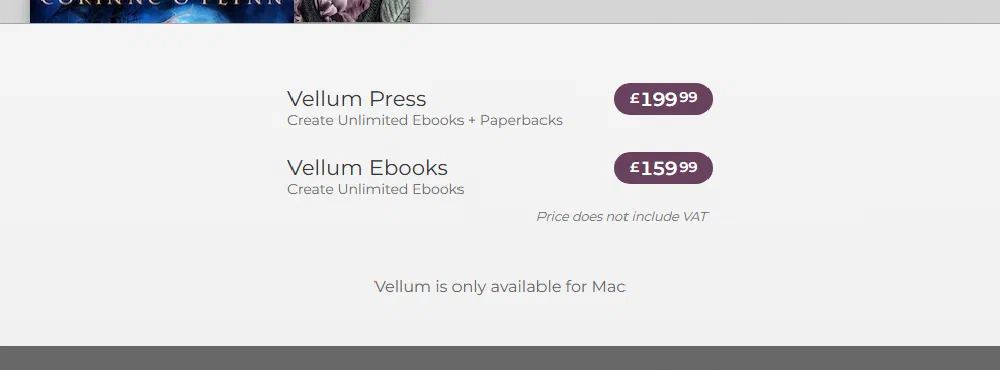
Quick answer Checked 24 September 2026. Atticus costs $147, once, and runs on Windows, Mac, Linux and Chromebook. Vellum costs £159.99 for ebooks or £199.99 with paperbacks, plus VAT, and runs only on a Mac. If you are not on a Mac, the decision is made: Atticus. If you are on a Mac and write fiction, I would pick Vellum. If you will only ever publish one book, paying a formatter costs about the same as Atticus and you skip learning a tool.
I run publishing.co.uk and I sell book formatting, so read this knowing that. I earn nothing from Atticus or Vellum, and I have no affiliate link on this page. One more thing worth knowing before you read any other comparison: the page that sits at the top of Google for this search is written by Atticus’s co-founder, who says on the page that he is biased. That does not make it wrong. It does mean you should hear from someone who is not selling you either one.
The verdict, by the kind of author you are
| You are… | Buy | Why |
|---|---|---|
| On Windows, Linux or a Chromebook | Atticus | Vellum does not run on anything but a Mac. Atticus lists “Windows, Mac, Linux, Chromebook”. |
| On a Mac, writing novels | Vellum | It is the older, more settled tool, and you can build and preview your whole book before you pay a penny. |
| Writing non-fiction with lots of subheadings, boxes and footnotes | Atticus, with care | Atticus lists H2 to H6 headings, callout boxes and footnotes. Vellum’s own site does not mention any of the three. |
| Want to write and format in one place | Atticus | It is a writing app and a formatter. Vellum only formats; you write in Word or Scrivener first. |
| Publishing one book, ever | Either Atticus or a formatter | Atticus ($147, about £110) and paying a formatter per book cost about the same for one book. The difference is whether you want to learn a tool you may never open again. See the calculator. |
| Publishing a box set of a finished series | Vellum | Its site says you can “combine everything into a box set in just a few steps”. Atticus lists “volumes and parts” instead. |
What each one costs in the UK
| Atticus | Vellum Ebooks | Vellum Press | |
|---|---|---|---|
| Price | $147 | £159.99 + VAT | £199.99 + VAT |
| What you can make | Ebooks and print | Ebooks only | Ebooks and paperbacks |
| Paid how | One payment, “no monthly fees” | One payment | One payment |
| Before you pay | 30-day money-back guarantee | Free to download, build and preview; you pay to export | Same as Ebooks |
| Currency | US dollars; your card converts it | Pounds for UK buyers | Pounds for UK buyers |
| Source, 24 Sep 2026 | atticus.io | store.vellum.pub | store.vellum.pub |
Vellum’s store shows UK buyers pounds and says “Price does not include VAT”. At the UK’s standard 20% rate, that would make Vellum Ebooks about £192 and Vellum Press about £240 if VAT is added at checkout. From a US browser the same store shows $199.99 and $249.99, which is why you will see both sets of numbers quoted online.
Work out what each one costs per book
The software is a one-off cost, so the more books you publish the cheaper each one gets. A formatting service is the opposite: the same price every time. Put in your own numbers.
Vellum and my prices are shown before VAT. Atticus is converted at $1 = £0.75, the market rate on 24 September 2026 (open.er-api.com, 0.7545); your card's rate will differ a little. My price is Print + Kindle at £119 per book, the cheapest option I sell that includes a Kindle file, from my formatting page. Nothing here counts your own time, which is the real cost of doing it yourself.
The honest reading of that: from two books on, either piece of software is cheaper than paying me per book, as long as your book is mostly words and you are willing to learn the tool. For a single book, Atticus and my Print + Kindle price are within about £10 of each other. I say the same thing on my own formatting page. Where a service earns its fee is the book you only do once, the book with pictures, tables or a picture-book layout, and the book that has already been rejected by KDP.
What each one does, from the vendors’ own pages
I have only put a feature in this table if the vendor’s own page says it, read on 24 September 2026. A blank means the vendor’s page does not say, not that the feature is missing.
| Feature | Atticus (atticus.io) | Vellum (vellum.pub) |
|---|---|---|
| Runs on | “Windows, Mac, Linux, Chromebook”, in a browser or as an app | “Only Available for Mac”, macOS 13 or newer |
| Write your book in it | Yes, it is a writing app as well | No, you import a finished manuscript |
| Imports | DOCX | Not stated on the homepage |
| Exports | EPUB, PDF, DOCX | EPUB 3 and EPUB 2, print PDF/X-1a, ARC files in EPUB and MOBI |
| Ebook and print from one file | “Paperback or Hardcover”, “24 Trim Sizes + Large Print” | |
| Designs | “17 templates”, a custom theme builder | Named book styles (Decorum, Metro, Stardust and others) |
| Headings | H2 to H6 | Not stated |
| Callout boxes | Yes | Not stated |
| Footnotes | Yes | Not stated |
| Full-bleed images | Yes | “Full-Bleed Pages & Backgrounds” |
| Box sets | “Volumes and Parts” | “Combine everything into a box set in just a few steps” |
| Works offline | “With or without an internet connection” | It is a desktop Mac app |
| Backups | Cloud storage and automatic backups | Not stated |
Where Atticus wins
Any computer. If you write on a Windows laptop, this is the whole argument. Vellum is not an option for you at any price.
Price. $147 covers ebooks and print. Vellum’s print-capable version is £199.99 before VAT. Atticus is the cheaper of the two by a clear margin, and it includes the writing app.
Non-fiction structure. If your book has chapter, section and sub-section headings, summary boxes and footnotes, Atticus lists all of them. Vellum’s site does not mention them, and non-fiction authors are the ones who notice.
Where Vellum wins
Try the whole thing first. Vellum lets you download it, build your book, style it and preview it, and you only pay when you want to export. That is the best trial in this market: you see your actual book before you spend anything.
Maturity. Vellum is the older of the two, and it shows in how settled it is. A non-fiction author who tested both for a book with heavy structure, Jeremy Shapiro, wrote up the gaps he found in each in June 2025: Vellum lacked the callout boxes and heading levels he needed, while Atticus had them but gave him layout bugs, including callout boxes splitting across pages and links that broke when chapters moved. He chose Atticus anyway. That matches what I would expect: Atticus does more, Vellum does less but does it smoothly.
Box sets. If you are bundling a finished series, Vellum’s box-set feature is built for exactly that job.
What I could not verify
- Vellum’s footnotes, heading levels and callout boxes. Vellum’s homepage does not mention them either way, so I have left them blank rather than guess. If they matter to your book, download the free version and try your own chapter before you buy.
- Atticus’s trim sizes. The Atticus homepage does not list them. KDP’s own trim sizes are in my trim size guide; check your size is offered before you buy.
- Atticus in pounds. Atticus prices in dollars, so what you pay in pounds depends on your card’s exchange rate on the day.
Before you buy either one
- Check your computer first. Not a Mac? Stop here and look at Atticus or the Vellum alternatives for Windows.
- Try your worst chapter, not your best one. The chapter with the table, the image or the three levels of heading is the one that will show you the limits.
- Count your books honestly. One book is a different sum from ten. Use the calculator above.
- Get your front matter right in whichever tool you use. Both tools will print whatever copyright page you give them; a UK one needs the right wording, which is in my copyright page template.
- Check the file before you upload. My free KDP readiness check reads your PDF the way KDP’s reviewers do.
Frequently Asked Questions
Is Atticus better than Vellum?
If you are not on a Mac, yes, because Vellum only runs on a Mac. On a Mac, for fiction, I would pick Vellum for how settled it is and because you can see your whole book before you pay. For non-fiction with deep structure, Atticus lists the features you need and Vellum’s site does not.
Can I use Vellum on Windows?
No. Vellum’s store says it is “Only Available for Mac”, and its site asks for macOS 13 or newer. Atticus runs on Windows, Mac, Linux and Chromebook.
Is Atticus a subscription?
No. Atticus is $147 as one payment, with “no monthly fees”, and a 30-day money-back guarantee, according to atticus.io on 24 September 2026.
Is Vellum free?
Vellum is free to download, and you can build, style and preview your book in it. You pay when you want to export: £159.99 for ebooks or £199.99 for ebooks and paperbacks, plus VAT, for UK buyers on 24 September 2026.
How much is Vellum in the UK?
Vellum’s store shows UK buyers £159.99 for Vellum Ebooks and £199.99 for Vellum Press, and says the price does not include VAT. From a US browser it shows $199.99 and $249.99.
Should I buy Atticus or Vellum for one book?
Work it out with the calculator above. For a single book, Atticus (about £110) and paying a formatter (my Print + Kindle is £119) cost about the same, and Vellum Press costs more. From two books on, the software is cheaper, as long as you are happy to learn it.
Related guides
- Atticus vs Vellum vs Kindle Create, if you want the free option in the comparison too
- Atticus review and how much Atticus costs
- How much Vellum costs
- Kindle Create vs Atticus
- Vellum alternatives for Windows
- Best book formatting software
Would rather not learn either tool? I format books for KDP from £69, paperback and Kindle files back usually within 24 hours, and if KDP rejects the file on formatting I fix it free.
