Rules and printing costs checked on Amazon’s KDP help pages on 26 November 2026.
Quick answer: Tick the Low-content box when you set up the book, and decide on the ISBN before you publish, because you cannot change it later. A low-content book needs no ISBN, but without one readers then cannot look inside, so show the pages with A+ Content. Make ruled lines at least 0.75 point thick, choose a regular trim to keep printing costs down, and allow 3 to 4 weeks for review.
Journals and planners are easy to lay out and easy to get wrong on KDP. Amazon treats most of them as “low-content” books, with their own rules on ISBNs, review times and distribution. A guided journal with real writing in it sits closer to an ordinary book, and its design matters far more than a blank notebook’s.
Would you rather someone else did it? Our book formatting services UK start at £69, VAT included, with files back in 24 hours.
Is your journal low-content?
Amazon’s low-content books page describes a low-content book as one with minimal content on the inside, generally repetitive and “designed to be filled in by the user”. Its examples:
- Low-content: notebooks, planners, diaries and journals, prompt journals and log books.
- Not generally low-content: novels, non-fiction, puzzle books, colouring books, photography and children’s books.
Amazon notes there can be exceptions. If your book is mostly your own writing with some space to respond, it may be an ordinary book. When you set up a low-content book, you must tick the Low-content box under Categories. Amazon says that if you do not, “your book will be rejected”.
The ISBN choice
For a low-content book, you can publish without an ISBN or use your own. You cannot use the free KDP ISBN. The choice matters more than it looks:
- It is permanent. Amazon says you cannot change your ISBN selection after publishing; you would have to unpublish and publish again.
- Without an ISBN, there is no Look Inside. Amazon says the sample and the back cover thumbnail are not supported for low-content books published without an ISBN. It suggests A+ Content to show the inside pages on the product page.
- No Expanded Distribution and no series for low-content books, whichever ISBN option you choose.
In the UK, ISBNs come from Nielsen. Our UK ISBN guide explains the options and costs.
If you publish without an ISBN, or leave out your own barcode, Amazon places a barcode in a 2 x 1.2 inch white box in the lower right corner of the back cover. Keep that area clear of text and pictures.
Designing the pages
A journal is mostly lines, boxes and prompts, repeated. Amazon’s manuscript guidance, checked on 26 November 2026, has two rules that catch journals:
- Lines at least 0.75 point (0.01 inches) thick. Amazon writes this for lines in charts, tables and graphics; in our experience it is worth applying to ruled lines too, because very thin lines print faintly.
- Grey fills of at least 10%, which Amazon recommends for grey backgrounds in black-ink books. If your lines or boxes are grey rather than black, keep them at 10% or darker.
Our free KDP readiness check looks at a finished PDF against Amazon’s margins before you upload.
Also watch for template text. Amazon’s formatting issues page rejects books with placeholder text left from a template, such as “Insert text here”, and limits blank pages to 4 in a row in the middle of a book. If your journal has deliberately blank pages, keep them apart.
A worked example: a 6 x 9 inch, 120-page journal
Here is one interior set up from Amazon’s tables, checked on 26 November 2026. Lined pages do not reach the edge, so this journal has no bleed.
- Page size: 6 x 9 inches. Without bleed, the PDF page is the trim size.
- Margins. Amazon’s margin table asks for an inside margin of 0.375 inches for 24 to 150 pages, and at least 0.25 inches at the top, bottom and outside. At those minimums the writing area is 5.375 x 8.5 inches. We would set 0.5 inches all round instead, leaving 5 x 8 inches, because a line on the limit can still be flagged.
- Line spacing. This is your choice, not Amazon’s. In our experience, lines about 0.3 inches apart suit most handwriting, which gives 26 lines in an 8 inch writing area.
- Line weight. At least 0.75 point, in black or a grey of 10% or darker, as above.
- Page count. 120 pages, an even number, with no more than 4 blank pages in a row in the middle of the book.
- Print cost. On Amazon’s printing cost table, a regular-trim black-ink book over 110 pages costs £0.85 plus £0.010 a page on Amazon.co.uk, so this one costs £2.05 a copy.
- Price. Amazon’s royalty page pays 60% at £7.99 or more on Amazon.co.uk. At £7.99, the royalty is 60% of £7.99 (£4.79) minus £2.05, about £2.74 a copy.
- Cover. The spine on white paper is 120 x 0.002252 = 0.270 inches, so the cover file is 12.52 x 9.25 inches with bleed. At 120 pages, the book can carry spine text.
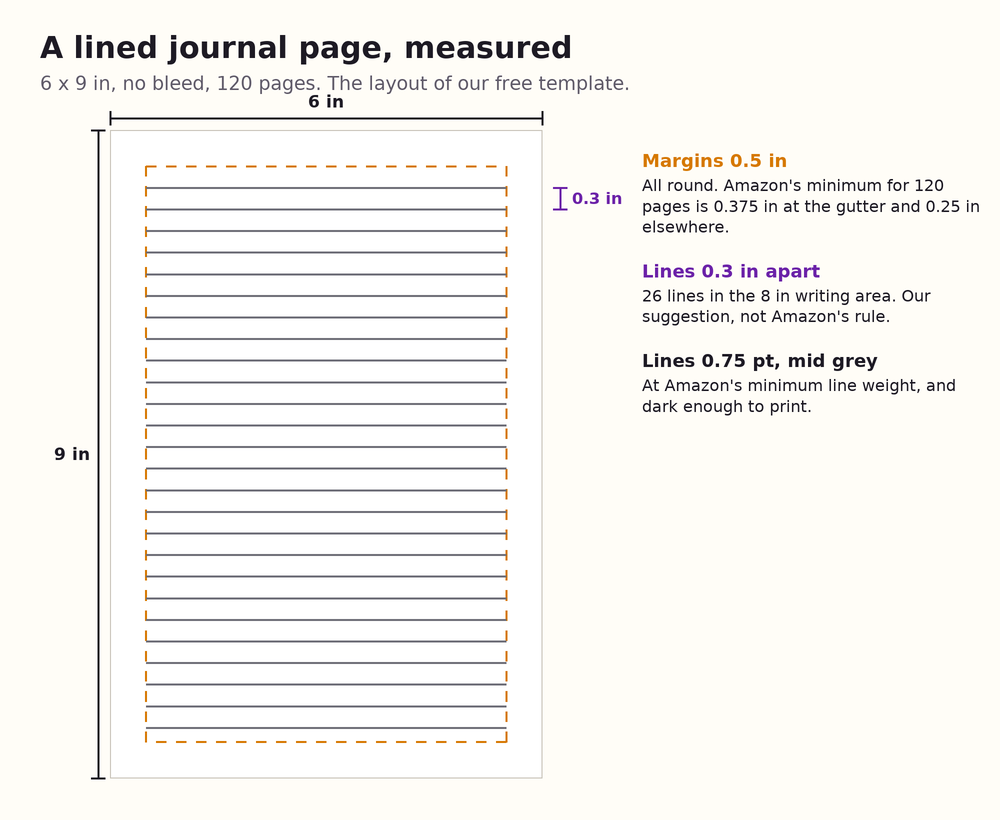
The worked example as a page: 6 x 9 inches, 0.5 inch margins, lines 0.3 inches apart. It is the layout of our free lined journal template.
Size and cost
Any size on Amazon’s trim table is allowed. Sizes up to 6.12 inches wide and 9 inches tall are regular trims, which cost less to print. On Amazon.co.uk, Amazon’s printing cost table, checked on 26 November 2026, gives these costs for black ink on white paper:
| Black ink | 6 x 9 in (regular) | 8.5 x 11 in (large) |
|---|---|---|
| 24 to 110 pages | £1.93 a copy | £2.15 a copy |
| 150 pages | £2.35 a copy | £2.65 a copy |
| 250 pages | £3.35 a copy | £3.85 a copy |
A journal printed in colour costs much more: premium colour is £0.85 plus £0.0435 a page for a regular trim. Most journals work well in black ink.
Weekly planners
Amazon’s low-content page lists planners with notebooks and journals, so the same rules apply: the Low-content box, the ISBN choice and the review time. The layout is different from a lined journal:
- Dated or undated. An undated planner, with a “Week of” line to fill in, works for any year. A dated planner has to be rebuilt and republished for each new year.
- A week across two facing pages. Monday to Thursday on the left page and Friday to Sunday with notes on the right keeps the whole week in view. In a printed book page 1 is a right-hand page, so the first week starts on page 2.
- A wider gutter. People write right up to the fold, so we set 0.625 inches at the gutter, more than Amazon’s 0.375 inch minimum for 24 to 150 pages.
- Page count. 52 weeks on two pages each is 104 pages. With a title page and a blank end page, the book is 106 pages.
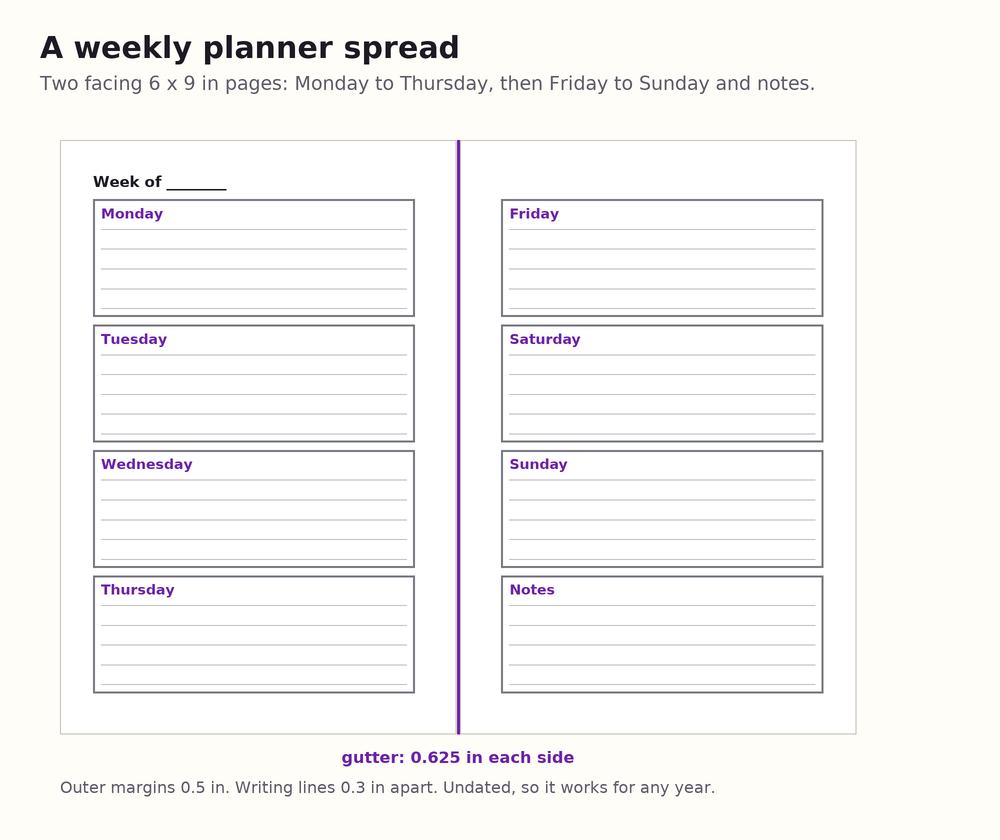
One undated week across two facing pages, the layout of our free weekly planner template.
Free journal and planner templates
Free to use for your own books:
- Lined journal (PDF, 6 x 9 inches, 120 pages): a “This journal belongs to” page, then 119 lined pages.
- Weekly planner (PDF, 6 x 9 inches, 106 pages, undated): a title page, 52 week spreads and an end page.
Both are ready to upload as a 6 x 9 inch interior with no bleed, with their one font embedded, and both pass our margin check. In KDP, choose 6 x 9 inches and no bleed, upload the PDF as the manuscript, and look through every page in the previewer.
To add your own title page, make a single 6 x 9 inch page in Canva (a custom design of 6 x 9 inches) or in Word (paper size 6 x 9 inches, margins of at least 0.5 inches), save it as a PDF, and use a PDF editor to put it in place of page 1. For a guided journal with your own writing in it, our free Word book template is a better starting point.
Review and launch
Amazon’s low-content page says reviews for low-content books “might take 3-4 weeks”, and that Release Date, the option to schedule a launch, is not offered for low-content books. Plan any launch around that wait rather than a fixed day.
Designing prompt pages
A guided journal has an introduction, a structure and prompts, so it is closer to an ordinary book. The layout choices that make it easy to use:
- One grid for every page. The same margins, line spacing and prompt position on every page, so the book feels steady in the hand.
- The prompt and its writing space together. Put a prompt on a left page with its lines on the facing right page, or the prompt at the top of a lined page. Never put the question on the back of the space for its answer.
- Room that matches the prompt. A one-line question needs a few lines; a “write about” prompt needs a full page.
- Plain type for prompts. Prompts are read once and then written under, so a clear text face at a comfortable size works better than a decorative one.
From our own work
A guided journal we set this year runs to more than 200 pages at 6 x 9 inches, and each prompt has its own lined page, so nobody writes on the back of a question. It passes our delivery check, which measures the ink on every page, ruled lines included, against Amazon’s margins.
Getting help
We lay out guided journals and planners for print: the page grid, prompt pages, line weights, page order and the print PDF, checked against Amazon’s rules. We quote each one after seeing the content; send it to us for a fixed price. Without an ISBN, A+ Content is how buyers see inside, and we make A+ Content from £89; see our A+ Content page. We also design covers: a full print wrap with a matching ebook cover is £199. See our cover design page, and our guide to formatting complex books.
Sources, read 26 November 2026: Amazon KDP help pages for low-content books, paperback royalty, manuscript files, formatting issues, trim sizes and printing costs.
Frequently asked questions
Is a journal a low-content book on KDP?
Usually yes. Amazon’s low-content page lists notebooks, planners, diaries and journals, prompt journals and log books as low-content. Activity books such as colouring and puzzle books are usually not.
Does a KDP journal need an ISBN?
No. A low-content book can be published without an ISBN or with your own, but it cannot use the free KDP ISBN. Without an ISBN, Amazon does not show the Look Inside sample or the back cover thumbnail.
Can I change my journal's ISBN option after publishing?
No. Amazon says you cannot change your ISBN selection after publishing. You would need to unpublish the book and publish it again.
How long does KDP take to review a journal?
Amazon’s low-content page says reviews for low-content books and for activity books might take 3 to 4 weeks.
What size should a KDP journal be?
Any size on Amazon’s trim list works. 6 x 9 and 5.5 x 8.5 inches are regular trims, which cost less to print than large trims such as 8.5 x 11.