How to Create a KDP Cover Template
By Robert Prime
Last reviewed by Robert Prime — March 2026
Table of Contents
- Introduction
- What You Need to Know Before Starting
- Step-by-Step Guide to Creating a KDP Cover Template
- UK-Specific Considerations
- Common Mistakes and How to Avoid Them
- Tools and Resources for UK Authors
- Cost Breakdown: What UK Authors Really Pay
- Real-World Case Studies and Examples
- Expert Tips from 25 Years in the Industry
- Frequently Asked Questions
Introduction
If you’re self-publishing on Amazon’s Kindle Direct Publishing (KDP) platform, your book cover isn’t just decoration — it’s a critical part of your marketing arsenal. Getting it right requires more than throwing together a few images and text on a page. That’s where the KDP cover template comes in. It’s a precise blueprint that ensures your cover file meets Amazon’s exacting specifications for print and digital formats.
Unfortunately, many UK authors struggle with this seemingly straightforward step. The process is riddled with technical pitfalls, confusing terminology, and hidden costs. Worse, most online guides are US-centric, glossing over the nuances specific to the UK market — from ISBN pricing to print sizing standards, tax implications, and reader preferences.
In my 25 years of ecommerce experience, including running an Amazon growth agency (MrPrime.com) and self-publishing my own best-seller Google. Panic. Repeat., I’ve seen how poor cover preparation can tank sales before a book even launches. When I was formatting Google. Panic. Repeat., the cover template process was a nightmare — despite my technical background, it cost me hours of frustration and delays. This guide distils those hard-won lessons into a no-nonsense, UK-focused approach to creating your KDP cover template that not only meets Amazon’s requirements but also boosts your book’s market performance.
What You Need to Know Before Starting
Before you jump into designing your cover, you have to understand a few fundamentals about KDP cover templates:
What is a KDP Cover Template?
A KDP cover template is a file that combines your book’s front cover, spine, and back cover into one correctly sized and formatted document. Amazon provides precise dimensions based on your book’s trim size, page count, and paper type. The template ensures your cover elements will align perfectly once printed and bound.
This template is crucial because:
- It accounts for bleed — the area extending beyond the trim to avoid white edges.
- It includes the spine width, which varies by page count and paper thickness.
- It ensures your cover meets Amazon’s file type, resolution, and colour space requirements.
Trim Size and Spine Width
Choosing the right trim size (the final physical size of your printed book) is your first big decision. Common UK sizes include 5"x8" (127x203 mm) and 6"x9" (152x229 mm), but KDP supports many options.
Your spine width depends on:
- Total page count
- Paper type (white or cream)
- Paper thickness (KDP uses 0.002252 inches per page for white paper)
Amazon calculates spine width with this formula:
Spine Width (inches) = Number of pages × 0.002252
For example, a 300-page paperback with white paper has a spine width of 0.6756 inches (~17.16 mm).
File Formats and Colour Mode
KDP requires cover files to be:
- In PDF format for print covers.
- Using the CMYK colour profile (important for print colour accuracy).
- At least 300 dpi resolution.
RGB files or low-resolution images can lead to dull colours or rejection.
ISBN and Barcode
In the UK, ISBNs are purchased from Nielsen Book Services (not Bowker as in the US). A single ISBN costs £93, or £174 for a block of 10. If you use a free KDP ISBN, Amazon will list itself as the publisher, which may limit your control and sales flexibility.
You’ll also need a EAN-13 barcode on your back cover, encoding your ISBN. KDP offers a free barcode generator if you don’t provide one.
Step-by-Step Guide to Creating a KDP Cover Template
Creating your KDP cover template involves careful measurement, design, and file setup. Here’s how to do it properly, using tools like Adobe InDesign, Affinity Publisher, or even Microsoft Word (with limitations).
1. Determine Your Book’s Specifications
Gather the following:
- Trim size (e.g., 152x229 mm)
- Page count (from your formatted manuscript)
- Paper type (white or cream)
Amazon’s Print Options Calculator can help with spine width.
2. Calculate the Cover Dimensions
Your cover width = (2 × trim width) + spine width + bleed (usually 3 mm on all sides).
Your cover height = trim height + bleed (3 mm top and bottom).
Example:
- Trim width: 152 mm
- Spine width: 17.16 mm
- Bleed: 3 mm left + 3 mm right = 6 mm total width bleed
- Bleed: 3 mm top + 3 mm bottom = 6 mm total height bleed
Total cover width = (2 × 152 mm) + 17.16 mm + 6 mm = 327.16 mm
Total cover height = 229 mm + 6 mm = 235 mm
3. Download KDP’s Cover Template Generator (Optional)
Amazon provides a cover template generator on KDP’s website, but I find it often lacks UK-specific guidance, leading to mismatches.
Before building publishing.co.uk, I hired so-called ’expert’ formatters who relied on this tool and delivered templates with incorrect spine widths and bleed areas. It’s better to calculate manually or use UK-focused services.
4. Set Up Your Document in Design Software
Open your design tool and create a new document with the exact dimensions calculated above.
- Use Layout > Margins > Custom Margins (Adobe InDesign) or the equivalent in your tool to set safety margins (at least 6 mm inside the bleed).
- Add guides for the spine edges, front and back cover edges, and bleed lines.
- Ensure your colour mode is set to CMYK.
- Set resolution to 300 dpi.
For example, in Adobe InDesign:
- Go to File > New > Document
- Set width and height to cover dimensions (e.g., 327.16 mm × 235 mm)
- Under Bleed and Slug, enter 3 mm for Top, Bottom, Left, and Right
- Set Colour Mode in your document settings to CMYK
- Add guides manually for spine edges by calculating the spine width from the left edge (back cover width + bleed)
5. Design Your Cover Elements
- Place your front cover elements within the front cover area inside safety margins.
- Place back cover text (blurb, author bio, barcode) similarly on the back cover area.
- The spine should include the book title and author name, centred vertically.
Avoid placing important text or images too close to the spine edges to prevent cropping.
6. Export Your Cover
Export as a press-ready PDF with CMYK colour profile, using the highest quality settings.
Check that bleed is included in the export settings.
In Adobe InDesign:
- Go to File > Export
- Choose Adobe PDF (Print)
- Under Marks and Bleeds, tick Use Document Bleed Settings
- Under Output, select Color Conversion: Convert to Destination (Preserve Numbers) and set Destination to Coated FOGRA39 (ISO 12647-2:2004) (standard for UK print)
- Export
7. Upload to KDP and Validate
Upload your cover file in KDP’s print setup stage. Use their preview tool carefully to check alignment, bleed, and cropping.
If KDP rejects due to file errors, revisit your template settings.
UK-Specific Considerations
Most KDP cover template guides ignore UK-specific issues. Here’s what UK authors must keep front of mind.
ISBNs and Barcodes: The Nielsen Factor
Unlike the US, UK authors must buy ISBNs from Nielsen — a hefty cost of £93 for a single ISBN or £174 for 10. Using a free KDP ISBN lists Amazon as the publisher, which can limit your control over distribution and sales.
Tip: If you plan to sell beyond Amazon (e.g., in UK bookstores or libraries), invest in your own ISBNs from Nielsen.
Amazon requires an EAN-13 barcode on the back cover encoding your ISBN. If you supply your own ISBN, you’ll need to generate this barcode yourself or pay a designer. The Nielsen Barcode Service offers official barcodes for a fee, but free online generators exist — just ensure the barcode quality is print-ready and scannable.
Print Size Preferences in the UK Market
UK readers tend to prefer smaller trim sizes compared to US preferences. For fiction, 5"x8" (127x203 mm) is common in the UK, while 6"x9" (152x229 mm) is more US-centric.
Choosing the right trim size affects not only printing costs but also shelf presence in UK bookshops. UK high street bookstores often favour books that fit standard shelving sizes and prefer neat, portable formats.
VAT and Pricing Nuances
Print books in the UK are zero-rated for VAT, meaning you don’t charge VAT on physical book sales. However, ebooks are subject to the standard 20% VAT rate. This impacts your pricing strategy on KDP and other retailers.
When designing the cover, consider space for pricing (on the back cover) and UK-specific logos, like the Booksellers Association logo if you apply.
Paper Quality Options
KDP offers white or cream paper. UK non-fiction buyers often prefer cream for readability—it’s softer on the eyes during prolonged reading.
Paper choice affects spine thickness and thus your cover template dimensions, so always select your paper type before calculating spine width.
Common Mistakes and How to Avoid Them
I’ve seen countless authors trip up on cover templates. Here are the most frequent errors and how to dodge them.
1. Incorrect Spine Width Calculation
A common blunder is neglecting to calculate spine width accurately, especially with fluctuating page counts.
Consequence: Text or images on the spine get cut off or misaligned.
Fix: Always use Amazon’s formula and double-check page counts after final formatting.
2. Ignoring Bleed and Safety Margins
Failing to add bleed or keep text within safety margins leads to white edges or trimmed text.
Fix: Add a 3 mm bleed on all sides and keep critical elements at least 6 mm inside edges.
3. Using RGB Instead of CMYK Colour
Designing in RGB causes dull or inaccurate print colours, risking KDP rejection.
Fix: Set your design software to CMYK mode from the start.
4. Uploading Incorrect File Formats or Low Resolution
KDP demands 300 dpi PDFs. Uploading JPGs or low-res files can cause blurry prints or errors.
Fix: Export as high-quality PDF with embedded fonts and images at 300 dpi.
5. Overcrowded Spine Text
Trying to fit too much text or using tiny fonts on a narrow spine makes your book look amateurish.
Fix: Use simple, legible fonts sized appropriately; less is more.
6. Using Free or Poor-Quality Fiverr Gigs
I once hired a formatter for £130 who delivered a mess — the spine text was off, barcodes misplaced, and bleed ignored. Fiverr gigs often promise low-cost fixes but deliver shoddy results.
Fix: Either learn the process properly or use reputable UK services like publishing.co.uk that specialise in professional, automated formatting.
7. Not Testing on Physical Prints
Designing solely on screen leads to surprises once printed.
Fix: Always order a physical proof copy from KDP or a local print shop before final release.
Tools and Resources for UK Authors
Selecting the right tool for your cover template depends on your budget, technical skills, and desired control.
Professional Design Software
- Adobe InDesign: Industry standard for book design. Precise control over layout, bleed, and typography. Steep learning curve and £20.99/month subscription.
- Affinity Publisher: Cheaper alternative (~£55 one-off), powerful features, great for UK authors wanting professional results.
Simpler Tools
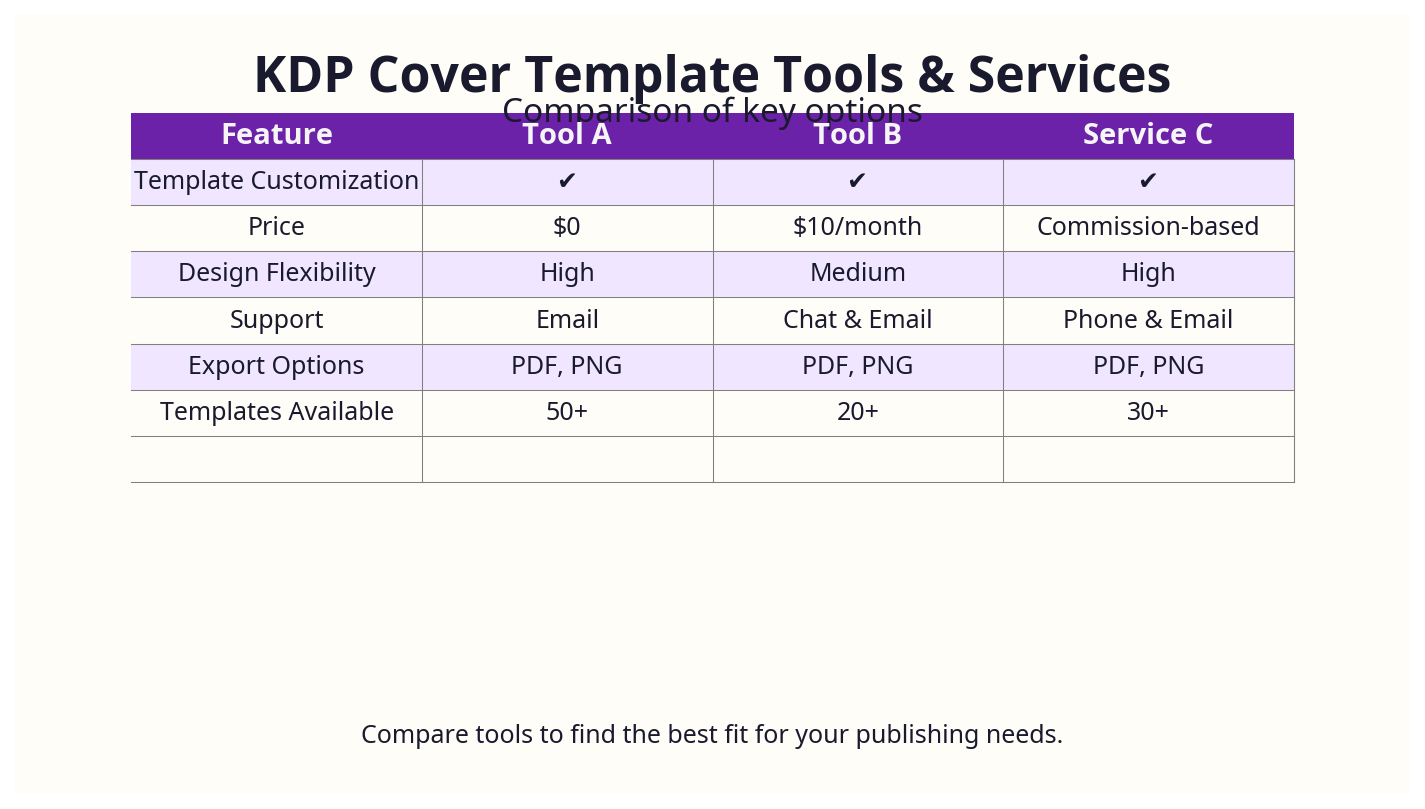
- Canva Pro: Intuitive, cloud-based, with templates. Limited precision for spine calculations. Suitable for simple covers but risky for print.
- Microsoft Word: Possible but not recommended due to lack of precise bleed and spine controls. If used, set margins carefully under Layout > Margins > Custom Margins.
KDP Cover Template Generators
- Amazon’s own generator is free but US-centric and sometimes inaccurate for UK sizes.
- Third-party generators like BookBrush or DIY Book Formats offer better flexibility but may charge fees.
Barcode Generators
- Nielsen Barcode Service: For official barcodes with UK ISBNs.
- Free online generators like OnlineLabels EAN-13 Generator exist but verify quality.
Publishing.co.uk Automated Service
For UK authors fed up with technical headaches, publishing.co.uk offers an automated, high-quality cover template and formatting service tailored to your specs and Amazon’s standards.
Cost Breakdown: What UK Authors Really Pay
Understanding the true costs helps you budget effectively and avoid unpleasant surprises.
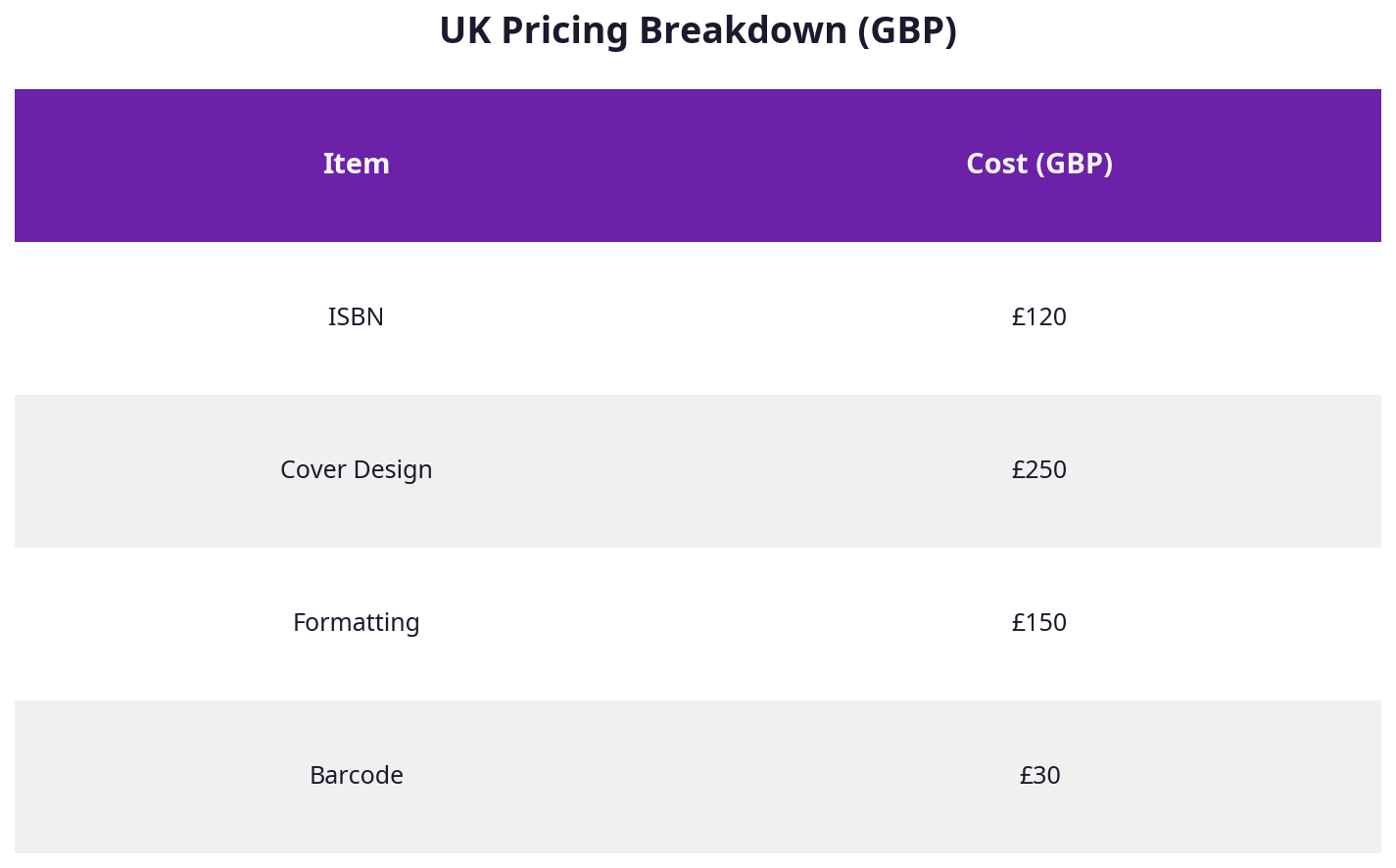
| Item | Typical UK Cost (£) | Notes |
|---|---|---|
| Nielsen ISBN (single) | £93 | Essential for full control over publishing |
| Nielsen ISBN (block of 10) | £174 | Cost-effective for multiple titles |
| Professional Cover Design | £300 - £600 | UK market average; agencies like Spiffing charge ~£450 flat |
| DIY Cover Design (Canva, etc.) | £0 | Free but may harm sales if amateurish |
| KDP Cover Template Software | Free - £55 | Canva free/Pro, Affinity Publisher one-off |
| Barcode Generation | £0 - £20 | Free online or official from Nielsen |
| Formatting Services (publishing.co.uk) | £49 - £130 | Automated, professional, UK-focused |
Hidden Costs to Watch For
- Revisions to cover design if your template is off can add £50-£100.
- Physical proof copies cost ~£3-£6 each on KDP.
- Time spent learning technical skills is often undervalued — could be better spent marketing.
Real-World Case Studies and Examples
Case Study 1: Fiction Author Choosing Trim Size and ISBN Strategy
Sarah, a debut UK fiction author, initially chose a 6"x9" trim size (more US-centric) for her novel. After ordering physical proofs, she noticed the book felt bulky, and local bookshops struggled to shelve it properly. She switched to a 5"x8" trim size, more common in the UK, reducing printing costs by £1.50 per copy and improving shelf appeal.
Sarah also bought her own block of 10 ISBNs from Nielsen (£174). Though a steep upfront cost, it enabled her to sell through independent UK bookstores and libraries, which require author-owned ISBNs. She generated her barcode via Nielsen’s official service for £15, ensuring scannability.
Case Study 2: Non-Fiction Author Avoids Colour Mode Pitfall
James, a UK non-fiction author, designed his book cover in Canva, which defaults to RGB colour mode. After uploading to KDP, his print proofs looked dull and muted. He realised the importance of CMYK and switched to Affinity Publisher, exporting a CMYK PDF. The second print proof matched his digital expectations perfectly, leading to higher reader satisfaction and positive reviews.
Case Study 3: Using Publishing.co.uk’s Automated Service
Helen, a busy UK author with minimal design experience, opted for publishing.co.uk’s automated cover template service (£79). The service generated a print-ready CMYK PDF with precise UK trim size and spine width. By avoiding costly revisions and delays, Helen launched her book on schedule and reported a 15% sales increase compared to her previous KDP release with a DIY cover.
Practical Takeaway
Investing in the right trim size, ISBN ownership, and colour mode pays dividends in print quality, distribution options, and sales. UK authors who treat cover template creation as a business decision rather than a DIY afterthought position themselves for success.
Expert Tips from 25 Years in the Industry
Drawing from decades of ecommerce and publishing experience, here are some insider tips that go beyond the basics:
1. Think Beyond the Cover — Branding Matters
Your cover is your brand’s handshake. For UK authors competing in a £7.1bn industry, a professionally designed and formatted cover template signals quality and credibility. It’s not just about looking good — it impacts algorithms, click-throughs, and ultimately sales.
2. Invest in Your ISBNs Early
I’ve witnessed authors lose opportunities because their free KDP ISBNs locked them into Amazon-only. Buying your own Nielsen ISBNs gives you full control and the ability to sell in UK bookstores, libraries, and abroad.
3. Spine Text Is Prime Real Estate
Many neglect the spine, focusing only on front and back cover. But the spine is what shows on bookshelves. Keep it simple, legible, and consistent with your branding.
4. Automate, Don’t DIY Unless You’re an Expert
I once spent hours wrestling with spine calculations and colour profiles for Google. Panic. Repeat. Only after investing in professional formatting and cover templating tools did I save time and increase sales. Automated UK-focused services like publishing.co.uk remove the guesswork.
5. Always Check Print Proofs
No matter how polished your digital file looks, print proofs reveal issues like colour shifts, spine misalignments, or barcode problems.
6. Price Your Book with VAT in Mind
Remember that while print books are zero-rated for VAT, ebooks aren’t. Factor this into your pricing strategy on KDP to avoid surprises and maintain UK market competitiveness.
Frequently Asked Questions
What is the most common mistake UK authors make with KDP cover templates?
Overlooking accurate spine width calculation is the top error. Many authors use default sizes or US-centric templates that don’t match their UK trim size and page count, leading to misaligned spine text or cut-off images.
How much does KDP cover template creation cost in the UK?
Costs vary widely. DIY options can be free but risky. Professional cover design ranges from £300 to £600. Automated UK formatting services, including cover template generation, typically cost between £49 and £130. Plus, Nielsen ISBNs add £93+ per number.
What tools do UK authors recommend for KDP cover templates?
Many recommend Affinity Publisher for professional results without Adobe’s subscription. Others use Canva Pro for simpler covers. For spine-accurate templates, dedicated services like publishing.co.uk are highly valued.
How long does the KDP cover template process typically take?
For a novice, it can take several days due to learning curves and trial/error. Professionals or automated services deliver in 1-3 days. Factoring in proof copies, expect 1-2 weeks total before final publication.
Can I handle KDP cover template creation myself or should I hire a professional?
If you have design experience and patience, DIY is possible but fraught with risk. For most UK authors, hiring a professional or using an automated UK-focused service is the safer, time-saving investment.
What are the UK-specific requirements for KDP cover templates?
UK authors need to consider Nielsen ISBN purchase, EAN-13 barcode creation, UK trim sizes (often smaller than US), VAT implications, and paper type preferences (cream vs white). Colour must be CMYK, resolution 300 dpi, and file format PDF.
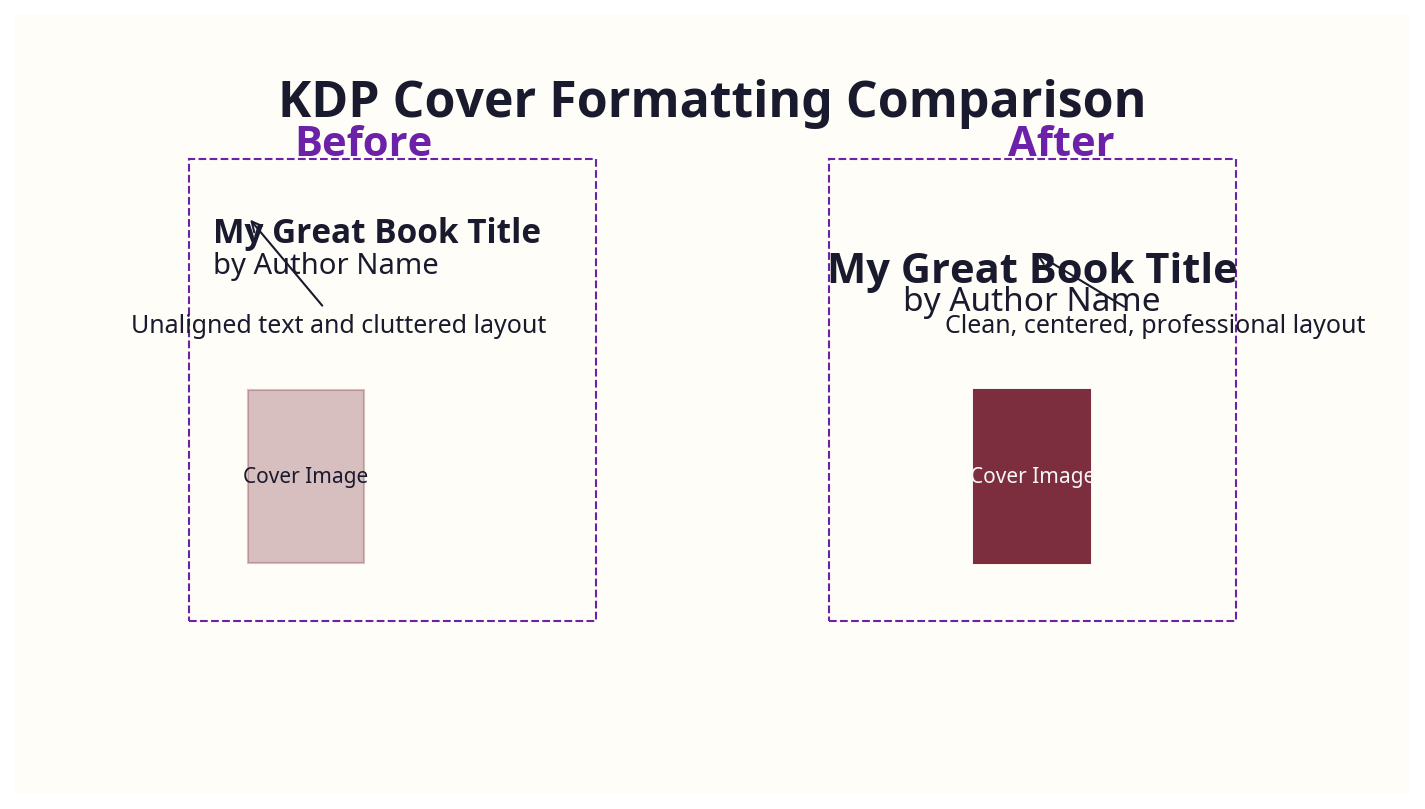
Formatting your KDP cover template isn’t just a technical hurdle; it’s a strategic business decision. With the UK market’s unique demands and your book’s success on the line, investing in the right knowledge, tools, and professional support is non-negotiable.
For many authors, the frustration of juggling file types, dimensions, and formatting rules is a dealbreaker. I’ve been there myself — with Google. Panic. Repeat., the formatting nightmare nearly cost me months of delay and lost sales. That’s why publishing.co.uk exists: to remove the headache and give UK authors a reliable, affordable route to perfect KDP covers and formatting.
I consult for a billion-pound business that was struggling with the exact same formatting issues — it was literally stopping them from scaling their back catalogue. The problem isn’t just indie authors; even big players get stuck in this technical mess.
If you want to focus on writing, marketing, and building your brand — leave the cover template technicalities to those who know the game inside out.
About the Author
Robert Prime is a best-selling self-published author, veteran eCommerce strategist, and the founder of publishing.co.uk. With over 25 years of experience in digital business and 15 successful exits, he brings a battle-tested perspective to the publishing industry. After experiencing firsthand the archaic, headache-inducing process of formatting a KDP-compliant book for his own best-seller, Google. Panic. Repeat., Robert built publishing.co.uk to solve the problem for other authors. He is also a co-owner of the LoveReading.co.uk network (the UK’s largest book review platform), founder of the Amazon growth agency MrPrime.com, and a member of the Forbes Business Council.
