Rules and sizes checked on Amazon’s KDP help pages on 26 November 2026.
Quick answer: Choose bleed if anything touches the edge of any page. Add 0.125 inches to the width and 0.25 inches to the height, keep text at least 0.375 inches from the outside edges, and upload a PDF. Choose no bleed for a text-only book.
Bleed causes more confusion than any other KDP setting, because you will see three different numbers quoted for it: 0.125, 0.25 and 0.375 inches. All three are right, and they describe three different things. Amazon’s trim, bleed and margins page is the source for each one.
Would you rather someone else did it? Our book formatting services UK start at £69, VAT included, with files back in 24 hours.
What bleed is
When a book is printed, every page is cut to size. Amazon says it trims 0.125 inches from the top, bottom and outside edge of each page. If a picture is meant to reach the edge, it has to extend past the cut line, or a thin white strip can appear after trimming. That extra area, which is cut away, is the bleed.
Bleed or no bleed?
- You need bleed if any picture, background colour or graphic reaches the edge of any page. Amazon says that if even one page needs bleed, the whole file is set up with bleed.
- You do not need bleed for a text-only book, or one whose pictures all sit inside the margins with white space around them.
- Every cover needs bleed. Amazon’s bleed section says “All book covers on KDP require bleed.” The interior is your choice; the cover is not.
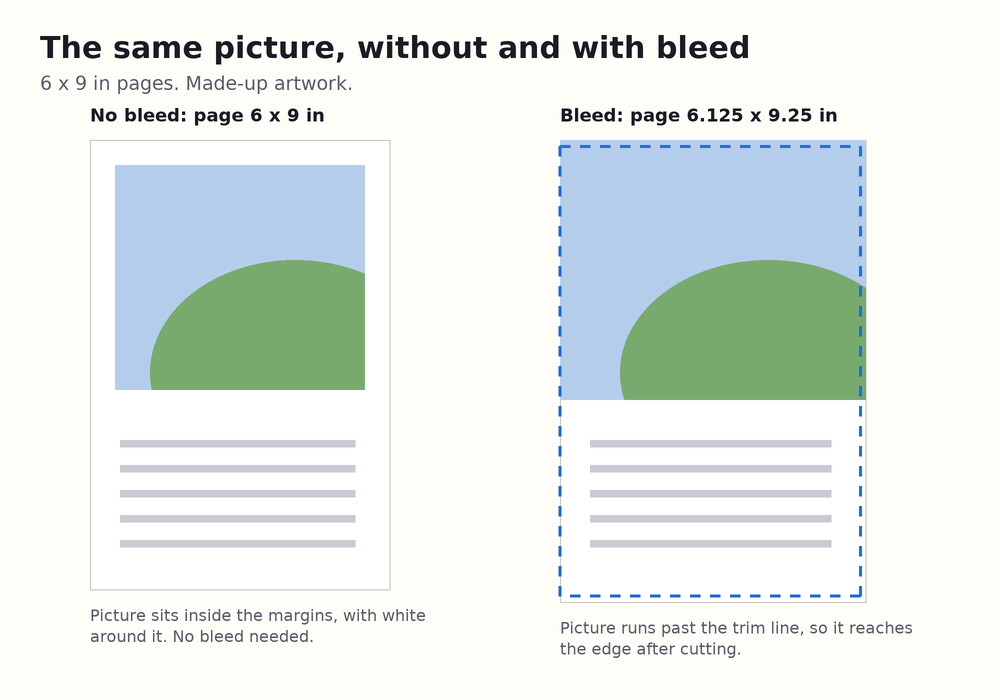
The same made-up picture without bleed (inside the margins) and with bleed (past the trim line).
The three numbers
| Number | What it is | Where it applies |
|---|---|---|
| 0.125 in (3.2 mm) | The bleed added to the page width | The outside edge only, once |
| 0.25 in | The bleed added to the page height | 0.125 in at the top plus 0.125 in at the bottom |
| 0.375 in (9.6 mm) | The minimum margin with bleed | Top, bottom and outside edges, for text and key detail |
We measure that 0.375 inches from the trim line, not from the edge of the bleed, because it is the safer reading of Amazon’s page. So a 6 x 9 inch book with bleed has pages of 6.125 x 9.25 inches, and its text sits at least 0.375 inches from the top, bottom and outside edges. Without bleed, the minimum outside margin is 0.25 inches. The inside margin (the gutter) depends on page count, from 0.375 inches for 24 to 150 pages up to 0.875 inches for 701 to 828 pages, with or without bleed.
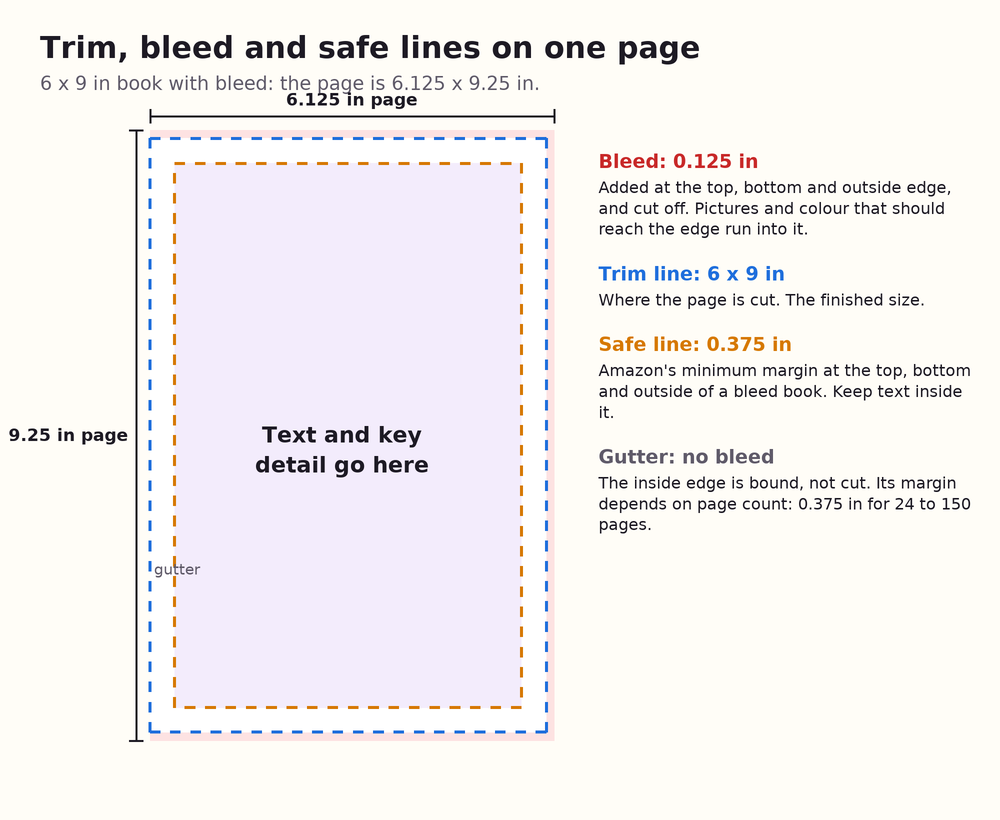
Trim, bleed and safe lines on one 6 x 9 inch page with bleed. The inside edge, the gutter, has no bleed.
Page sizes with bleed, every trim
These come straight from Amazon’s table, checked on 26 November 2026.
| Trim size | Page size with bleed |
|---|---|
| 5 x 8 in | 5.125 x 8.25 in |
| 5.06 x 7.81 in | 5.185 x 8.06 in |
| 5.25 x 8 in | 5.375 x 8.25 in |
| 5.5 x 8.5 in | 5.626 x 8.75 in |
| 6 x 9 in | 6.125 x 9.25 in |
| 6.14 x 9.21 in | 6.265 x 9.46 in |
| 6.69 x 9.61 in | 6.815 x 9.86 in |
| 7 x 10 in | 7.125 x 10.25 in |
| 7.44 x 9.69 in | 7.565 x 9.94 in |
| 7.5 x 9.25 in | 7.625 x 9.5 in |
| 8 x 10 in | 8.125 x 10.25 in |
| 8.25 x 6 in | 8.375 x 6.25 in |
| 8.25 x 8.25 in | 8.375 x 8.5 in |
| 8.25 x 11 in | 8.375 x 11.25 in |
| 8.27 x 11.69 in (A4) | 8.395 x 11.94 in |
| 8.5 x 8.5 in | 8.625 x 8.75 in |
| 8.5 x 11 in | 8.625 x 11.25 in |
Amazon’s table lists 5.5 x 8.5 inches as 5.626 inches wide with bleed, not 5.625. We have copied it exactly; either way, check your file against the KDP previewer.
Setting it up
- Set the page size in your layout program to the size with bleed from the table above, or start from one of Amazon’s manuscript templates.
- Extend every edge picture past the trim line to the edge of the larger page.
- Keep text inside the margins: 0.375 inches from the top, bottom and outside edges, and the gutter for your page count on the inside.
- Export a PDF. Amazon’s submission guidelines say a book with bleed must be uploaded as a PDF, with layers flattened and no crop marks.
- Choose “Bleed” in KDP when you upload, so the setting matches the file.
Our margin calculator gives the gutter for your page count, and our free KDP readiness check looks at the finished PDF before you upload it. Our free bleed and margin checker measures every page of your PDF against these sizes and shows you each page that is too close.
In the software you are using
The numbers are the same everywhere. What changes is where you type them.
- Microsoft Word. Set the paper size to the page size with bleed from the table above, for example 6.125 x 9.25 inches for a 6 x 9 book. Amazon’s trim page says the trim is set through the page or paper size setting, and it links to Word templates and to its own step-by-step Word guides. For a text-led book, our free Word book template is already set up. Stretch edge pictures to the edge of the larger page, and keep text inside the margins.
- Canva. Canva’s own help page on bleed and crop marks says it “adds 0.125 inches (3.175 mm) on all sides”, and its download has one switch, “Crop marks and bleed”, that adds crop marks and bleed. Neither suits a KDP interior: KDP wants bleed on the outside edge only, not the inside, and its submission guidelines say no crop marks. So make the design at the KDP page size with bleed from the table above (6.125 x 9.25 inches for a 6 x 9 book), run backgrounds to the edge of it, keep text 0.375 inches in from the top, bottom and outside, and download a print PDF with that switch left off. Then check the PDF’s page size and make sure it has no crop marks.
- Adobe InDesign. Set the page size to the trim size, such as 6 x 9 inches. Adobe’s bleed and slug page gives separate bleed values for top, bottom, inside and outside, each 0 by default; set top, bottom and outside to 0.125 inches and leave inside at 0. When you export, Adobe’s print-ready PDF page says to “confirm bleed settings match your document setup”. Export Pages, not Spreads (Adobe’s export options page says spreads “are not recommended for print workflows”, and KDP wants single pages), and leave crop marks off.
Whichever you use, open the exported PDF and check its page size before you upload. It should match the table to the third decimal place.
Bleed on the cover
The cover always has bleed, whatever you chose for the inside. Amazon’s paperback cover page adds 0.125 inches to the top, bottom and outside edges of the whole wrap, and keeps cover text at least 0.125 inches inside the trim lines. Its sum is:
- Cover width = bleed + back cover + spine + front cover + bleed
- Cover height = bleed + trim height + bleed
For a 6 x 9 inch paperback of 250 pages on white paper, the spine is 250 x 0.002252 = 0.563 inches, so the cover file is 12.813 x 9.25 inches. Our cover calculator does the sum for any size. A hardcover is different again; see our hardcover guide.
Why bleed rejections repeat
A common story: you fix the page KDP flagged, upload again, and a different page is flagged. In our experience this often means the file was never set up with bleed as a whole, so each page with art near the edge fails in turn. The cure is to set the whole file to the bleed page size and check every page, not just the one in the message. Our guide to why KDP rejects a book covers the other common reasons.
Pictures across two pages
Amazon wants single pages, not spreads, and the inside edge has no bleed. If a picture crosses two pages, see our guide to picture books, spreads and the gutter.
From our own work
Our delivery check measures the interiors we deliver against Amazon’s margins, with a small safety margin on top, because the line is real: a novel set exactly at Amazon’s minimum was rejected on 34 pages. Amazon is not always that strict, though. A paperback by our founder, which Amazon accepted and sells, has page numbers 0.247 inches from the bottom edge, just under the 0.25 inch minimum. Do not rely on that: aim clear of the line.
Getting help
If your book keeps coming back from review, we can set it up for you. We check every page against Amazon’s bleed and margin rules before the file goes to you; send it to us for a fixed quote. Every printed book also needs a cover with bleed, sized to the final page count, and we design a full print wrap with a matching ebook cover for £199. See our cover design page and our guide to formatting complex books.
Sources, read 26 November 2026: Amazon KDP help pages for trim size, bleed and margins and paperback submission guidelines.
Frequently asked questions
When do I need bleed on KDP?
When any image, background colour or graphic reaches the edge of a page. Amazon says that if even one page needs bleed, the whole file should be set up with bleed. A text-only book does not need it.
How much bleed does KDP need?
Amazon trims 0.125 inches from the top, bottom and outside edge. So the page with bleed is 0.125 inches wider than the trim size and 0.25 inches taller. A 6 x 9 inch book with bleed has pages of 6.125 x 9.25 inches.
Why does KDP say 0.375 inches for bleed books?
That is a margin, not bleed. With bleed, Amazon’s minimum top, bottom and outside margin is 0.375 inches, so text and important detail stay safely away from where the page is cut.
Is there bleed on the inside edge?
No. Amazon adds bleed only to the width once, on the outside edge, and to the top and bottom. The inside edge, at the spine, has no bleed.
Can I upload a Word file with bleed?
No. Amazon’s submission guidelines say a book with bleed must be uploaded as a PDF. Books without bleed can also be uploaded as DOC, DOCX, RTF, HTML or TXT.