Last reviewed by Robert Prime — June 2026
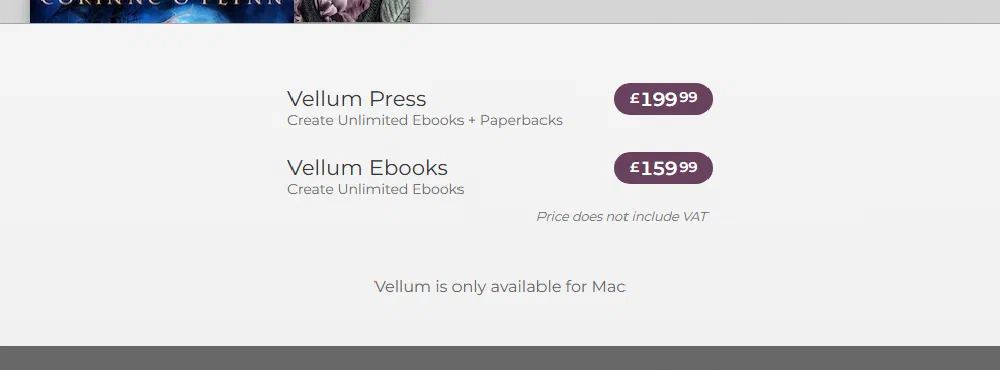
Quick Answer: Vellum is a one-off purchase, not a monthly subscription. Vellum’s own store prices in US dollars only — there is no GBP option and no confirmed VAT add-on for UK buyers. There are two licences: Vellum Ebooks at £159.99 (generates ebook files only) and Vellum Press at £199.99 (generates both ebook files and a print-ready PDF). The store’s own checkout notes the price “does not include tax” (US sales tax, not UK VAT). As a UK buyer you pay the dollar price converted at your card’s rate — roughly £149 and £186 at typical rates, though that moves with the exchange rate. You can download Vellum and format your entire book for free — you only pay when you want to export the finished files, and that one-off fee then unlocks unlimited book generation forever. The big caveat: Vellum runs on macOS only. Verify the current price on vellum.pub before you buy.
Full breakdown below — including what UK authors actually pay once the dollar price is converted.
Vellum pricing at a glance
| Licence | Price (one-off) | What it generates |
|---|---|---|
| Vellum Ebooks | £159.99 (≈£149) | Ebook files only (Kindle/EPUB) |
| Vellum Press | £199.99 (≈£186) | Ebook files and print-ready PDF |
Prices confirmed on Vellum’s own store and purchasing FAQ (vellum.pub, help.vellum.pub) as of September 2026 — both show pounds to a UK visitor, with the page stating the price excludes VAT, so there is no evidence Vellum bills UK buyers natively in pounds. The sterling figures above are simple currency conversions at a typical exchange rate; confirm the exact charge at checkout. Searching “is Vellum free” or “Vellum free trial” instead? Same answer: it’s free to download and format, paid to export — there’s no time-limited trial and no monthly plan.
What Vellum actually is
Vellum is a desktop book-formatting app made by 180g. You import your manuscript (typically from Word), and it turns it into a properly formatted ebook and/or print interior — chapter headings, drop caps, ornamental breaks, running heads, the lot — without you touching code or wrestling with templates. It’s known for two things: best-in-class typography out of the box and a near-zero learning curve. For a lot of authors it’s the difference between a book that looks self-published and one that looks like it came from a traditional house.
The trade-off is that it’s Mac-only. There is no Windows version, no web version, no Linux version. If you’re on a PC, that’s the single most important fact on this page — more on the workarounds below.
The pricing model — and why people ask “is Vellum free?”
This is where Vellum is genuinely unusual, and why the “is it free?” question keeps coming up.
Vellum is free to download and free to use right up to the point of export. You can install it, import your full manuscript, format the entire book, style every chapter, and preview exactly how it’ll look — all without paying a penny. Nothing is locked behind the paywall except the final step.
You only pay when you want to generate (export) the actual files you’ll upload to Amazon KDP or elsewhere. At that point you buy a licence. So the honest description is: free to try fully, paid to export.
Two things follow from that, and both are good news:
- There’s no time-limited trial. You’re not racing a 14-day clock. Take as long as you like to evaluate the full formatting experience before deciding.
- The fee is one-off and unlocks unlimited books. Once you’ve paid, you can generate as many books as you want, forever, at no extra per-book cost. Write a 20-book series and you pay once. There is no subscription — this is not Adobe.
The only real restriction is that you can’t export until you’ve bought a licence. You can do everything else first.
Which licence should you buy — Ebooks or Press?
It comes down to one question: do you want a paperback?
- Vellum Ebooks (£159.99) generates ebook files only. Fine if you’re going Kindle-only and have no plans for print.
- Vellum Press (£199.99) generates both ebook files and a print-ready PDF for paperback (and hardback) interiors.
For about $50 more, Press covers you for print as well as digital. Given that most self-published books on KDP end up offering a paperback eventually — and that a print PDF formatted separately is a real headache — Vellum Press is the sensible default for the majority of authors. Only buy Ebooks if you’re certain you’ll never want print.
What it costs a UK author in pounds
Vellum is priced and charged in US dollars, so what you pay in sterling moves with the exchange rate. As a rough guide at the time of writing:
- Vellum Ebooks (~£159.99) ≈ £149 (approx — verify on the day)
- Vellum Press (~£199.99) ≈ £186 (approx — verify on the day)
Treat those as approximate and verify the live figure at checkout — the rate, plus any card foreign-transaction fee your bank charges, will nudge it. Any UK VAT on the purchase itself is applied at checkout, so check your receipt for the exact total.
What you do need to remember is the VAT on the books you sell: UK ebooks have been zero-rated for VAT (0%) since 1 May 2020, in line with printed books, so no UK VAT is deducted from your ebook sales.
And if you want your own ISBN rather than a free Amazon-assigned one, that’s a separate cost: Nielsen charges around £93 for a single ISBN (inc VAT) or £174 for a block of ten. You don’t need an ISBN for a Kindle ebook, and KDP gives you a free one for paperbacks — but a free ISBN can’t be carried to another retailer or printer. See ISBN requirements for UK authors if you’re weighing that up.
Windows users: your options
Because Vellum is Mac-only, PC authors have three realistic routes, none of them free of friction:
- Borrow or use a Mac. If a friend, family member, library, or co-working space has one, you can install Vellum, do your formatting, and export. Perfectly legitimate.
- Rent a cloud Mac. Services like MacInCloud let you remote into a Mac by the hour or month. It works, but it adds a rental cost on top of the licence and a layer of faff (uploading your manuscript, working over a remote desktop).
- Pick a cross-platform tool instead. This is the honest answer for most PC owners — see the comparison below.
I won’t oversell the workarounds. They exist, plenty of authors use them, but if you’re a committed Windows user with one book to format, paying for both a cloud-Mac subscription and a Vellum licence often costs more than the alternatives — and you’re learning a remote-desktop workflow on top of learning the app.
How Vellum compares on price
To put the numbers in context:
- Atticus — around $147 one-time (cross-platform: Windows, Mac, Linux, Chromebook, web). Cheaper than Vellum and runs everywhere, which is why it’s the obvious shout for PC users. See Vellum vs Atticus.
- Kindle Create — free from Amazon. Basic, Kindle-focused, limited control over the finer typography, but genuinely free. See Kindle Create vs Vellum.
- Vellum — £159.99 / £199.99 one-off, Mac-only. The premium option. You’re paying for the typography and the speed-to-finished-book, not for features Atticus lacks on a spec sheet.
If you’ve got a Mac and you value a polished result with almost no learning time, Vellum earns its price. If you’re on a PC, the maths usually points to Atticus.
Quick verdict
Choose Vellum Ebooks (£159.99) if: you have a Mac, you’re publishing Kindle/ebook only, and you want gorgeous typography fast.
Choose Vellum Press (£199.99) if: you have a Mac and you want both ebook and print — the right pick for most authors, since paperback usually follows.
Best alternative: No Mac? Go cross-platform with Atticus (~$147 one-time), or if you’d rather not format at all, publishing.co.uk’s done-for-you formatting starts at £69 and handles both Kindle and print — no software, no Mac, no learning curve.
Frequently asked questions
Is Vellum free?
Vellum is free to download, import your manuscript, and format your whole book — including a full preview. You only pay when you want to export the finished files. The one-off licence (£159.99 or £199.99 at the time of writing) then unlocks unlimited book generation. There’s no time-limited trial and no subscription.
Does Vellum have a free trial?
Not in the usual sense — there’s no countdown clock. Instead, the whole app is usable for free up to the point of export, so you can fully evaluate it before paying. The paywall only sits on generating the actual files.
How much does Vellum cost in the UK?
You pay in US dollars, so roughly £149 for Vellum Ebooks and £186 for Vellum Press depending on the exchange rate and any card fee — verify the live figure at checkout. Remember UK ebooks are zero-rated for VAT (0%), and your own ISBN (if you want one) is a separate Nielsen cost.
Can I run Vellum on Windows?
No — Vellum is macOS only. You’d need to borrow a Mac or rent a cloud Mac (e.g. MacInCloud), both of which add cost or hassle. Most PC authors are better served by a cross-platform tool like Atticus or a done-for-you formatting service.
Where can I check my book before I upload it?
Run a free KDP Readiness Score — it catches common upload issues in seconds, no signup. If anything fails, the report tells you exactly what to fix.
About this guide
Written by Robert Prime for publishing.co.uk. Last reviewed June 2026. Specs and pricing change — verify current figures with the linked sources before relying on them.
