Rules checked on Amazon’s KDP help pages on 26 November 2026.
Quick answer: Choose fixed layout only when the page design is the book: picture books, comics, and some photo or coffee-table books. Everything else reads better reflowable. Amazon allows one format per Kindle book, and the fixed formats give up text resizing and screen reader support. Make the file with Kindle Create (a KPF file) or as a fixed-layout EPUB, then test it in Kindle Previewer on a tablet and a phone view.
Fixed layout is the question authors of picture books, cookbooks and illustrated books ask most, and the one with the least clear answers. Most guides describe EPUB in general. Kindle has its own set of formats, each with its own devices and trade-offs, and choosing the wrong one is hard to undo once readers have bought the book.
Would you rather someone else did it? Our book formatting services UK start at £69, VAT included, with files back in 24 hours.
Fixed layout or reflowable?
A reflowable book is like a web page: the reader picks the typeface and size, and the text flows to fit the screen. A fixed-layout book is like a PDF: every page stays exactly as designed.
Amazon’s format comparison puts it plainly: “Only one format can be used for each Kindle book.” It also lists what each format gives up. The short version:
- Reflowable suits text-heavy books. It works on every Kindle device and app, and keeps font settings, dictionary look-up, word search and screen reader support.
- The fixed formats keep the page design but lose user font settings and screen reader support, and some lose text selection and search too.
If most of your book is words, choose reflowable. Our guide to formatting a Kindle ebook covers that route.
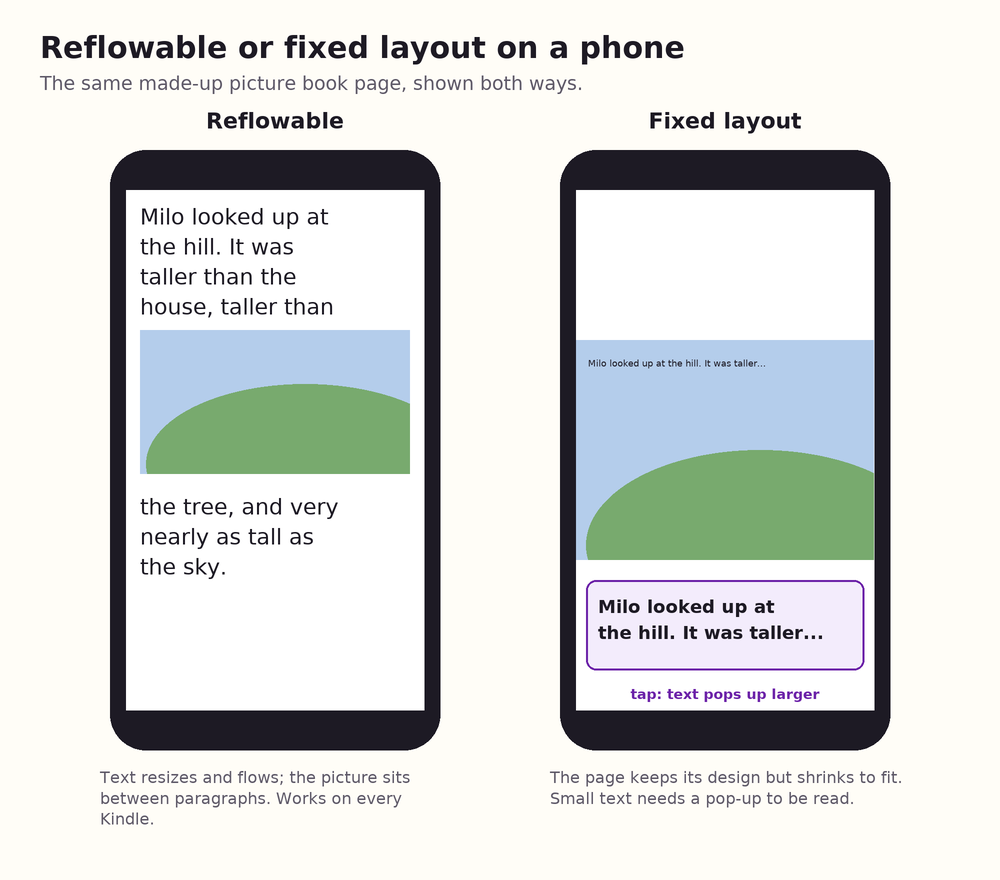
The same made-up picture book page on a phone, reflowable and fixed layout. Fixed layout keeps the design but its text needs pop-ups to be read.
The Kindle formats, compared
A quick rule before the detail: a children’s picture book usually suits fixed layout with text pop-ups, a comic suits Panel View or virtual panels, and a cookbook or textbook usually reads better reflowable.
These rows come from Amazon’s format comparison, read on 26 November 2026.
| Format | Amazon says it suits | Devices | What readers lose |
|---|---|---|---|
| Fixed layout with text pop-ups | Image-heavy books with little text, such as children’s picture books or coffee table books | Fire tablets, Kindle apps, Cloud Reader; Kindle e-readers case by case | Text selection, dictionary, font settings, screen reader |
| Fixed layout with image pop-ups (Panel View) | Comics with simple rectangular panels | Kindle e-readers (3rd generation and later), Fire tablets, Kindle apps | Text selection, dictionary, font settings, screen reader |
| Fixed layout with virtual panels | Complex comics and manga | Fire tablets, touch-screen e-readers, Kindle apps | Text selection, dictionary, font settings, screen reader |
| Fixed layout without pop-ups | Image-heavy books with large text | Kindle e-readers and Fire tablets, Kindle apps | Font settings, screen reader |
| Print Replica | Only when the exact print layout is essential | Not compatible with Kindle e-readers | Text resizing, screen reader |
The last row matters most for cookbooks and textbooks. Amazon says to use Print Replica only when your content “absolutely requires maintaining exact print layout and cannot be effectively converted to a more accessible format”.
How to make a fixed-layout Kindle book
There are three routes. Which one fits depends on your files and your skills.
Kindle Create
Amazon’s Kindle Create guide for comics and kids’ books says it imports PDF, PNG or JPEG files and converts them into an illustrated, comic or kids’ book. When you export, it produces a KPF file that you upload to KDP. Two things to know:
- Text goes into the pictures. Amazon recommends adding text to images before you import them. That text then becomes part of the picture, so readers cannot search or select it.
- Wide pages become single pages. Kindle Create sets any page wider than it is tall as a single page, so plan your spreads before you export.
A picture book or comic made this way follows these steps, from Amazon’s Kindle Create guide:
- Finish each page as one picture, with its words already placed on it. Kindle Create has no text formatting tools, so the words must be on the image before you import it.
- Name the files in order, such as page-0001.jpg, page-0002.jpg, because Amazon says images import in the order they are selected. Or make one PDF of the pages.
- Start a new project in Kindle Create (File, then New Project) and import the PDF or the image files.
- Preview it with Kindle Create’s preview tool. Rotate the device and switch device types, and check the smallest screen, a phone, where text is hardest to read.
- Export (File, then Export). Kindle Create makes a KPF file to upload to KDP. Keep the KCB project file on your computer, because you need it to make changes later.
- Open the KPF in Kindle Previewer for a last check (see the testing section below), then upload it as your Kindle manuscript.
For a print book you have already laid out, Kindle Create can also turn the PDF into a Print Replica book. Remember that Print Replica does not reach Kindle e-readers.
A fixed-layout EPUB
A fixed-layout EPUB gives you the most control, and it is the route for books with live text over pictures. Amazon’s guide to fixed layout with text pop-ups sets out what Kindle needs (checked on 26 November 2026). The parts that most often trip authors up:
- The original resolution is required. Each book declares the screen size it was designed for. Amazon’s example uses 1024 x 600 pixels, the screen of the first Kindle Fire.
- Orientation. A book can lock to portrait or landscape, or allow both. The text pop-ups guide notes that the lock is not supported on iOS. Amazon’s guide to fixed layout without pop-ups recommends unlocking orientation only when text is readable in both portrait and landscape.
- Spreads. A picture that spans two pages can be shown as two halves side by side when the book is locked to landscape.
- Pop-up text. In a text pop-up book, the enlarged text should usually be set at 150% of the normal size on the page. Amazon gives exceptions: text already large enough does not need a pop-up at all, and small text may need more, such as 225%.
Amazon’s MOBI support page says it stopped accepting MOBI for fixed-layout books on 18 March 2025. Upload EPUB or KPF instead.
Having it built for you
Turning a finished print PDF into a good fixed-layout Kindle book is mostly checking: every page at the right size, spreads that read correctly, text that is still readable on a phone, and a file that passes Amazon’s own conversion in Kindle Previewer.
Test it before you publish
Use Amazon’s free Kindle Previewer to open the file and check it on tablet and phone views, and on an e-reader view where your format supports one. Check that:
- every page is in the right order, and spreads sit side by side where they should
- text is readable on a phone without zooming, or pops up where it should
- nothing important sits at the very edge of the page
- the cover shows correctly in the library view
The cover
The Kindle cover is a separate image. Amazon’s cover guidelines give an ideal size of 2,560 pixels high by 1,600 wide. If the book also has a print edition, the print cover needs a spine and back as well, sized to the final page count.
From our own work
All 20 Kindle files we have delivered across 5 books are reflowable, including one book with more than 40 photographs. Its readers can still choose their own font size, and the photographs sit between the paragraphs they belong to. That is our usual advice: reflowable first, and fixed layout only where the page design is the point, such as a picture book.
Getting help
We usually advise a reflowable Kindle book, and we make fixed-layout picture books on request, from print PDFs or artwork files. We quote each one after seeing it, because page counts and layouts vary; send us the files for a fixed price. We can also design the cover: £129 for an ebook cover, or £199 for a full print wrap with a matching ebook cover. See our cover design page.
For other picture-led books, see our guide to formatting complex books, and for cookbooks, self-publishing a cookbook.
Sources, read 26 November 2026: Amazon KDP help pages for Kindle formats, Kindle Create for comics and kids’ books, Print Replica, fixed layout with text pop-ups, fixed layout without pop-ups, MOBI support, Kindle Previewer and ebook covers.
Frequently asked questions
What is the difference between fixed layout and reflowable?
A reflowable Kindle book lets the reader change the font and size, and the text reflows to fit any screen. A fixed-layout book keeps each page exactly as designed, like a printed page. Amazon’s comparison says fixed formats give up user font settings and screen reader support.
Do fixed-layout Kindle books work on Kindle e-readers?
It depends on the format. Amazon lists fixed layout with text pop-ups as working on Kindle e-readers only on a case-by-case basis, and says Print Replica books are not compatible with Kindle e-readers. They work on Fire tablets and the Kindle apps.
Can I upload a fixed-layout EPUB to KDP?
Yes. Amazon’s MOBI support page says to use EPUB or KPF files for fixed-layout ebooks. It stopped accepting MOBI files for fixed-layout books on 18 March 2025.
How do I make a fixed-layout Kindle book myself?
Amazon’s Kindle Create imports PDF, PNG or JPEG files and turns them into an illustrated, comic or kids’ Kindle book, saved as a KPF file you upload to KDP. Amazon recommends adding any text to the images before you import them.
Should my picture book be fixed layout?
Usually yes, because the words and pictures are designed together. Amazon’s comparison lists fixed layout with text pop-ups for image-heavy books with little text, such as children’s picture books.