Rules checked on Amazon’s KDP help pages on 26 November 2026.
Quick answer: If your book is mostly text, any good formatting tool will do. If it is built around pictures, layout or repeated pages, it fails KDP review for its own reasons. Pick your kind of book below. Each guide covers the Amazon rules for that book, checked on Amazon’s own pages, and what to check before you upload.
Most formatting advice is written for novels. A novel has one column of text, no pictures and nothing that runs to the edge of the page. The books on this page are different. They are also the books authors most often ask us to rescue after a run of rejections. If your file is already finished, our free KDP readiness check looks at it before you upload.
Would you rather someone else did it? Our book formatting services UK start at £69, VAT included, with files back in 24 hours.
Choose your kind of book
| Your book | What usually goes wrong | Read |
|---|---|---|
| Cookbook | Colour print costs, full-page photos, recipes that break on Kindle | Self-publishing a cookbook |
| Picture book | Bleed, pictures across the gutter, cover size | Picture books: bleed, spreads and the gutter |
| Colouring or activity book | Single-sided pages, margins, bleed or not | KDP colouring books |
| Journal, planner or notebook | Repeated pages, page counts, low-content rules | Journals and planners on KDP |
| Hardcover edition | Different sizes, page limits and cover wrap | KDP hardcover sizes and templates |
| Kindle book that must keep its layout | Choosing the right Kindle format | Fixed-layout Kindle books |
| Any book with edge-to-edge pictures | Bleed sizes that every source quotes differently | KDP bleed, explained |
| Photo book or illustrated memoir | Bleed, colour cost and picture resolution | No separate guide yet: use the bleed guide and the colour section below, or ask us |
Work out what your book needs
Answer these in order. Each answer comes from one of Amazon’s help pages, linked in the guide it points to.
- Does any picture or colour touch the edge of a page? Then the whole file is set up with bleed: each page is 0.125 inches wider and 0.25 inches taller than the trim. See the bleed guide.
- Is anything inside printed in colour? Then choose a colour ink before you set anything else, because you cannot change ink type after publishing. A colour book under 72 pages must be premium colour, because standard colour starts at 72 pages.
- Is it under 80 pages? Then plan the cover without spine text. Keep spine text for books of 80 pages or more (Amazon’s cover page gives 79 as the line in two wordings, and its cover tools need 80).
- Is it a notebook, planner or log book meant to be filled in? Then it is probably low-content, with its own ISBN and review rules. See the journals guide.
- Do you want a hardcover too? Check that your size is one of the five hardcover trims and the book has 75 to 550 pages. See the hardcover guide.
- Must the Kindle edition keep its page layout? Then it needs a fixed-layout format, and readers lose text resizing. See the fixed-layout guide.
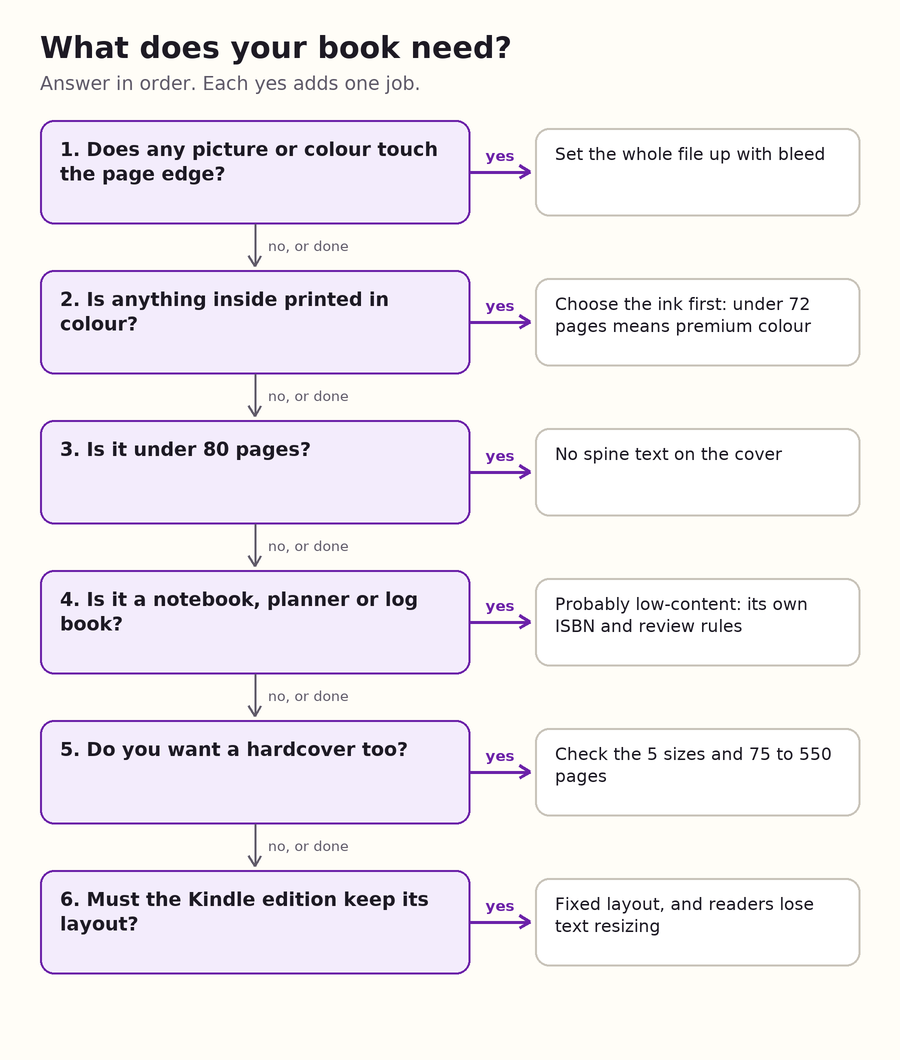
The six questions as a flow chart. Answer them in order; each yes adds one job to the book.
Why these books get rejected
The rules that catch complex books come from a short list on Amazon’s own formatting issues page: trim size and bleed, margins, image resolution, blank pages, template content, small text and cover size. A novel rarely meets most of them. A picture book can meet all of them on one page.
Three things cause most of the trouble:
- Bleed. If any picture or background reaches the edge of a page, Amazon’s bleed rules change the page size of the whole file.
- The gutter. A picture that crosses the middle of a two-page spread loses part of itself into the binding unless it is planned for that.
- Kindle. Amazon’s format comparison says each Kindle book can use only one format, and the formats that keep a page layout give up text resizing.
If your book has been rejected already, our guide to why KDP rejects a book lists every common reason and its fix.
Colour costs more than you expect
Colour changes the price of every copy. Amazon’s colour ink page says premium colour suits “children’s books, cookbooks, or photography books”, and that once a book is published you cannot change its ink type. Our cookbook guide works through the cost per copy on Amazon.co.uk, using Amazon’s printing cost table read on 26 November 2026. Check the price before you choose a trim size, because a large trim costs more per page.
From our own work
We measured the last 12 print interiors we built. Six were picture-led, carrying between 31 and 161 pictures each, all of them in colour. Two were set with bleed, and between them the 12 used seven different page sizes, one of which is not on Amazon’s trim list at all. No single template would have fitted more than a few of them, which is why each guide linked in the table above starts from the book’s own shape.
Doing it yourself or getting help
Many of these books can be done yourself with care. Our free KDP readiness check looks at a finished file before you upload it.
If you would rather hand it over, we format complex books for print and Kindle. Because photo counts and layouts vary so much, we quote each one after seeing the file; send it to us for a fixed price. Most complex books also need a cover built to the final page count, and our cover design includes a full print wrap from £199.
Sources, read 26 November 2026: Amazon KDP help pages for formatting issues, trim, bleed and margins, Kindle formats, colour ink, formatting a hardcover and printing costs.
Frequently asked questions
What makes a book hard to format for KDP?
Pictures that run to the edge of the page, images that cross the middle of a spread, colour printing, layouts that must not move on a Kindle, and page types that repeat, such as journal or colouring pages. Each one has its own KDP rule, and each can get a file rejected.
Can Kindle Create format a cookbook or picture book?
Kindle Create can make some image-heavy Kindle books, but Amazon says each Kindle book can use only one format, and fixed layouts give up features such as text resizing. Amazon recommends Kindle Create for text-heavy books with simple layouts, and its Format Your Hardcover help page says Kindle Create isn’t supported for paperbacks with tables, footnotes, or images that bleed. That limit is about print editions; for the Kindle edition of a picture book, see our fixed-layout guide. Our guides explain the route for each kind of book.
Do I need bleed for a picture book or cookbook?
Only if pictures or colour run to the edge of the page. Amazon says that if even one page needs bleed, the whole file is set up with bleed. Our bleed guide shows the page sizes.