Quick answer Checked 1 October 2026. Kindle Create is Amazon’s free desktop app for Windows and Mac. It turns your Word file into a Kindle ebook and a paperback or hardcover file you upload to KDP, with four fixed themes and no covers, and Amazon says tables, footnotes and endnotes “aren’t supported for print books yet”. Book Studio costs £29.99 a book including VAT and runs in any web browser: it makes the paperback, Kindle ebook and covers from your Word file, shows them beside your Word file, and checks every page against your file and Amazon’s print rules before you pay. If your book is a plain novel and you are happy to check it yourself, Kindle Create costs nothing.
I run publishing.co.uk, and the Book Studio is ours, so weigh everything here knowing that. Kindle Create is free and made by Amazon, and for a lot of plain novels it is enough. Where I describe it I quote Amazon’s own pages.
The verdict, by the kind of author you are
| You are… | Choose | Why |
|---|---|---|
| Publishing a plain novel, mainly as a Kindle ebook | Kindle Create | It is free, and made by Amazon for Kindle. |
| Writing non-fiction with footnotes or tables, in paperback | Book Studio | Amazon says “Tables, footnotes, and endnotes aren’t supported for print books yet” in Kindle Create. The studio handles footnotes. |
| Needing a cover | Book Studio | Amazon: “Kindle Create is an interior formatting tool and doesn’t provide features for designing covers.” The studio makes paperback, hardcover and Kindle covers. |
| Wanting a different look | Book Studio | Kindle Create has four themes, and “These themes cannot be edited by the user.” The studio has 6 looks, 19 fonts and your own font. |
| Wanting proof before you upload | Book Studio | Kindle Create gives you a checklist to work through while you preview. The studio checks every page against your Word file and Amazon’s print rules for you. |
| On a tight budget and willing to learn | Kindle Create | Free, with Amazon’s own help pages. |
What each one costs
| Kindle Create | Book Studio | |
|---|---|---|
| Price | Free | £29.99 a book, including VAT |
| Paid how | Nothing to pay | Once per book, when you take your files |
| Before you pay | Free | Free to upload, check and change; no card needed |
| Promise | None stated | “Amazon-ready or your money back”, plus a 30-day money-back guarantee |
| Source, 1 Oct 2026 | amazon.com/kindlecreate | studio.publishing.co.uk |
What each one does, from their own pages
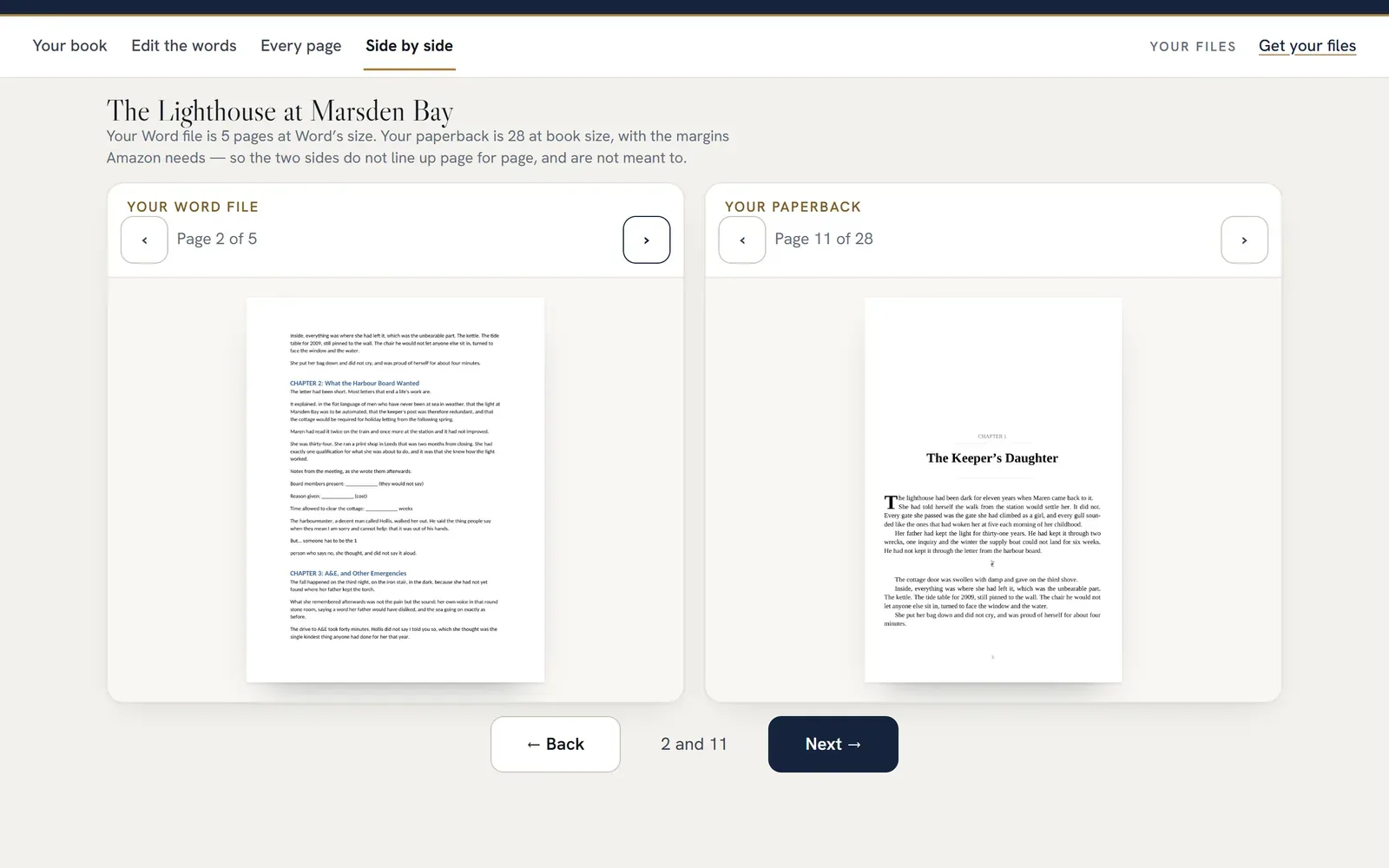
Book Studio’s side-by-side screen, with the Word file on the left and the finished paperback on the right. Our own sample book, captured 24 September 2026.
| Kindle Create | Book Studio | |
|---|---|---|
| Runs on | “Windows 10 or later for PC, MacOS 10.15 or later for Macs” | Any web browser |
| Starts from | A Word .docx/.doc file (also .rtf, .txt or pasted text) | The Word file you wrote your book in |
| Makes | A KPF file to publish on KDP, and an EPUB for reflowable books; ebook, paperback or hardcover “with the same manuscript file” | Paperback PDF and Kindle ebook, and paperback, hardcover and Kindle covers (the paperback file is also the hardcover’s inside) |
| Covers | No | Yes, fitted to your page count |
| Looks | Four themes: “Modern, Classic, Cosmos, and Amour”; they “cannot be edited by the user” | 6 one-click looks, or set the typeface, text size, chapter openings and colours yourself |
| Fonts | Set per paragraph; how many is not stated | 19, plus your own font |
| Page sizes | Chosen on KDP | 16 Amazon sizes |
| Footnotes and tables in print | “Tables, footnotes, and endnotes aren’t supported for print books yet.” | Footnotes handled |
| Change the words | “you can edit the text in Kindle Create. The most frequent reasons are to correct typos and spacing issues.” Tables, lists and footnotes can’t be edited | “Edit any word”, then the pages are set again |
| Preview | A Previewer for the ebook; for print, export and upload to KDP, then use its Print Previewer | The finished pages, side by side with your Word file |
| Versions | Back up the folder holding your KCB work file | Every version kept; every change can be undone |
| Checks the finished book | A checklist “While previewing your eBook” that you work through | Every word, every bold and italic, and Amazon’s print rules, measured on the pages |
| Readers’ comments | Not stated | A private link where readers comment on the pages, no account needed |
Where Kindle Create wins
- It is free. Nothing to pay, ever, and it is Amazon’s own tool for Amazon’s own store.
- Made for Kindle. As well as ordinary reflowable ebooks it does Print Replica, comics and illustrated children’s ebooks.
- Ebook and print from one file. Amazon says you can “prepare an eBook and a paperback or hardcover book with the same manuscript file”.
- EPUB as well. For reflowable books it can export an EPUB as well as the KPF file you publish on KDP.
Where Book Studio wins
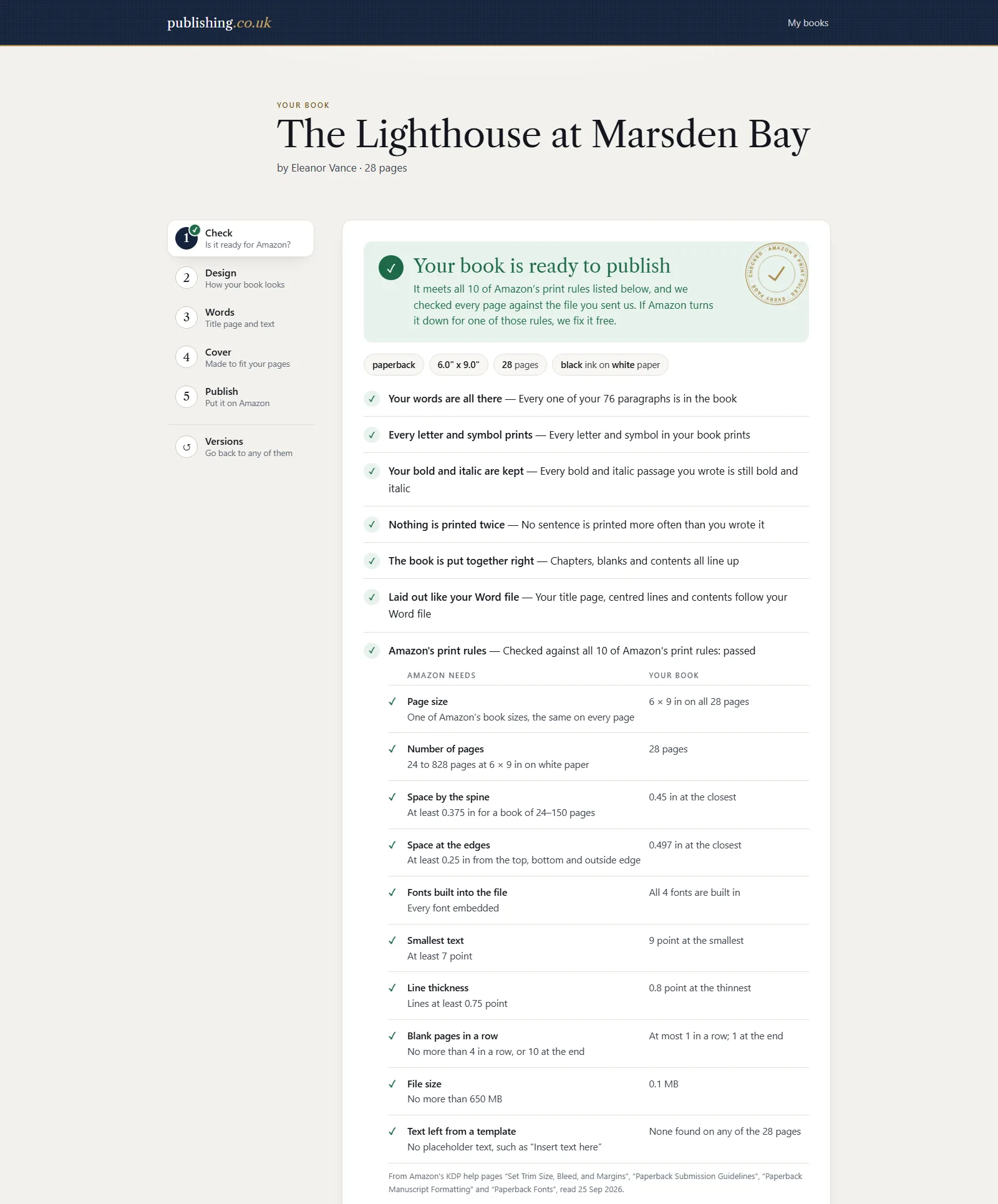
The check page for the same sample book: your words, your bold and italic, the layout against your Word file, and Amazon’s print rules with each measurement. Captured 1 October 2026.
- Covers. Kindle Create does not design covers. The studio makes the paperback, hardcover and Kindle covers to fit your page count.
- Footnotes in print. Amazon says Kindle Create does not support tables, footnotes or endnotes in print books yet.
- More choice of look. Four fixed themes, against the studio’s 6 looks, 19 fonts and your own font.
- Proof before you upload. Kindle Create gives you a checklist and Amazon’s previewers. The studio checks every paragraph and every bold and italic against your Word file, and measures every page against Amazon’s print rules with a safety margin.
- Your Word file beside your book. The studio shows your own file and the finished pages side by side.
- Every version kept, and nothing lost when you change your mind. Amazon warns that when you replace your manuscript in Kindle Create, “you’ll lose some of the formatting done in Microsoft Word.” In the studio every change can be undone.
- Nothing to install. Kindle Create is a desktop app. The studio runs in a web browser.
What I could not verify
- How many fonts Kindle Create offers. Amazon’s pages say you can set a font style per paragraph, but give no list.
- Whether Kindle Create’s EPUB is meant for selling in other shops. Amazon describes it as a way to view your book “on non-Kindle devices”.
Before you choose
- Look at your book. A plain novel: Kindle Create may be all you need. Footnotes, tables or endnotes in a paperback: Kindle Create says it can’t print them yet.
- Decide who makes the cover. Kindle Create doesn’t. The studio does, or you can bring your own.
- Decide how you will check it. With Kindle Create you check it yourself in its previewer and KDP’s. The studio checks it against your Word file and Amazon’s print rules before you pay.
Frequently Asked Questions
Is Kindle Create free?
Yes. Amazon describes it as “a free desktop application”, for Windows 10 or later and macOS 10.15 or later. Book Studio costs £29.99 a book, including VAT, and only when you take your files.
Can Kindle Create make a paperback?
Yes. Amazon says you can “prepare an eBook and a paperback or hardcover book with the same manuscript file”. You export a KPF file and upload it to KDP; to see the print version you use KDP’s Print Previewer. For print books Amazon says tables, footnotes and endnotes “aren’t supported for print books yet”.
Does Kindle Create make covers?
No. Amazon’s own answer is “Kindle Create is an interior formatting tool and doesn’t provide features for designing covers.” Book Studio makes paperback, hardcover and Kindle covers to fit your page count.
Can I export an EPUB from Kindle Create?
For reflowable books, yes: Amazon says the reflowable format “allows you to create files for Kindle, print, and EPUB”. What you upload to KDP is the KPF file.
Does Kindle Create check my book?
Amazon gives a checklist to use “While previewing your eBook”, covering things such as the contents, fonts, images and tables. Its pages do not describe an automatic check. Book Studio checks every word, bold and italic against your Word file, and measures every page against Amazon’s print rules.
