Vellum vs Atticus: Which Book Formatting Tool Is Best?
By Robert Prime
Last reviewed by Robert Prime — March 2026
Self-publishing has never been more accessible, yet the technical hurdle of book formatting remains a significant pain point for many UK authors. Two tools dominate the conversation among indie authors: Vellum and Atticus. Both promise to simplify the process of creating professional-quality ebooks and print-ready files for platforms like Amazon KDP. But which one truly fits the needs of UK authors, who face unique market conditions, pricing considerations, and ISBN regulations?
Having spent over 25 years in eCommerce and navigating the publishing trenches myself while preparing my own best-seller Google. Panic. Repeat., I’ve learned that the devil is in the details. When I was formatting Google. Panic. Repeat., I thought writing was the hard part. I was wrong. The real nightmare was getting it KDP-ready. I’m more technical than most, but formatting file types and navigating Amazon’s archaic systems took hours of my life I’ll never get back. This article goes beyond the usual US-centric chatter to deliver an authoritative, no-nonsense comparison of Vellum vs Atticus from a UK perspective, including practical steps, cost breakdowns, common pitfalls, and how these tools fit into the broader self-publishing journey.
Table of Contents
- What You Need to Know Before Starting
- Step-by-Step Guide to Using Vellum and Atticus
- UK-Specific Considerations
- Common Mistakes and How to Avoid Them
- Tools and Resources Beyond Vellum and Atticus
- Cost Breakdown: Vellum vs Atticus in GBP
- Real-World UK Case Studies and Examples
- Expert Tips from 25 Years in eCommerce and Publishing
- Frequently Asked Questions
What You Need to Know Before Starting
Before choosing between Vellum and Atticus, it’s crucial to understand some core concepts and your specific needs as a UK author. The UK self-publishing landscape has nuances that many US-based guides overlook, so let’s set the stage properly.
Terminology and Formats
- EPUB: The industry-standard ebook format accepted by most retailers except Amazon.
- MOBI/AZW3: Amazon Kindle’s preferred ebook formats. Note that Amazon is now shifting towards EPUB acceptance, but MOBI/AZW3 remains widely supported.
- Print-Ready PDF: A file formatted for Print-on-Demand (POD) services like KDP Print, with correct trim size, bleed, and margins.
- Trim Size: The final dimensions of the printed book (e.g., 5" x 8", 6" x 9"). UK printers and distributors expect precise sizing to meet their POD templates.
- Bleed: Printing beyond the trim edge so that colour or images reach the edge of the page.
- ISBN: International Standard Book Number, essential for retail distribution in the UK, purchased via Nielsen Book Services.
Why Formatting Is More Than Cosmetic
Formatting isn’t just about making the book look nice. A poorly formatted file can:
- Get rejected by KDP or other platforms due to non-compliance with their technical requirements.
- Result in wrong page counts, misaligned content, or distorted images that frustrate readers.
- Hurt readability and damage your brand’s reputation.
- Create headaches for marketing and distribution, especially when files need re-submission.
The UK Publishing Landscape
The UK book market is mature and competitive. In 2023, it generated £7.1 billion in revenue, with self-published titles growing 68% over the past five years. Key to commercial success is not just writing a good book but formatting it to the stringent UK and international standards.
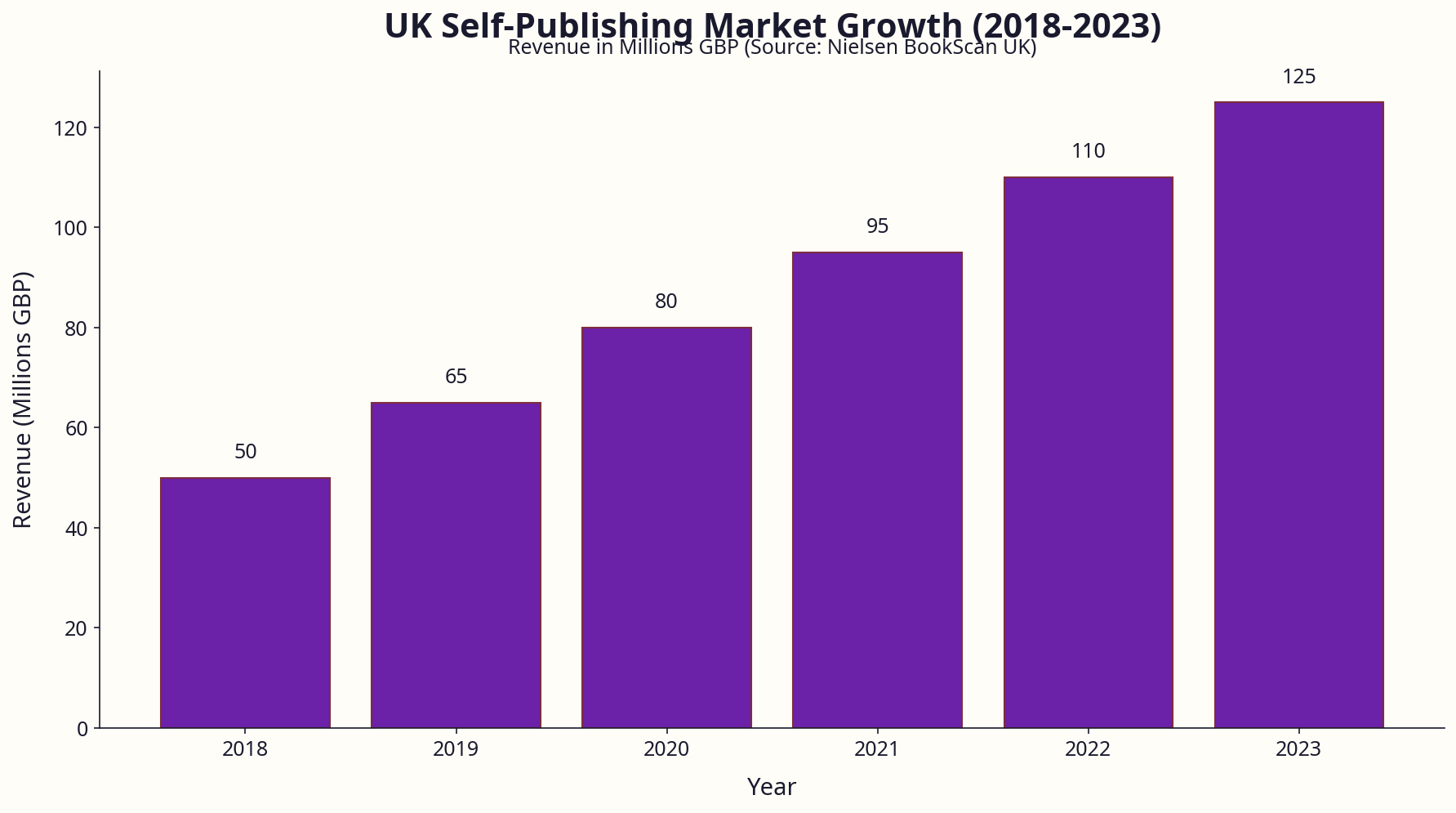
Data visualisation showing UK self-publishing market growth and revenue (source: Nielsen BookScan UK, 2023)
Step-by-Step Guide to Using Vellum and Atticus
Vellum Overview
Vellum is a macOS-only application designed for authors who want a polished, professional output with minimal fuss. It excels at creating beautifully typeset ebooks and print books, with a strong emphasis on typography and ease of use.
How to Use Vellum (Mac Only)
- Import Your Manuscript
Open Vellum on your Mac, then drag and drop your Word DOCX manuscript file into the project window. Alternatively, use File > Import Manuscript. - Choose Your Book Size
Navigate to Book Settings > Trim Size. Select from standard sizes like 5" x 8" or 6" x 9", or enter custom dimensions to match UK POD specs.
Pro Tip: I always use 198mm x 129mm (approximately 5" x 8") because this matches UK printers’ most common sizes and looks professional. - Format Your Book
Use the left sidebar to apply styles:- Click on chapter titles to assign heading styles.
- Insert drop caps, block quotes, images, or footnotes via the Format menu.
- Set paragraph spacing and indentation under Style options.
- Preview Your Book
Vellum provides a live preview pane, including how the book looks on Kindle, iPhone, and iPad devices. - Export Files
Go to File > Export and select the desired formats: EPUB for Apple Books or Kobo, MOBI/AZW3 for Kindle, and print-ready PDF for KDP or IngramSpark.
Atticus Overview
Atticus is a cloud-based, cross-platform formatting and writing tool that targets authors seeking an all-in-one solution combining writing and formatting. It runs on Windows, Mac, and Linux via a browser.
How to Use Atticus (Cross-Platform)
- Create a New Project
Log in at Atticus, click New Project, and name your book. - Import Your Manuscript
Paste your manuscript directly or import a DOCX file via File > Import. - Set Your Book Dimensions
Under Settings > Print Options, select your trim size (common UK sizes are pre-loaded). Modify margins and gutter as needed to match POD requirements. - Apply Styles
Use the Styles panel to apply heading levels, paragraph styles, drop caps, and spacing. Atticus supports custom CSS for advanced users. - Export Your Book
Click Export and choose formats: EPUB, Kindle (MOBI/AZW3), or PDF. Download the files directly or save them to cloud storage.
Visual comparison of Vellum and Atticus user interfaces during formatting
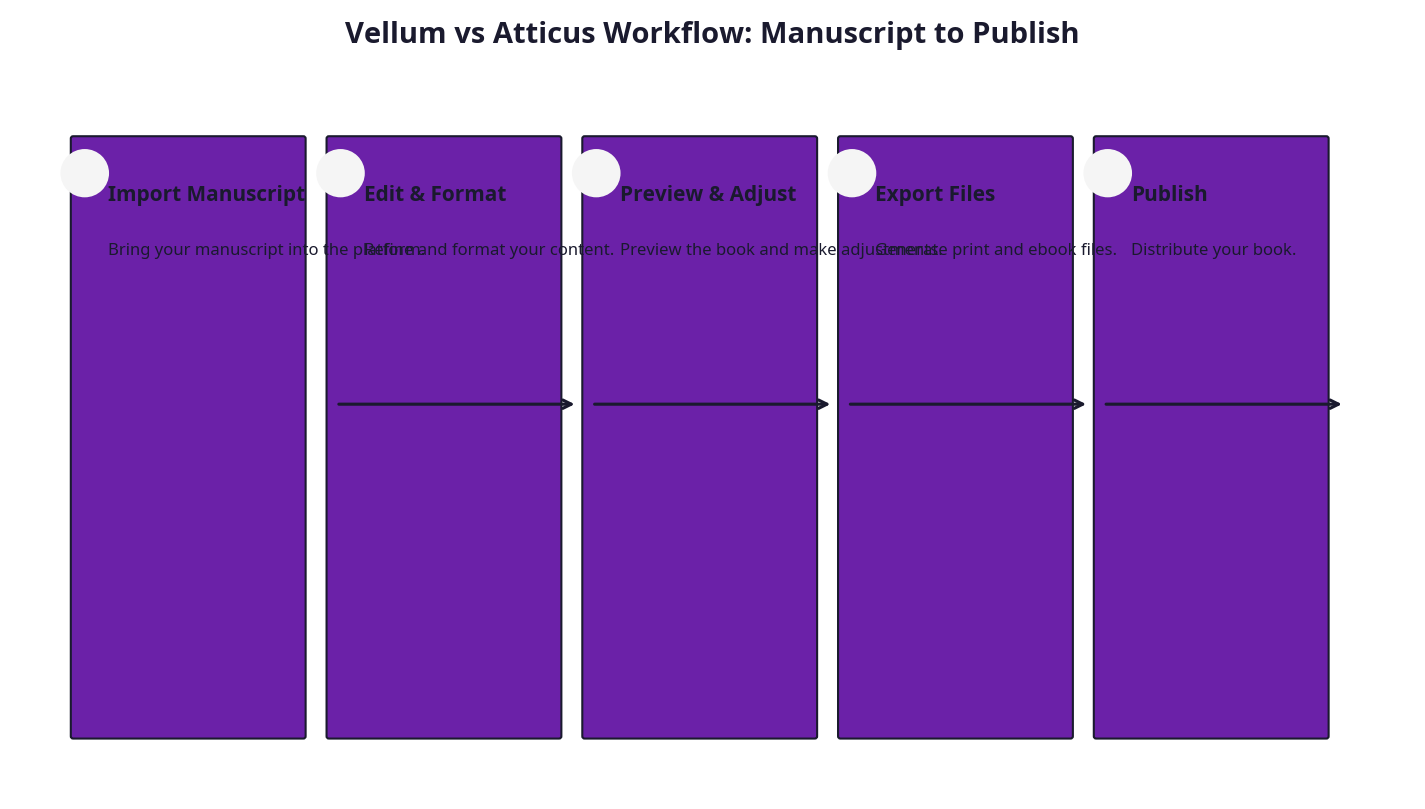
Visual comparison of Vellum and Atticus workflows
UK-Specific Considerations
Pricing and VAT
UK authors need to factor in pricing in pounds sterling, including VAT. Here’s what you should know:
- Print Books are zero-rated for VAT in the UK, meaning no VAT is charged on physical books.
- Ebooks and digital publications attract 20% VAT in the UK, which affects pricing strategies.
- Retail platforms like Amazon automatically handle VAT, but you should be aware of net pricing for accounting purposes.
If you’re VAT-registered as a business, proper VAT treatment of book sales is essential to avoid complications.
ISBN and Metadata
ISBNs in the UK are purchased through Nielsen Book Services:
| ISBN Package | Cost (excl. VAT) | VAT (20%) | Total Cost |
|---|---|---|---|
| Single ISBN | £77.50 | £15.50 | £93.00 |
| 10-pack ISBN | £145.00 | £29.00 | £174.00 |
Purchasing your own ISBNs is crucial if you want to be recognised as an independent publisher, maintain control over metadata, and be listed in UK book trade databases.
Note: Amazon KDP offers free ISBNs, but these list “Amazon” as the publisher, which can limit distribution to other retailers and reduce professional credibility.
Print Sizes Popular in the UK
UK readers generally prefer classic, manageable sizes:
- 5" x 8" (129mm x 198mm) — popular for fiction and memoirs.
- 6" x 9" (152mm x 229mm) — common for non-fiction and general trade books.
- A5 (148mm x 210mm) — often used for workbooks, manuals, or niche non-fiction.
Both Vellum and Atticus support custom trim sizes, but be sure to confirm the exact measurements with your POD provider (e.g., KDP UK or IngramSpark UK).
Distribution Channels
While Amazon KDP is the dominant platform, UK authors benefit from diversifying:
- Amazon KDP UK: Fast, easy, and cost-effective.
- IngramSpark: Offers wide distribution across UK and European bookstores, libraries, and retailers.
- Draft2Digital: Useful for aggregating to other platforms and libraries.
- Waterstones and other UK bookshops: Require specific metadata and professional ISBNs.
Ensure your formatting supports these channels’ requirements, particularly in terms of print-ready PDFs and metadata embedding.
Detailed UK pricing breakdown for self-publishing authors
Common Mistakes and How to Avoid Them
Overpaying for Formatting Services
Before founding publishing.co.uk, I hired a so-called ’expert’ formatter for £130 to prepare my debut book. The result? A file riddled with errors, requiring multiple rounds of corrections. I then tried several Fiverr gigs, but the quality was inconsistent, despite the low price.
Lesson: Many authors waste hundreds on third-party formatters who lack UK-specific knowledge. Investing in a robust tool like Vellum or Atticus—and verifying the output—often saves time and money.
Ignoring Exact Trim Sizes and Bleed Settings
A recurring error is neglecting to set the precise trim size and bleed margins. For example, submitting a 5.1" x 8" file instead of 5" x 8" can cause POD printers to reject the file or crop content awkwardly.
Pro Tip: Always consult the latest KDP or IngramSpark UK print templates. Vellum provides preset sizes, but double-check under Book Settings. Atticus lets you customise margins and bleed; use those features diligently.
Using Unprofessional Fonts and Styles
Fonts such as Papyrus or Comic Sans might look quirky but damage professional credibility. Both Vellum and Atticus offer industry-standard fonts like Georgia, Palatino, and Baskerville.
My experience: Early on, I used a free font that looked great on screen but failed on print devices. Stick to fonts widely supported across devices and print.
Confusing File Formats
Uploading the wrong file format is a common trap:
- Use MOBI/AZW3 for Kindle devices.
- Use EPUB for Apple Books, Kobo, and most other ebook platforms.
- Use PDF for print.
Both Vellum and Atticus simplify this, but always verify your target retailer’s current requirements.
Example of professional formatting vs amateur mistakes
Tools and Resources Beyond Vellum and Atticus
While Vellum and Atticus are powerful, they aren’t silver bullets. For UK authors, here’s what else to consider:
- publishing.co.uk: Our automated formatting and validation service ensures your files meet UK POD specs, KDP, and IngramSpark compliance. We integrate with outputs from both tools, saving you time and stress. This is vital because even the best software misses UK-specific details like barcode generation and VAT pricing validation.
- Nielsen ISBN Agency: Essential for obtaining legitimate UK ISBNs and metadata management.
- LoveReading.co.uk: The UK’s largest book review platform, offering invaluable reader insights and marketing opportunities. As co-owner, I can attest to its value for UK authors navigating the market.
- Amazon KDP Documentation: Always consult Amazon’s official resources for the latest file specifications: Amazon KDP Help.
- UK Society of Authors: For legal advice, rights management, and publishing best practices.
Alternative Approaches
Some UK authors explore other tools or workflows:
- Scrivener + Calibre: Scrivener for writing and initial formatting, Calibre for converting EPUBs and MOBIs. This approach requires more technical know-how and often more manual tweaking.
- Adobe InDesign: Professional-level layout software, but with a steep learning curve and higher costs.
- Reedsy Book Editor: A free, online editor with decent formatting capabilities but limited print PDF customisation.
Cost Breakdown: Vellum vs Atticus in GBP
| Item | Vellum (macOS only) | Atticus (Cross-platform) |
|---|---|---|
| Software License | $199 one-time (~£160) | £147/year subscription |
| UK ISBN (single) | £93 (via Nielsen) | £93 (via Nielsen) |
| UK ISBN (10-pack) | £174 (via Nielsen) | £174 (via Nielsen) |
| Professional Cover Design | £300-£600 (typical UK range) | £300-£600 (typical UK range) |
| Print Proof Copies (KDP) | ~£3.50 per copy | ~£3.50 per copy |
| Outsourcing Formatting | £130+ (freelancer average) | £130+ (freelancer average) |
| Publishing.co.uk Service* | £49-£99 per book (automated) | £49-£99 per book (automated) |
*Publishing.co.uk integrates with file outputs from both tools to ensure flawless UK POD and KDP submission.
Additional Notes:
- Vellum’s one-time cost means no recurring fees but requires a Mac.
- Atticus’s subscription model offers ongoing updates and multiplatform access but is an annual expense.
- ISBN costs are non-negotiable and often overlooked by new authors.
- Professional cover design is a significant but essential investment.
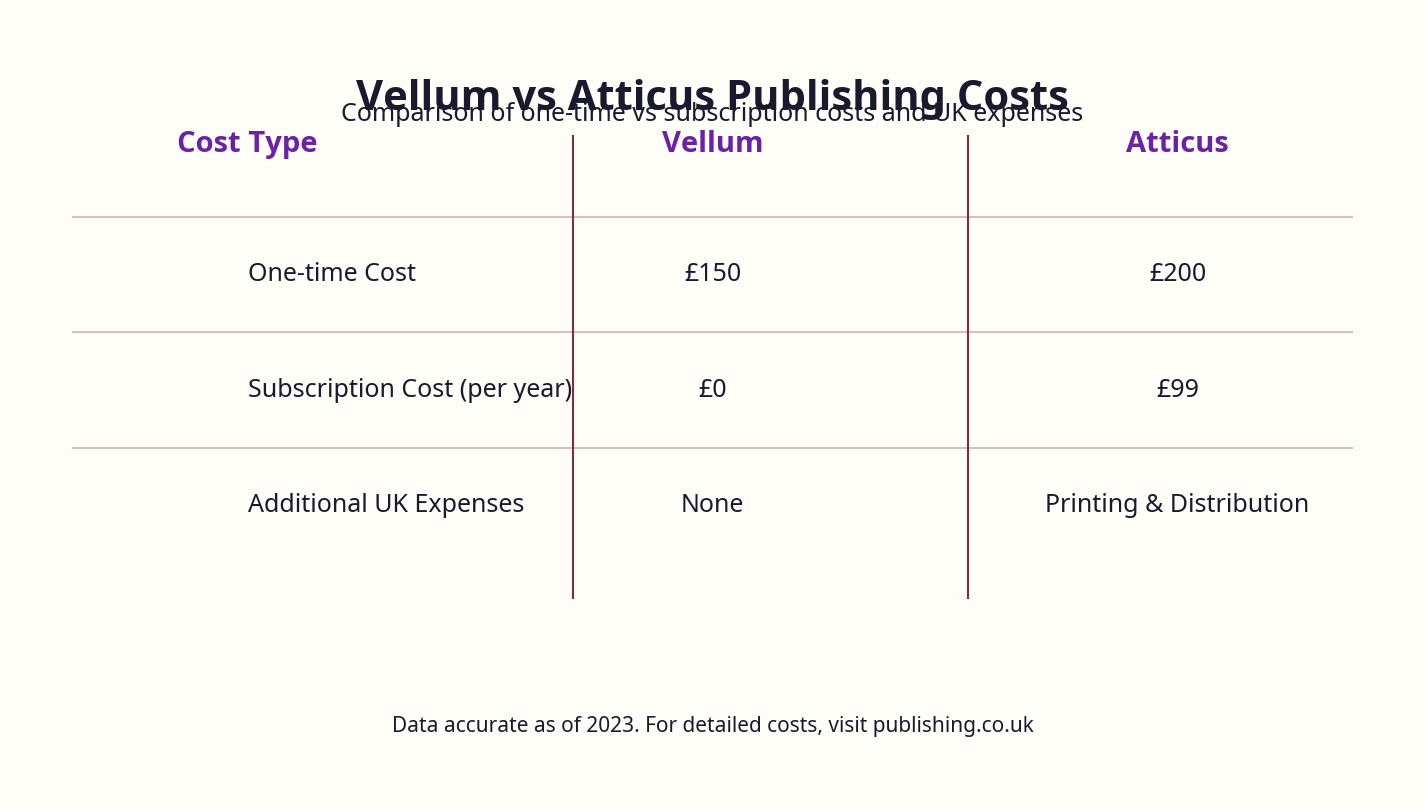
Cost comparison between Vellum and Atticus with ISBN and cover design included
Real-World UK Case Studies and Examples
Case Study 1: Fiction Author Using Vellum
Author: Sarah T., a London-based romance novelist.
Scenario: Sarah wrote her debut novel and chose Vellum for its macOS polish. She purchased a 10-pack of ISBNs from Nielsen (£174) to prepare for multiple titles. After importing her manuscript, she selected the 5" x 8" trim size, applied drop caps, and exported EPUB, MOBI, and print PDF files.
Outcome:
- The files passed KDP UK and IngramSpark validation on the first attempt.
- Sarah reports that Vellum’s clean formatting saved her 10+ hours of manual layout work compared to her previous experience with freelancers.
- She uses publishing.co.uk to validate UK-specific metadata and POD settings before submission.
Case Study 2: Non-Fiction Author Using Atticus
Author: Michael R., a Manchester-based business author.
Scenario: Michael preferred a cloud-based tool accessible from his Windows PC and iPad. He subscribed to Atticus (£147/year), imported his DOCX manuscript, and used custom CSS tweaks to match his branding.
Outcome:
- Michael exported print-ready PDFs matching A5 size for his workbook.
- He faced initial challenges with margin settings but resolved them by following Atticus’s help guides on UK POD margins.
- His ebook files were accepted smoothly by KDP and Apple Books.
- Michael found Atticus’s integrated writing and formatting workflow improved his productivity.
Case Study 3: Hybrid Approach with Publishing.co.uk
Author: Emma J., a self-published thriller author from Edinburgh.
Scenario: Emma used Vellum for initial formatting but wanted to ensure compliance with UK POD specs and ISBN metadata. She uploaded her files to publishing.co.uk for automated validation and corrections.
Outcome:
- The service highlighted minor margin issues and missing metadata fields.
- Publishing.co.uk’s corrections prevented costly print rejections and delayed launches.
- Emma now recommends this hybrid approach to fellow UK authors.
Expert Tips from 25 Years in eCommerce and Publishing
1. Don’t Rely Solely on Software for Quality
Both tools are excellent starting points, but real expertise comes from understanding UK print requirements. When I formatted Google. Panic. Repeat., I wasted hours fixing margin issues that automated tools missed.
2. Prioritise File Compatibility with UK Retailers
Amazon KDP is a must, but UK authors should also prepare files for IngramSpark and local distributors. Atticus’s cloud approach is flexible, but Vellum’s macOS exclusivity can limit options if you don’t have Apple hardware.
3. Beware Cheap Fiverr Gigs and Overpriced Formatters
If you’re tempted to save money by hiring a £5 Fiverr formatter, don’t. I’ve seen these jobs ruin covers, miss indentation norms, and produce non-compliant files. Instead, invest in a reliable tool or service.
4. Use Publishing.co.uk for the Last Mile
Once your manuscript is formatted, upload your file to publishing.co.uk to validate and fine-tune it for the UK market. Our system catches errors that even Vellum and Atticus overlook, including ISBN metadata compliance, barcode generation, and VAT pricing validation.
5. Be Mindful of Typography Differences Between Fiction and Non-Fiction
Fiction requires indented paragraphs and no space between, whereas non-fiction needs block paragraphs and clear bullet formatting. Both tools allow this, but you must set it manually.
6. Invest Time in Learning the Software Properly
Both Vellum and Atticus have learning curves. Don’t rush the process. Spend at least a few days experimenting with styles, exports, and previews before committing to your final files.
Frequently Asked Questions
What is the most common mistake UK authors make with Vellum vs Atticus?
Failing to set the correct trim size and ignoring UK-specific POD print requirements is the biggest mistake. This often results in rejected print files or poor-quality physical books. Always double-check your POD printer’s templates and ensure your software settings match exactly.
How much does Vellum vs Atticus cost in the UK?
Vellum is a one-time purchase around £160 (converted from $199) but requires a Mac. Atticus is subscription-based at approximately £147 per year and works across platforms. Both require separate ISBN purchases (£93 single or £174 for 10 from Nielsen). Additional costs include cover design (£300-£600 typical) and print proof copies (~£3.50 each).
What tools do UK authors recommend for Vellum vs Atticus?
Many UK authors appreciate Vellum’s polished output but complain about Mac-only limitations. Atticus is praised for flexibility and integrated writing tools. For final validation and UK-specific compliance, publishing.co.uk is highly recommended to catch any last-minute issues.
How long does the Vellum vs Atticus process typically take?
For a standard 60,000-word novel, expect 4-8 hours of formatting including import, styling, and export. This can extend if you’re unfamiliar with POD requirements or need extensive revisions. Learning the software upfront reduces time spent debugging later.
Can I handle Vellum vs Atticus myself or should I hire a professional?
If you have technical patience and a good eye for detail, you can handle it yourself. But many UK authors, including myself before founding publishing.co.uk, find that outsourcing final checks or using automated UK-specific services saves time and money.
What are the UK-specific requirements for Vellum vs Atticus?
You must ensure ISBN registration via Nielsen, use UK-preferred trim sizes (such as 5" x 8"), comply with EAN-13 barcodes, and prepare VAT-compliant pricing metadata. Both tools allow these settings but do not enforce them automatically; manual verification is necessary.
Closing Thoughts
Choosing between Vellum and Atticus comes down to your platform preference, budget, and how deeply you want to engage with the formatting process. Vellum offers exceptional polish for Mac users, while Atticus provides cross-platform flexibility and cloud convenience.
From my experience, the key is not just the tool but what you do after formatting—validating UK-specific print specs, investing in proper ISBNs, and preparing your files for Amazon and wider UK and European distribution.
If you want to avoid the headaches I endured—hiring poor freelancers, battling formatting rejections, and wasting days on technical details—consider using publishing.co.uk as your final step. We’re built by authors, for authors, to take the pain out of UK book formatting.
About the Author
Robert Prime is a best-selling self-published author, veteran eCommerce strategist, and the founder of publishing.co.uk. With over 25 years of experience in digital business and 15 successful exits, he brings a battle-tested perspective to the publishing industry. After experiencing firsthand the archaic, headache-inducing process of formatting a KDP-compliant book for his own best-seller, Google. Panic. Repeat., Robert built publishing.co.uk to solve the problem for other authors. He is also a co-owner of the LoveReading.co.uk network (the UK’s largest book review platform), founder of the Amazon growth agency MrPrime.com, and a member of the Forbes Business Council.
Published on publishing.co.uk | © 2024 Robert Prime
