How to Format a Book for KDP: The Complete UK Guide
By Robert Prime
Last reviewed by Robert Prime — March 2026
Table of Contents
- What You Need to Know Before Starting
- Step-by-Step Guide to Formatting Your Book for KDP
- UK-Specific Considerations When Formatting for KDP
- Common Mistakes and How to Avoid Them
- Tools and Resources for UK Authors
- Cost Breakdown: What Formatting for KDP Really Costs in the UK
- Expert Tips from 25 Years in the Industry
- Real-World Case Studies and Examples
- Frequently Asked Questions
What You Need to Know Before Starting
Formatting a book for Kindle Direct Publishing (KDP) is often the most technical and frustrating part of self-publishing, especially for UK authors who face specific market nuances that many US-centric guides overlook. When I wrote my own book, Google. Panic. Repeat., I quickly realised that writing was the easy part. Preparing a KDP-compliant file that looks professional both in print and as an ebook was a completely different beast. Despite my technical background, I spent countless hours wrestling with margins, fonts, and file types — Google. Panic. Repeat.
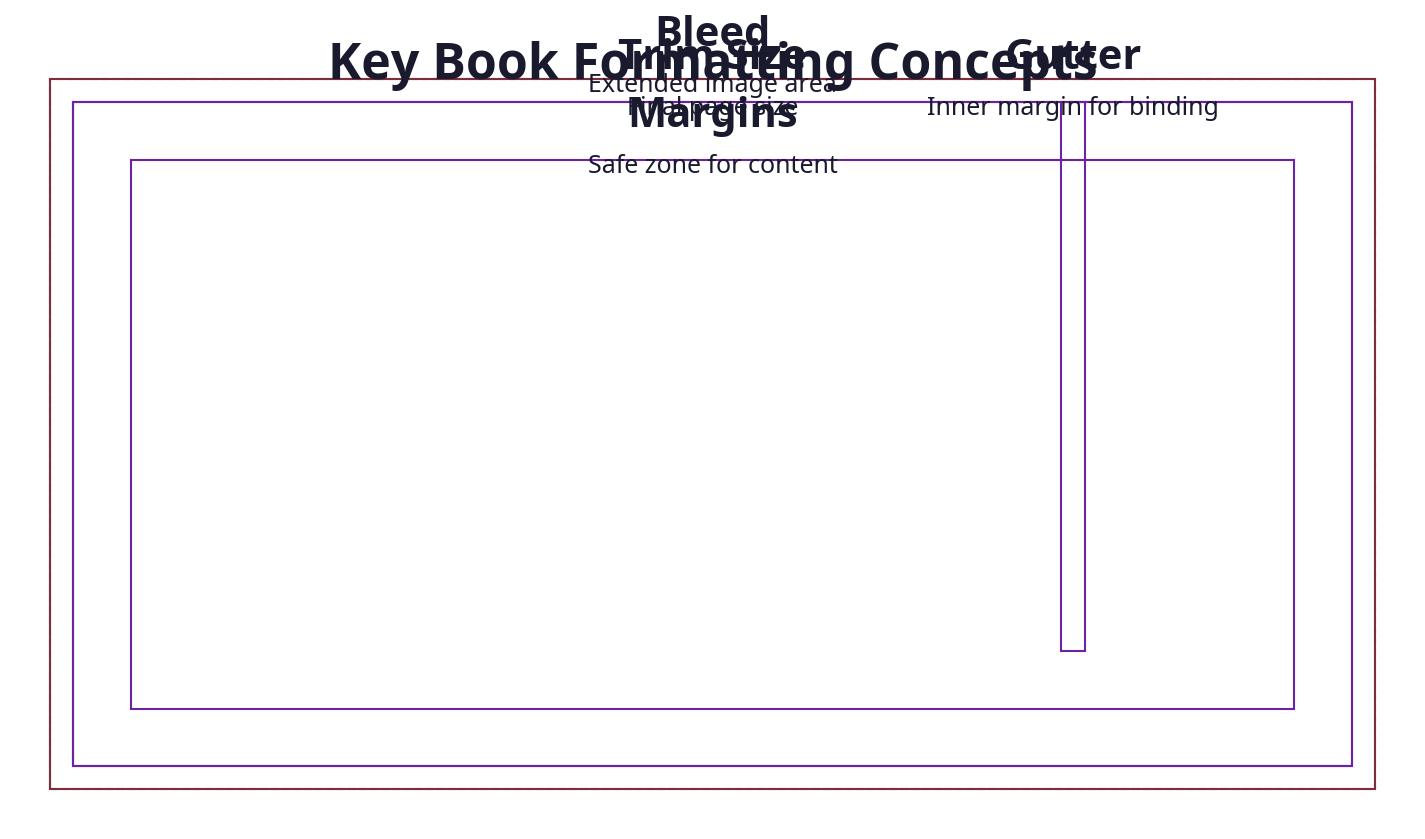
KDP requires precise formatting to ensure your book appears exactly as intended on a myriad of devices and in print. This includes understanding concepts like trim size, bleed, margins, and the differences between EPUB, MOBI, and PDF files. Since KDP is a global platform, UK authors must also be mindful of ISBN registration through Nielsen, VAT considerations, and pricing strategies relevant to the UK market.
Before you start, ensure you have:
- A finalised manuscript in a clean, editable format (preferably Word DOCX or Google Docs).
- Clarity on your book’s physical dimensions (KDP supports many trim sizes but 5"x8" and 6"x9" are popular).
- A UK-registered ISBN if you want to maintain control over your publishing imprint (free KDP ISBNs assign Amazon as publisher).
- Access to professional formatting tools or services if you don’t want to build the formatting yourself.
- A clear budget that includes not only formatting but also cover design, ISBNs, and VAT-related tax implications.
- Awareness of market expectations in the UK, including print quality standards and retail pricing norms.
Author’s note: When I first self-published in the UK, I underestimated the importance of buying my own ISBN. Using a KDP-assigned ISBN left me with Amazon as the listed publisher — not ideal for long-term branding or distribution outside Amazon.
Experience insight: I consult for a billion-pound business that was struggling with the exact same formatting issues—it was literally stopping them from scaling their back catalogue. This shows even large publishers don’t have it all figured out.
Step-by-Step Guide to Formatting Your Book for KDP
1. Choose Your Trim Size and Page Setup
Your book’s trim size determines its physical dimensions and impacts layout decisions. Popular UK self-published sizes are 5"x8" (127mm x 203mm) or 6"x9" (152mm x 229mm). Setting the right trim size early saves headaches later.
In Microsoft Word:
- Go to Layout > Size > More Paper Sizes.
- Enter your desired width and height in millimetres or inches.
- Click OK.
For UK authors, I recommend using millimetres since the UK publishing industry standardises on metric measurements, plus it’s easier to communicate with designers and printers locally.
Set margins to accommodate the binding:
- Go to Layout > Margins > Custom Margins.
- Use at least 12.7mm (0.5") for outside margins and increase the inside margin to 19mm (0.75") or more for bleed safety.
Pro tip: For books with many pages (over 150), increase the inside margin further to avoid text disappearing into the spine. For example, 22mm for 200+ pages is safer.
2. Format Your Paragraph Styles
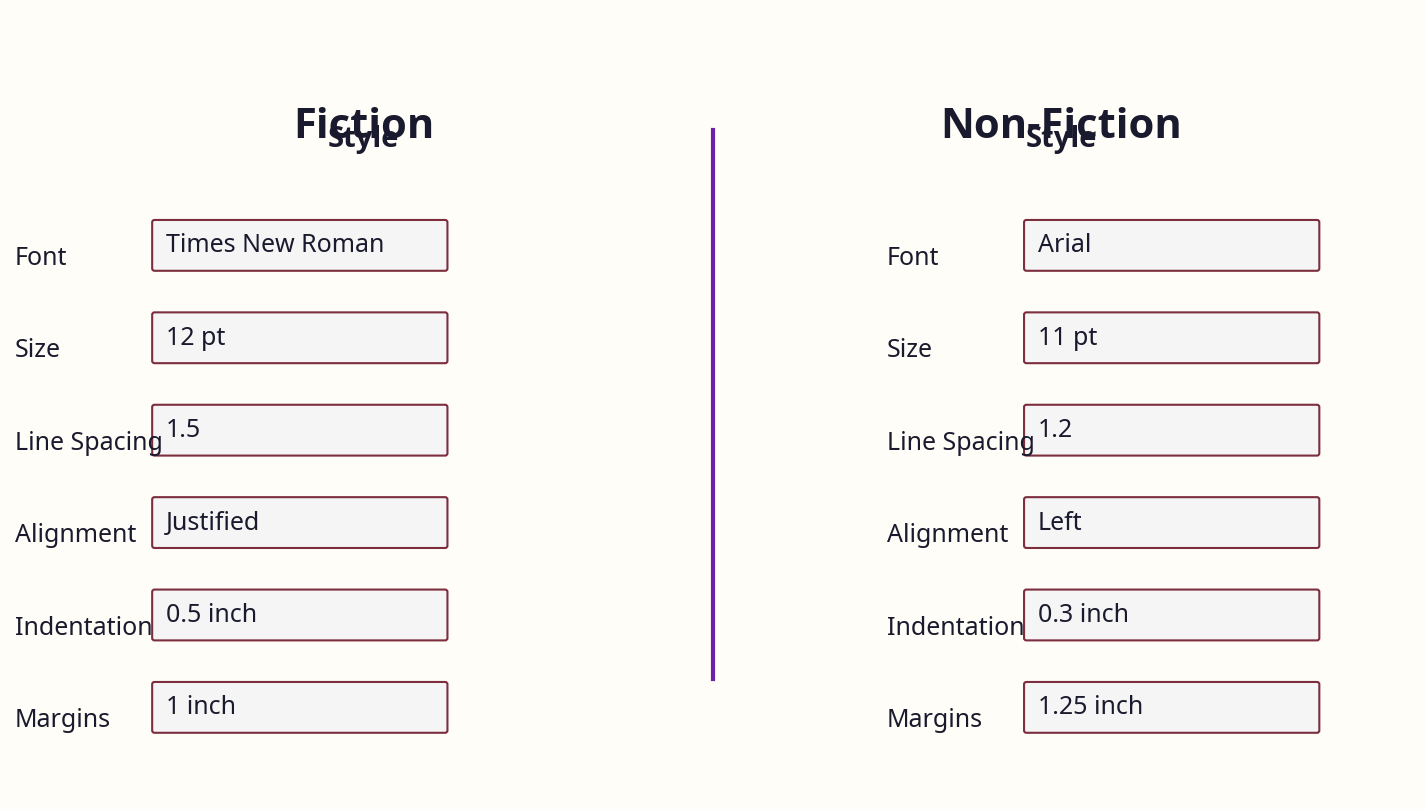
Fiction and non-fiction have different conventions:
- Fiction: Use first-line indents (about 7.5mm or 0.3") without extra spacing between paragraphs to keep the flow natural.
- Non-fiction: Often uses block paragraphs with spacing between paragraphs and no indent, making lists and sections clearer.
In Word:
- Highlight your paragraphs, right-click and select Paragraph.
- Under Indentation, set Special: First line to 7.5mm (0.3").
- Under Spacing, set After to 0 for fiction or 6-8pt for non-fiction.
Avoid manual spacing with Enter keys — use styles for consistency. Create and modify your own paragraph styles named “Body Text – Fiction” or “Body Text – Non-fiction” for easy reuse.
3. Choose Appropriate Fonts
KDP supports most standard fonts, but avoid decorative or overly stylised fonts like Papyrus, Bleeding Cowboys, or anything that hurts readability. Reliable choices include Garamond, Georgia, Times New Roman, or Arial for body text.
Font size should be between 10pt and 12pt, depending on your genre and target audience. For children’s books or older readers, 12pt or larger is advisable.
UK-specific note: UK readers often expect serif fonts for literary fiction and non-fiction, as they’re easier on the eye in print. On Kindle devices, sans-serif fonts like Arial or Verdana can work better for screen readability.
4. Insert Page Numbers and Headers/Footers
Page numbers are essential for print books but not for Kindle ebooks.
In Word:
- Go to Insert > Page Number.
- Choose bottom centre or bottom outside corners for print.
- Use Different Odd & Even Pages under Design > Options for professional layout.
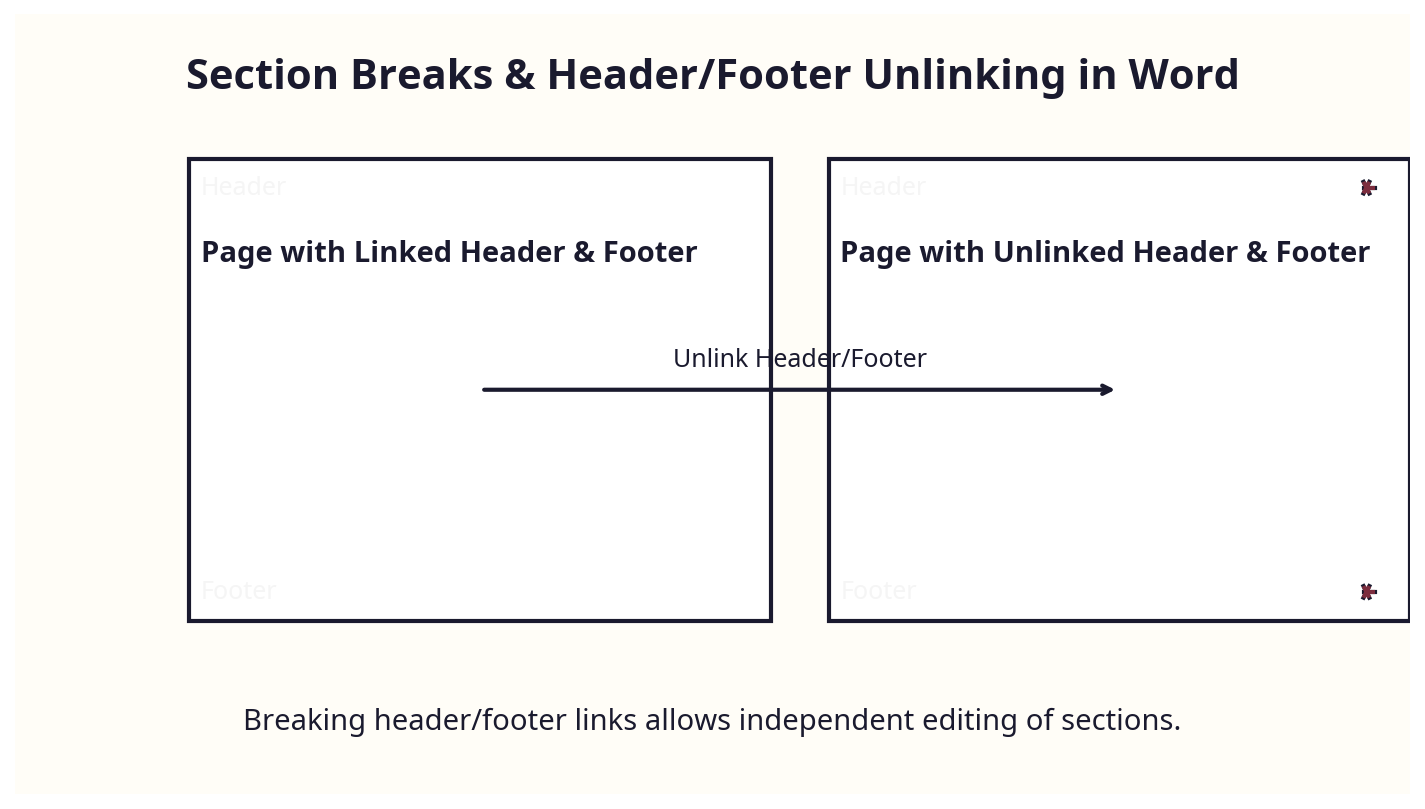
Avoid page numbers on chapter opening pages — use Section Breaks:
- At the start of each chapter, insert a Next Page Section Break via Layout > Breaks > Section Breaks > Next Page.
- In the header/footer, unlink from previous section to remove page numbers on chapter starts.
5. Prepare Chapter Titles and Table of Contents (TOC)
Use Heading 1 styles for chapter titles. This allows Word to generate a clickable TOC.
For print books, insert the TOC after your front matter:
- Go to References > Table of Contents and choose an automatic style.
- Update the TOC after any edits by right-clicking and selecting Update Field.
For Kindle ebooks, KDP generates navigation based on your headings, but double-check with preview tools and on actual devices.
Pro tip: Use Heading 2 and Heading 3 sparingly for sub-sections to maintain clean navigation.
6. Handle Images and Graphics Carefully
Images must be high resolution (at least 300 dpi) for print. Insert images with Inline with Text wrapping to avoid layout issues.
For print books requiring bleed (images extending beyond the page edge), you need to increase page size slightly — for example, add 3mm bleed on all sides — and set the bleed margins in your PDF export. KDP requires a trimmed size plus bleed in the PDF.
UK tip: Use CMYK colour mode for print covers, as UK printers often expect this. KDP accepts RGB, but for local print runs or expanded distribution, CMYK ensures better colour matching.
7. Exporting Your File
For Kindle ebooks:
- Save or export your manuscript as .docx or .epub.
- KDP accepts Word DOCX natively and converts it to Kindle format.
- For better control, you can convert to EPUB using tools like Calibre or Vellum (Mac only).
For print:
- Export a PDF with embedded fonts and correct trim size/bleed.
- In Word, go to File > Save As > PDF, then select Options and tick ISO 19005-1 compliant (PDF/A) for compatibility.
- Ensure “Bitmap text when fonts may not be embedded” is unchecked to keep text crisp.
8. Validate and Preview Your Files
Use KDP’s Previewer tool to see how your book appears on various devices and in print. Look out for:
- Orphan or widow lines (single lines at top or bottom of pages).
- Incorrect page breaks or chapter breaks.
- Font or image glitches (missing fonts or low-res images).
Fix issues by adjusting your source file and re-uploading. For print, order a proof copy from KDP to check physical quality before finalising.
Experience insight: When I was formatting Google. Panic. Repeat., I spent hours on previewing and fixing tiny layout issues that no automated tool caught. This step is crucial and often overlooked.
UK-Specific Considerations When Formatting for KDP
ISBNs: The Nielsen Factor
In the UK, ISBNs are only available through Nielsen. Unlike Bowker in the US, Nielsen charges £93 for a single ISBN and £174 for a block of 10 (valid as of 2026). This is a significant upfront cost compared to US authors but necessary if you want to keep your imprint name on the metadata and retain full control over your book’s distribution and rights.
Many UK authors opt for free KDP-assigned ISBNs, which is tempting but comes with compromises:
- Amazon is listed as the publisher, not you.
- Your book’s metadata is controlled by Amazon, limiting your ability to list your book elsewhere or to shift distributors later.
- Some UK retailers and libraries may prefer or require a publisher-owned ISBN.
If you plan to sell in UK bookshops, libraries (via Ingram or Gardners), or want to register with Nielsen BookData for broader UK market visibility, you must purchase your own ISBN.
Author anecdote: I initially used a free KDP ISBN for my debut, but after wanting to distribute my book across UK independents and libraries, I had to buy Nielsen ISBNs and reformat metadata — a costly and time-consuming fix.
VAT and Pricing
Print books are zero-rated for VAT in the UK, meaning you don’t pay VAT on physical copies sold domestically. However, ebooks and digital sales carry a 20% VAT rate. This VAT difference impacts your royalty calculations and pricing strategy on KDP.
When setting your price for UK sales in KDP:
- Price print books in £ sterling (£) and factor in print costs (which KDP calculates based on page count, ink type, and trim size).
- For ebooks, set prices that reflect the 20% VAT. For example, if you want a net price of £3.99, the gross price should be about £4.79 to cover VAT.
- KDP’s royalty rates differ for ebooks priced between £1.99 and £7.99 (35% or 70% royalty tiers). Choose your price carefully.
Practical advice: Many UK authors price print books between £6.99 and £9.99 for trade paperbacks, balancing affordability with perceived value.
Cover Design and File Preparation
UK cover designers typically charge between £300 and £600 for professional, bespoke covers. While KDP provides a free cover creator, it lacks polish and flexibility, especially for UK market expectations where covers often follow specific genre conventions.
If you’re handling formatting yourself:
- Ensure your cover matches your trim size exactly, including spine width, which depends on page count and paper type.
- Add a 3mm bleed on all sides for print covers.
- Use colour profiles suitable for print (CMYK) or RGB depending on your printer’s requirements (KDP accepts RGB but UK printers may not).
- Export your cover as a PDF or JPEG at 300 dpi.
To calculate spine width:
Spine width (mm) = page count ÷ 444 (for white paper) or ÷ 500 (for cream paper)
For example, a 200-page book on cream paper:
200 ÷ 500 = 0.4mm spine width
Add this to your front and back cover widths.
Market Size and Trends
The UK publishing industry generated approximately £7.1 billion in 2023, with over 750,000 self-published titles and a 68% growth in self-publishing over the last five years. This growth means competition is fierce, and professional formatting can be the difference between a book that sells and one that languishes.
UK readers often expect certain standards in print quality and layout, influenced by longstanding British trade publishing conventions. For example:
- Paper choice (cream vs. white) influences font choice and size.
- Trade paperback sizes differ subtly from US sizes; 5"x8" is popular for fiction, but 6"x9" is preferred for non-fiction and larger books.
Author anecdote: I’ve seen UK authors priced out of bookshops by poor formatting and amateurish covers, despite strong content. Professional formatting is your first step to a professional sales channel.
Common Mistakes and How to Avoid Them
The Freelancer Trap
Before building publishing.co.uk, I hired a formatter for £130 who delivered a shoddy job: inconsistent margins, missing page numbers, and poor chapter breaks. Then I tried Fiverr — same story. These cheap gigs often fail to deliver KDP-compliant files, causing costly delays and frustration.
Avoid this trap: Vet freelancers carefully, ask for samples, and confirm KDP experience. Alternatively, use automated UK-focused services that understand the nuances of the UK market.
Formatting Without Styles
Many authors manually format their manuscript with spaces and tabs instead of using paragraph styles. This leads to inconsistent layout and problems during file conversion.
Fix: Learn and use Word’s Styles feature religiously. It’s your formatting backbone and makes fixes and conversions smoother.
Ignoring Bleed and Margins
Not accounting for bleed on print covers or setting insufficient margins causes content to be cut off or look cramped in print.
Tip: Always add a 3mm bleed on covers and ensure inside margins are wide enough for binding. Use KDP’s templates as a guide.
Using Unsupported Fonts
Fonts like Papyrus or Comic Sans kill credibility and readability. Stay professional with classic serif or sans-serif fonts.
Overlooking UK Pricing and ISBNs
Using a free KDP ISBN might seem like a shortcut but gives Amazon control over your title’s metadata, which can limit your brand’s future potential. Similarly, ignoring UK VAT and pricing nuances leads to incorrect royalties and customer confusion.
Poor Image Resolution
Low-res images print pixelated, damaging your book’s quality and reviews.
Always use 300 dpi or higher for print images. For ebooks, 72 dpi is acceptable but higher res is better.
Tools and Resources for UK Authors
Software
- Microsoft Word: The industry standard for manuscript formatting; use Layout > Margins > Custom Margins for precise control.
- Adobe InDesign: Professional layout software for advanced users seeking full control.
- Scrivener: Excellent for writing organisation but requires export to Word or EPUB for formatting.
- Calibre: Useful for converting ebooks but limited for print formatting.
- Kindle Previewer: Essential for checking ebook appearance on devices and validating files.
- Affinity Publisher: A cost-effective alternative to InDesign for professional layout, gaining traction among UK indie authors.
ISBNs and Barcodes
- Purchase UK ISBNs via Nielsen.
- Generate EAN-13 barcodes for print covers once you have your ISBN. Many barcode services offer UK-specific barcodes.
- Free ISBNs from KDP do not require barcodes.
Publishing.co.uk Formatting Service
For UK authors overwhelmed by formatting or lacking time, automated services like publishing.co.uk offer tailored solutions ensuring KDP compliance without the headaches. This allows authors to focus on writing and marketing.
Author insight: I built publishing.co.uk after my own painful formatting experience to provide UK authors with a no-nonsense, reliable solution that respects UK market standards.
[IMAGE CALLOUT: Tool comparison matrix showing features and pricing of popular formatting tools and services]
Cost Breakdown: What Formatting for KDP Really Costs in the UK
| Item | Typical UK Cost (£) | Notes |
|---|---|---|
| Nielsen ISBN (single) | £93 | Essential for imprint control |
| Nielsen ISBN (block of 10) | £174 | More economical for multiple titles |
| Cover Design | £300 - £600 | Professional, custom covers |
| Freelance Formatter | £130+ | Beware of poor quality at low prices |
| DIY Formatting Tools | £0 - £100 | Software costs or free tools |
| Publishing.co.uk Formatting | £80 - £150 (approx.) | Automated, UK-tailored, hassle-free |
The real cost of formatting isn’t just money — it’s time and lost opportunities if your book isn’t properly prepared. For example, I spent 40+ hours on my first book’s formatting and lost weeks of sales waiting for fixes.
[IMAGE CALLOUT: Bar chart comparing formatting costs and time investment between DIY, freelancers, and publishing.co.uk]
Expert Tips from 25 Years in the Industry
- Don’t Waste Time on Cheap Gigs: I’ve seen too many authors get burned by low-cost freelancers and DIY tools. You get what you pay for. Investing in quality formatting upfront saves headaches and lost sales.
- Think Like a Business: Your book is a product. Presentation matters. Professional formatting is not optional if you want to compete.
- Use Styles Religiously: Styles are your best friend in Word. They keep formatting consistent and make edits easier later.
- Test on Real Devices: Use KDP’s Previewer but also load your ebook on real Kindle devices or apps to catch quirks.
- Plan Your ISBN Strategy: If you want full control, buy your own ISBNs from Nielsen. If you want speed, use KDP’s free ISBN but be aware of limitations.
- Be Precise with Margins and Bleed: The print-on-demand process is unforgiving. Margins too narrow or bleed missing can wreck your print book.
- Don’t Underestimate Cover Impact: The cover is your first salesperson. Invest wisely, and ensure your formatting complements the cover design.
- Keep Your UK Market in Mind: Pricing, VAT, ISBNs, and print standards differ from the US. Tailor your approach accordingly.
- Keep Backup Versions: Always keep dated versions of formatting files to revert if needed.
[IMAGE CALLOUT: Before/after example showing best practices in formatting a UK KDP print book]
Real-World Case Studies and Examples
Case Study 1: Jane’s Historical Fiction Success
Jane, a UK historical fiction author, initially used KDP’s free ISBN and a cheap Fiverr formatter. Her book’s metadata listed Amazon as publisher, limiting sales in UK bookstores. After investing £174 in Nielsen ISBNs and hiring a professional formatter through publishing.co.uk (£120), her sales doubled within 6 months due to better distribution and a professional look.
Key takeaway: ISBN ownership and professional formatting opened new UK retail channels.
Case Study 2: Tom’s Non-Fiction Guide to British Politics
Tom self-formatted his non-fiction using Word but overlooked bleed settings on his print cover. His first print run had text cut off on spine and edges. After consulting with me, he re-exported with 3mm bleed and updated margins. His next batch looked professional, and he secured a local bookstore stockist.
Key takeaway: Small technical details like bleed can make or break print quality.
Case Study 3: Sarah’s Children’s Picture Book
Sarah struggled with image resolution and font sizing for her children’s picture book. Using 72 dpi images led to pixelation in print. Switching to 300 dpi images and adjusting font sizes for young readers (14pt+) improved readability and reviews.
Key takeaway: Know your audience and technical requirements for images and font sizes.
[IMAGE CALLOUT: Case study infographic summarising key lessons from Jane, Tom, and Sarah]
Frequently Asked Questions
What is the most common mistake UK authors make with how to format a book for KDP?
The most frequent error is underestimating the complexity of print margins and bleed, combined with relying on free KDP ISBNs that list Amazon as the publisher. These lead to avoidable technical issues and limit your control over metadata and distribution.
How much does formatting a book for KDP cost in the UK?
Costs vary widely. DIY is free but time-consuming and risky. Freelancers can charge £130 or more, often with mixed results. Automated UK-focused services like publishing.co.uk offer reliable formatting for around £80-£150, providing a good balance of quality and affordability.
What tools are best for UK authors to format books for KDP?
Microsoft Word remains the standard for manuscript formatting. Adobe InDesign is powerful but has a steep learning curve. Kindle Previewer is essential for validation. For hassle-free, UK-specific compliance, services like publishing.co.uk are increasingly popular.
How long does the formatting process usually take?
Self-formatting can take days or weeks depending on complexity and experience. Professional services can reduce this to a few days or even hours, letting you focus on writing and marketing.
Should I buy my own ISBN or use KDP’s free one?
If you want full control over your book’s metadata, branding, and wider UK distribution, buy your own ISBN from Nielsen. Free KDP ISBNs are fine for quick Amazon-only publishing but limit future options.
What UK-specific formatting details should I watch out for?
Use metric measurements for trim sizes and margins, add 3mm bleed on print covers, price in £ with VAT considerations, and ensure your cover spine width is calculated correctly for UK paper types. Also, avoid cheap formatting shortcuts that don’t respect UK standards.
About the Author
Robert Prime is a best-selling self-published author, veteran eCommerce strategist, and the founder of publishing.co.uk. With over 25 years of experience in digital business and 15 successful exits, he brings a battle-tested perspective to the publishing industry. After experiencing firsthand the archaic, headache-inducing process of formatting a KDP-compliant book for his own best-seller, Google. Panic. Repeat., Robert built publishing.co.uk to solve the problem for other authors. He is also a co-owner of the LoveReading.co.uk network (the UK’s largest book review platform), founder of the Amazon growth agency MrPrime.com, and a member of the Forbes Business Council.
This guide is designed to save you time, money, and frustration by helping you format your book for KDP the right way, with UK market realities front and centre.
