Canva for Book Covers: A Complete Tutorial
By Robert Prime
Last reviewed by Robert Prime — March 2026
Table of Contents
- Introduction
- What You Need to Know Before Starting
- Step-by-Step Guide to Creating a Canva Book Cover
- UK-Specific Considerations for Canva Book Covers
- Common Mistakes and How to Avoid Them
- Tools and Resources Beyond Canva
- Cost Breakdown: What UK Authors Should Expect
- Expert Tips From 25 Years in the Industry
- Real-World UK Case Studies
- Frequently Asked Questions
Introduction
Designing a book cover is often the single most important marketing decision an author makes. For UK authors especially, the process can be riddled with hidden traps — from ISBN procurement to print specifications — that few guides cover adequately. Canva has democratised graphic design for indie authors, providing an intuitive platform to create professional-looking covers. However, the devil’s in the detail.
I’m Robert Prime, founder of publishing.co.uk, and with 25 years in eCommerce and self-publishing, I’ve witnessed the difference between a Canva cover that sells and one that kills sales dead in its tracks. This guide is tailored to the UK author, offering practical, business-oriented advice that goes beyond the usual “drag and drop” tutorials.
We’ll cover the real costs in GBP, Nielsen ISBN pricing, UK-specific formats, and business realities you must consider. Plus, I’ll share first-hand anecdotes, detailed menu paths in Canva, comparisons with alternative approaches, and case studies from the UK market.
When I was formatting Google. Panic. Repeat. for Amazon KDP, I thought the cover was the easy part. I was wrong. Between bleed settings, spine width, and barcode placement, I lost hours to trial and error. It’s not just about looking good on screen — it’s about print-ready precision that UK printers demand.
What You Need to Know Before Starting
Before you dive into Canva, understanding the fundamentals of book cover design and UK publishing requirements will save you hours of frustration and potentially thousands in lost sales or reprints.
Understanding Your Book’s Genre and Audience
Every successful cover speaks directly to its audience. It’s not enough to slap on a pretty picture and call it a day. Consider:
- Thrillers and Crime: Dark, moody palettes; bold sans-serif fonts like Montserrat or Oswald; often minimalist with striking central imagery.
- Romance: Soft pastels or warm tones; script or serif fonts such as Playfair Display or Great Vibes; imagery often includes symbolic elements rather than explicit photos.
- Non-fiction (Business, Self-help): Clean, professional layouts; simple colour schemes (navy, grey, white); clear sans-serif fonts like Lato or Open Sans; avoid clutter.
From my consultancy experience, including advising a billion-pound UK publisher struggling with branding consistency, I’ve seen authors pick fonts or colours they personally like but that confuse or alienate their readers. In the UK market, readers expect a certain visual language — and when that’s ignored, sales suffer.
Technical Terms You Must Understand
- Trim Size: The physical size of your finished book. Popular UK sizes include:
- 5” x 8” (127 x 203 mm) — common for fiction
- 6” x 9” (152 x 229 mm) — popular for non-fiction and larger paperbacks
- A5 size (148 x 210 mm) — traditional UK paperback size
- Bleed: An extra 3mm of image or background that extends beyond the trim edge to prevent white margins after cutting. This is non-negotiable for print.
- Spine Width: Based on page count and paper thickness; crucial for wraparound covers. UK paper thickness is typically 0.06 mm per page for standard white paper.
- Resolution: Print requires 300 DPI; Canva’s free tier exports at 96 DPI by default, so you must use the PDF Print export option or upgrade to Canva Pro for higher resolution.
- File Types: PDF for print (with crop marks and bleed); JPEG/PNG for ebooks. Amazon KDP accepts PDF for print covers and JPEG for Kindle ebooks.
UK Market Realities
The UK publishing environment is distinct and can catch authors off guard. Here are some realities that directly impact your Canva cover workflow:
- ISBNs: The UK’s Nielsen ISBN agency charges £93 for a single ISBN and £174 for a block of 10. This is a significant, often overlooked cost for indie authors wanting to control their own imprint (instead of using Amazon or other free ISBNs).
- Barcode: UK retailers require an EAN-13 barcode that matches your ISBN on the back cover. Canva cannot generate barcodes, so you must source and import this image manually.
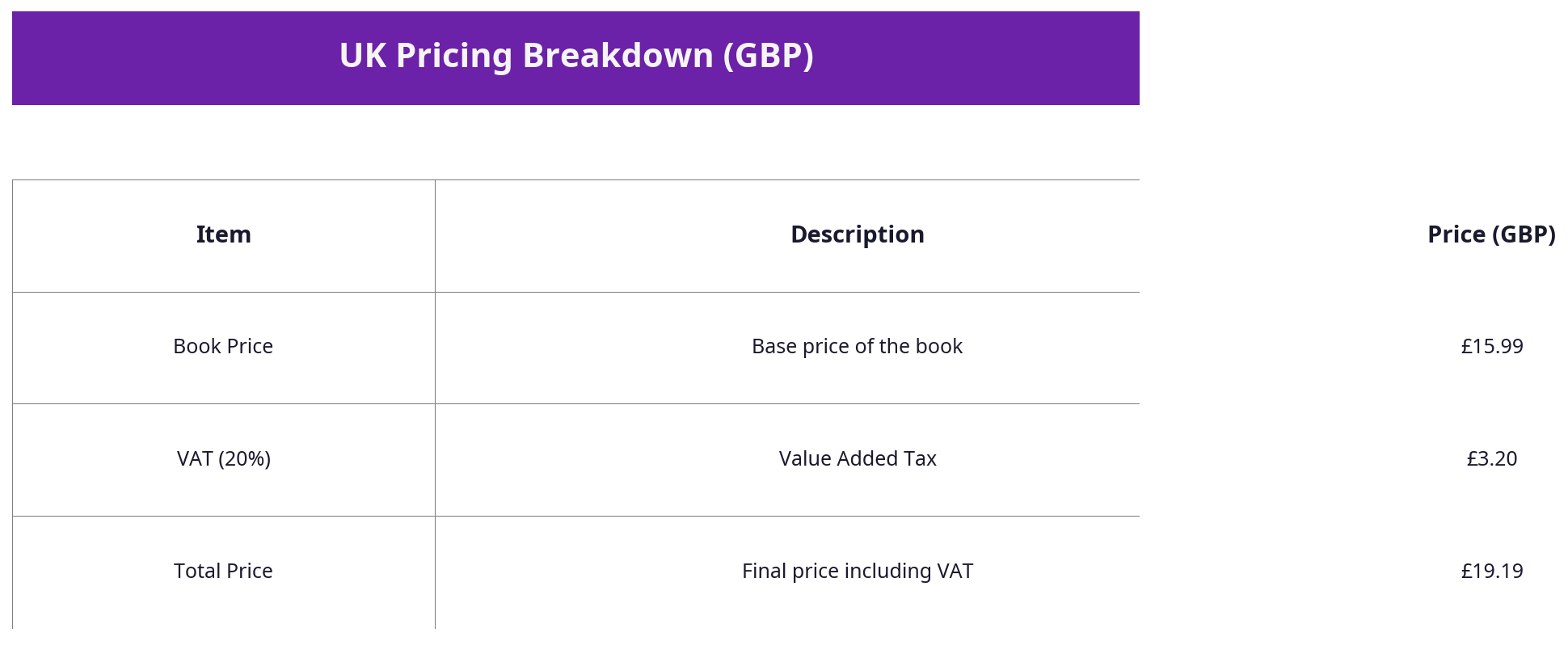
- VAT: Physical books are zero-rated for VAT, but ebooks attract 20%, affecting your pricing and marketing strategy. Your cover design should reflect this value difference.
- Distribution Differences: UK bookshops and online retailers like Waterstones or LoveReading.co.uk have preferences around cover style and barcode placement that differ slightly from US markets.
Ignoring these factors can delay your book launch or result in costly reprints.
Before building publishing.co.uk, I hired a so-called ’expert’ formatter for £130 to help with my own book’s cover and spine. The result was a mess—wrong spine width, poor barcode placement, and a low-res export. I then tried Fiverr gigs, which were equally disappointing. That experience cemented my commitment to creating UK-focused, reliable services that authors can trust.
Step-by-Step Guide to Creating a Canva Book Cover
Here’s a detailed walkthrough for UK authors to create a print-ready and ebook cover using Canva, including exact menu options.
Step 1: Set Up Your Document with Correct Dimensions
- Log in to Canva and click Create a design (top right corner).
- Select Custom size at the bottom of the dropdown.
- Enter your book’s dimensions including bleed:
- For a 6” x 9” book with 3 mm bleed each side, add 0.125” (3.175 mm) to width and height.
- Input Width: 6.25 inches
- Input Height: 9.25 inches
- Alternatively, use metric: Width 158 mm, Height 235 mm (approx).
- Click Create new design.
Pro tip: Always double-check your printer’s bleed requirements. For instance, KDP UK requires 3 mm bleed, whereas IngramSpark UK may want 5 mm.
Step 2: Calculate Spine Width and Adjust Canvas
Calculate spine width using this formula:
Spine Width (mm) = (Page Count / 444) x Paper Thickness (0.06 mm)Example: 300 pages:
(300 / 444) * 0.06 = 0.04 mm ≈ 4 mm spine widthConvert spine width to inches for Canva: 4 mm ≈ 0.157 inches.
Your total canvas width = front cover width + spine width + back cover width + bleed on both sides.
For a 6” x 9” book with 4 mm spine:
Total Width = 6 + 0.157 + 6 + (2 x 0.125) = 12.407 inches (approx)Height remains the same (9.25 inches).
Because Canva doesn’t allow resizing after creation, the easiest way is to create a custom canvas large enough to fit all three panels.
Pro tip: Use Canva’s Grid or Rulers (View > Show Rulers and Guides) to mark the boundaries for front cover, spine, and back cover.
Step 3: Design the Front Cover
- Use the Elements tab to add shapes or images.
- Use Text > Add a heading for your book title. Set the font to something genre-appropriate and legible.
- Avoid fonts like Papyrus or Comic Sans—instead, use Montserrat, Playfair Display, or Lora.
- Upload your own images or choose from Canva’s library. For professional results, use high-res images from sites like Unsplash or Adobe Stock.
- Keep your design simple and impactful.
Menu path:
Elements > Photos to search images
Text > Add a heading/subheading/body text to add text boxes
Uploads > Upload Media to add your own files
Step 4: Design Back Cover and Spine
- For the back cover, include:
- Book blurb or synopsis (font size minimum 10 pt)
- Author bio (optional photo and website link)
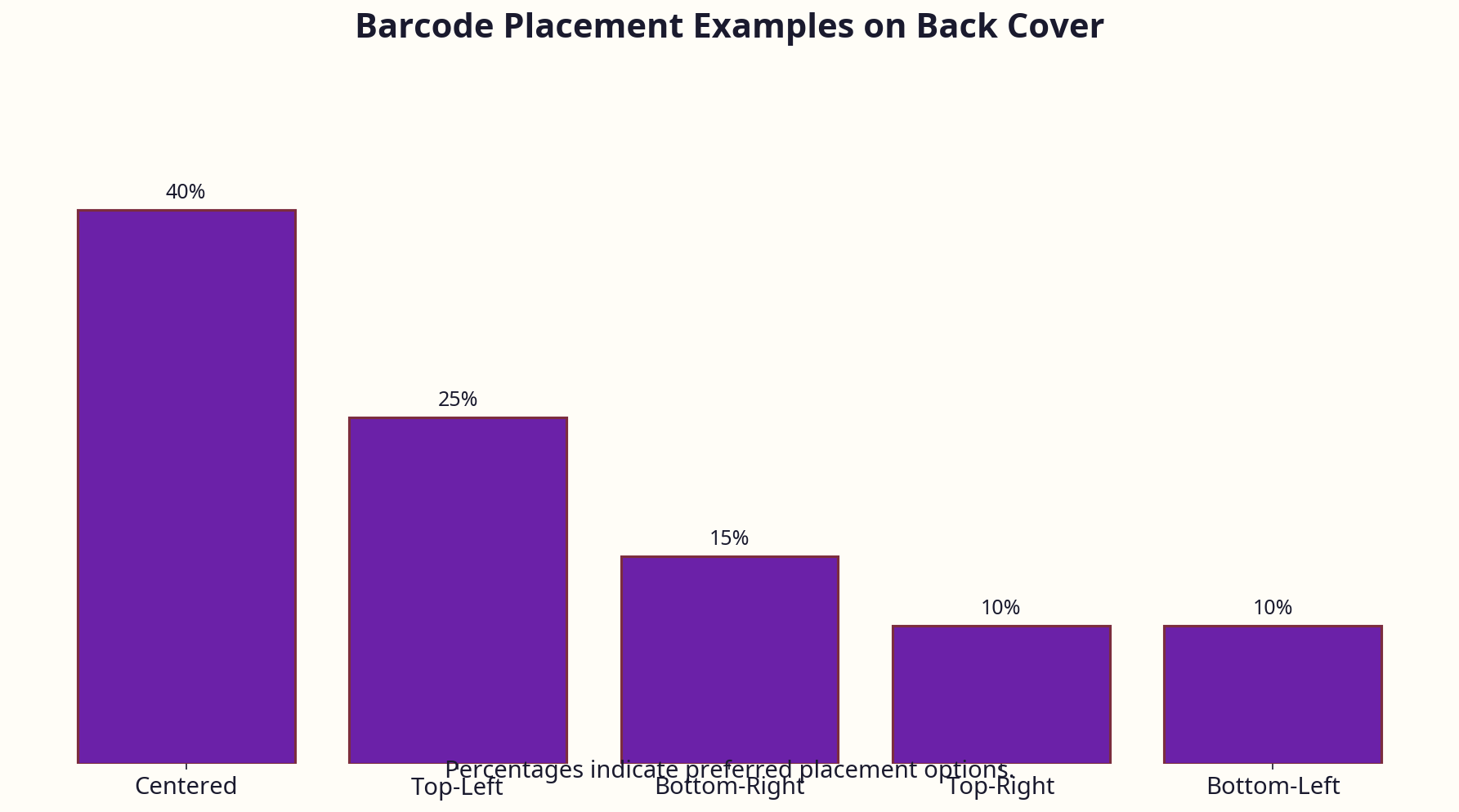
- Leave a clear space for the barcode at the bottom right (approx 3.5 cm x 2.5 cm)
- For the spine:
- Add the book title and author name, centred vertically.
- Adjust font size carefully; it must fit within the narrow spine width.
Pro tip: Create guides at the spine boundaries and bleed edges to avoid placing critical text too close to the edges.
Step 5: Import ISBN Barcode
- Generate your EAN-13 barcode using a free online generator that accepts your Nielsen ISBN or purchase directly from Nielsen.
- Download the barcode as a high-resolution PNG or JPEG.
- In Canva, go to Uploads > Upload Media, then drag the barcode onto the back cover area.
- Position in the bottom right corner, respecting bleed margins.
Step 6: Export Correctly
- Click Share > Download.
- Select PDF Print format.
- Tick Crop marks and bleed.
- Click Download.
Pro tip: If you’re on Canva free, this option might be limited or exported at 96 DPI. Upgrade to Canva Pro (£9.99/month) for full print-quality export.
UK-Specific Considerations for Canva Book Covers
The UK publishing landscape imposes nuances that Canva users abroad often overlook.
Nielsen ISBN and Barcode Requirements
- ISBNs: Unlike US authors who can use free ISBNs from Amazon, UK authors must purchase theirs from Nielsen.
- The cost is £93 for one ISBN or £174 for a block of 10. This upfront cost is significant but critical if you want full control of your publishing rights and imprint.
- ISBNs bought from Nielsen come with an EAN-13 barcode number, which must be correctly displayed on your back cover.
Print on Demand (POD) Compatibility
- UK POD services such as Amazon KDP UK, IngramSpark UK, and local printers have varying bleed and margin requirements.
- Always obtain your printer’s specification sheet before designing your cover in Canva.
- For example, IngramSpark UK requests 5 mm bleed, which means your Canva document must be adjusted accordingly.
- Some UK printers require CMYK colour profiles; Canva exports RGB, so colours may shift slightly in print.
Cover Finish and Paper Types
- Canva does not preview finishes, but your design choices should factor in the effect of finish types:
- Matte covers tend to tone down colours and reduce glare — better for dark, moody designs.
- Gloss covers make colours pop, ideal for romance or bright designs.
- UK print services generally offer both; order physical proofs to confirm your choice.
VAT and Pricing Strategy
- Print books sold in the UK are zero-rated for VAT, making physical copies cheaper for customers.
- Ebooks carry 20% VAT, which can affect your pricing and market positioning.
- Your cover should communicate value accordingly — a premium look supports a higher price point.
Distribution Channels’ Visual Norms
- UK bookshops (Waterstones, Foyles) and online retailers (LoveReading.co.uk, Hive.co.uk) lean towards covers that are minimalistic and elegant for non-fiction, and genre-accurate for fiction.
- Covers that perform well in the US with flashy, busy designs often flop in the UK market.
Common Mistakes and How to Avoid Them
Mistake 1: Ignoring Bleed and Trim Size
Many authors design exactly to trim size, forgetting to add bleed. The result? Printers cut off text or images. Always add at least 3 mm bleed on all sides and export with crop marks.
Mistake 2: Using Low-Resolution Images
Canva’s free images are often 72 DPI, which is insufficient for print. Exporting in low resolution leads to pixelated covers. Always export as PDF Print at 300 DPI.
Mistake 3: Overcrowded Design and Poor Typography
Too many fonts or colours confuse readers. Restrict your design to 1-2 fonts max, and test legibility at thumbnail size (Amazon UK and LoveReading typically display covers at 100x160 px).
Mistake 4: Forgetting Spine Width Calculation
A miscalculated spine leads to off-centre or missing text, which looks unprofessional. Use the formula provided and double-check measurements before designing the spine.
Mistake 5: Overreliance on Canva Templates Without Customisation
Canva templates are often US-centric and generic. UK authors must customise for UK ISBN placement, barcode size, and font choices aligned with UK reader preferences.
Mistake 6: Not Testing Thumbnail View
Does your title stand out when shrunk to a tiny thumbnail? Test by zooming out on your design or uploading to Amazon’s preview tool.
Tools and Resources Beyond Canva
While Canva is a fantastic starting point, many UK authors benefit from complementing it with other tools and services.
Professional Formatting and Barcode Services
At publishing.co.uk, we offer automated formatting to ensure your Canva cover meets exact spine width, bleed, and barcode requirements for KDP UK, IngramSpark UK, and other POD services. This prevents costly reprints and delays.
Alternative Design Tools
- Adobe InDesign: The industry standard, offering total control over typography, layout, and print specs. Steeper learning curve, but worth it for serious authors.
- Affinity Publisher: A one-time purchase (£54.99) alternative to InDesign with great features.
- Book Brush: Tailored for authors, with marketing templates and cover mockups; integrates well with Canva designs.
Stock Image Providers Recommended by UK Authors
- Unsplash and Pexels: Free, high-quality images with commercial use licenses.
- Adobe Stock and Shutterstock: Paid services with extensive, genre-specific imagery.
Font Resources
- Google Fonts offers free, quality fonts like Montserrat, Lora, and Playfair Display.
- Avoid fonts that are overused or have restrictive licenses.
Cost Breakdown: What UK Authors Should Expect
Understanding the true cost of your Canva book cover and associated publishing elements is vital for budgeting.
| Item | Typical UK Cost (£) | Notes |
|---|---|---|
| Canva Pro Subscription | £9.99/month or £99.99/year | Needed for high-res exports and premium assets |
| Nielsen ISBN (Single) | £93 | Essential for own imprint on UK books |
| Nielsen ISBN (Block of 10) | £174 | More cost-effective for multiple titles |
| Barcode Generation | £10–£30 | Sometimes included with ISBN purchase |
| Professional Cover Design | £300–£600 | Outsourcing cost if not doing yourself |
| Printing Proof Copy | £10–£20 | To verify print quality before mass printing |
| Formatting Service (publishing.co.uk) | £79–£149 | Ensures print-ready files and compliance |
Is Canva Really Free?
Canva’s free tier is usable, but severely limited in export quality and image licensing. Most authors upgrade to Canva Pro to get print-ready PDFs and access premium images. This subscription cost adds to your outlay but is often necessary for professional results.
Hidden Costs of DIY Mistakes
I once helped an author who spent weeks designing in Canva but forgot to calculate spine width properly. The resulting print run had a spine too narrow for the text, forcing a costly reprint. Sometimes, investing upfront in formatting saves you double or triple in time and money.
Expert Tips From 25 Years in the Industry
Design for Your Brand, Not Just the Book
Your author brand is a long-term asset. Use Canva to create a consistent look across your titles: fonts, colours, and logo placement. This builds recognition on UK platforms like LoveReading.co.uk, a key discovery platform.
Test Your Cover Against Competitors
Mock up your cover in Canva and compare it side-by-side with bestsellers in your UK genre on Amazon UK and Waterstones websites. Ask yourself if it stands out or blends into the pack.
Avoid Overused Canva Fonts and Elements
Fonts like Papyrus and Brush Script scream amateur hour. Instead, use professional, readable fonts like Montserrat, Playfair Display, or Lora.
Use Contrast and Colour Theory to Your Advantage
UK readers respond well to strong contrast and clear visual hierarchy. For example, dark navy backgrounds with white or gold text convey premium non-fiction; bright colours with legible white text work well for romance.
Don’t Skip Proof Prints
Always order a physical proof before launch. Screen colours (RGB) often differ from print (CMYK), and Canva’s export defaults to RGB. Proofing saves you from unwanted surprises and costly reprints.
Leverage publishing.co.uk for Seamless Integration
Creating your cover in Canva is just step one. Use services like ours to automate spine calculation, barcode placement, and format optimisation for UK POD platforms.
Real-World UK Case Studies
Case Study 1: Self-Published Thriller Author
Sarah, a UK-based indie thriller author, designed her first cover in Canva’s free plan. She assumed 6” x 9” trim size without bleed and uploaded a low-res stock photo. The print run arrived with white edges and a blurry cover. After upgrading to Canva Pro, recalculating spine width, and ordering proof copies, her next print run sold 30% better, according to her feedback from UK readers on LoveReading.co.uk.
Case Study 2: Non-Fiction Business Book
James used Canva Pro and purchased a block of 10 Nielsen ISBNs. He designed a minimalist cover with Montserrat font and a navy/gold scheme, tailored to UK business readers. He manually added the EAN-13 barcode on the back cover. With physical proofs and professional formatting from publishing.co.uk, James successfully got his book stocked at Waterstones and reported a 40% increase in sales compared to his previous DIY cover.
Case Study 3: Romance Author Using Book Brush & Canva
Emily combined Canva with Book Brush for social media mockups and marketing assets. She used Canva’s custom sizing for print covers and Book Brush’s templates for promotional images. Although her first print run was delayed due to incorrect spine calculation, after adjusting and ordering proofs, her title was featured on LoveReading.co.uk’s romance newsletter, boosting sales significantly.
Frequently Asked Questions
1. What is the most common mistake UK authors make with Canva book covers?
Ignoring bleed and trim size requirements is the biggest error. Many forget to add the mandatory 3 mm bleed or miscalculate spine width, resulting in covers that printers cut off or print incorrectly.
2. How much does a Canva book cover cost in the UK when factoring in all expenses?
While Canva itself can be free, expect to pay at least £9.99/month for Pro to export print-quality PDFs. Add £93 for a Nielsen ISBN, £10–£30 for barcode generation, and optional £79–£149 for professional formatting. Outsourcing cover design can cost £300–£600.
3. Can Canva covers meet UK print quality standards?
Yes, if you use Canva Pro to export PDF Print with bleed and crop marks, and carefully calculate spine width. However, you must supplement Canva with barcode images and formatting checks.
4. Should I use a free Nielsen ISBN or buy my own?
Free ISBNs from Amazon restrict your publishing rights and list Amazon as the publisher. For UK authors serious about their brand and rights, buying your own ISBN from Nielsen (£93 single or £174 for 10) is the better option.
5. How do I calculate spine width for my UK paperback?
Use this formula:
Spine Width (mm) = (Page Count / 444) x 0.06 mm (paper thickness)
Convert to inches for Canva, then add to your total canvas width.
6. What fonts work best for the UK market in Canva?
Fonts like Montserrat, Playfair Display, Lora, and Open Sans are popular for UK readers. Avoid overused or novelty fonts like Papyrus, Comic Sans, or Brush Script.
About the Author
Robert Prime is a best-selling self-published author, veteran eCommerce strategist, and founder of publishing.co.uk. With over 25 years of experience in digital business and 15 successful exits, he brings a battle-tested perspective to publishing. After navigating the archaic process of formatting a KDP-compliant book for his own bestseller, Google. Panic. Repeat., Robert built publishing.co.uk to solve these problems for other authors. He co-owns LoveReading.co.uk (the UK’s largest book review platform), founded Amazon growth agency MrPrime.com, and is a Forbes Business Council member.
This expanded guide equips UK authors with the practical know-how, business insight, and real-world examples needed to create compelling, professional Canva book covers that sell — without the costly mistakes I’ve seen far too often.
